
18 Entity Framework Core Mistakes Slowing Down Your Application

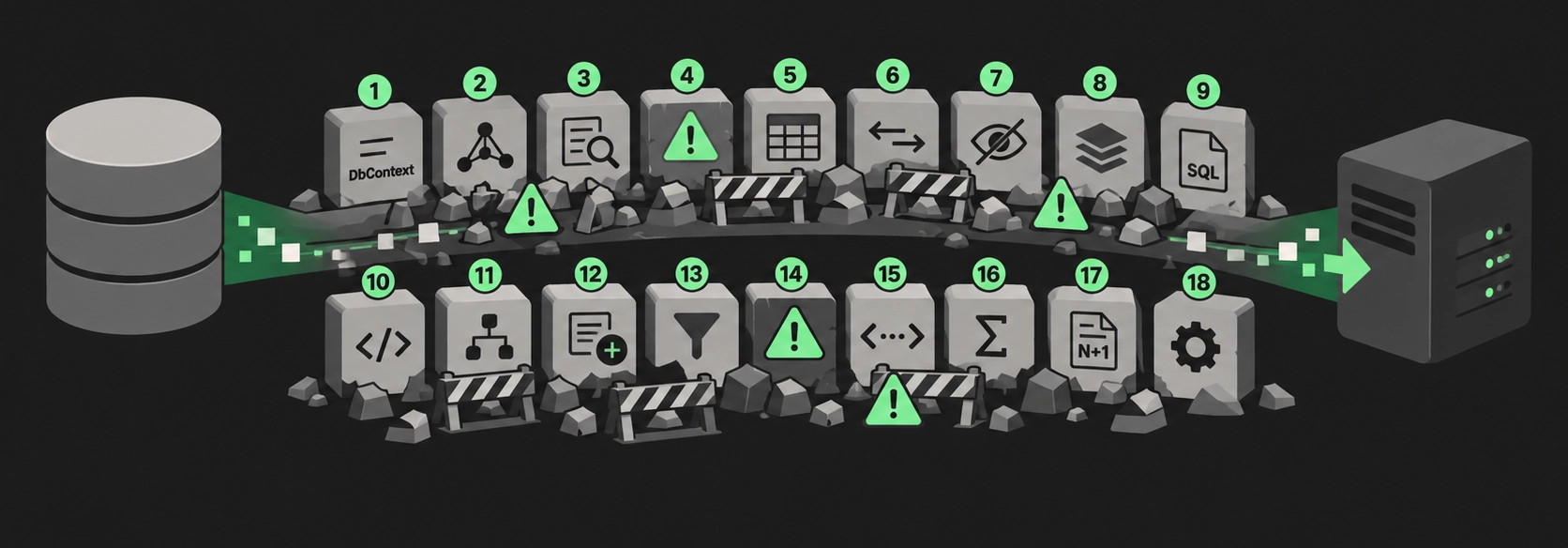
EF Core makes the slow path look exactly like the fast path.
The same LINQ reads clean whether it does one indexed seek or a thousand round trips. context.Orders.Where(o => o.CustomerId == id) looks identical whether the column is indexed or the database scans the whole table. A foreach over a navigation property looks like a normal loop, right up until you see it fire one query per row. The C# gives you no hint. The cost shows up later, under real data volume, in production.
Most of the mistakes below aren't EF Core's fault. They come from writing C# that hides what the SQL is doing. So the fix is almost always the same shape: see the generated SQL and the query plan, then push the work back to the database.
Here is the pattern that runs through the whole list. Ask for a Blog's URL and get the whole entity:
await foreach (var blog in context.Blogs.AsAsyncEnumerable())
    Console.WriteLine(blog.Url);
SQL:
SELECT [b].[BlogId], [b].[CreationDate], [b].[Name], [b].[Rating], [b].[Url]
FROM [Blogs] AS [b]
Ask for only the column you use, and the SQL shrinks to match:
await foreach (var url in context.Blogs.Select(b => b.Url).AsAsyncEnumerable())
    Console.WriteLine(url);
SQL:
SELECT [b].[Url] FROM [Blogs] AS [b]Same intent, different SQL. That gap is the whole article.
Loading too much data

1. Loading whole entities when you need two columns
Querying entity instances is the default, and it pulls every mapped column even when you use one. On a wide table with a few nvarchar(max) columns, that is a lot of bytes moved for a list view that shows a name and a date.
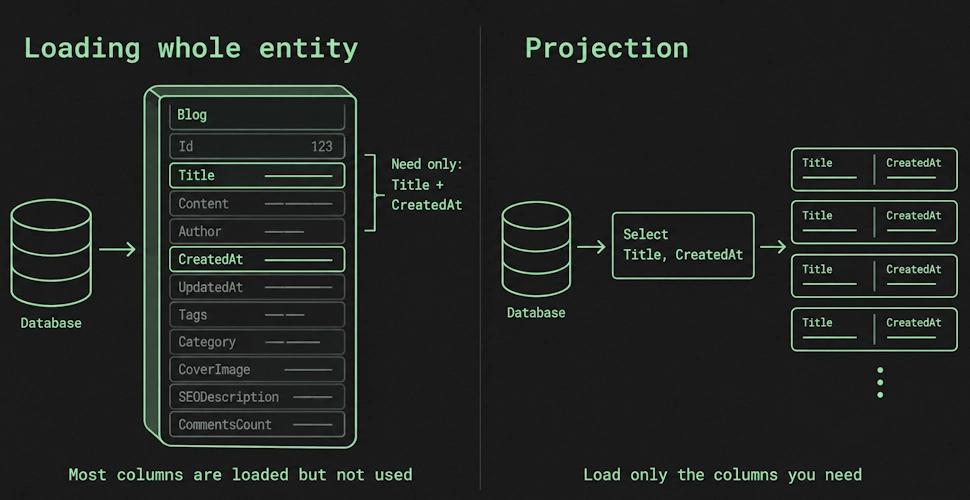
What to change. Project with Select into an anonymous type or a DTO with the columns you need. Keep full-entity loads for the cases where you will actually change and save the entity, since change tracking only works on entities.
2. Unbounded result sets
A query with no limit returns every matching row. Your test database has a few hundred rows, so everything is fast. Production has two million, and the same query loads them all into memory and ships them over the network.
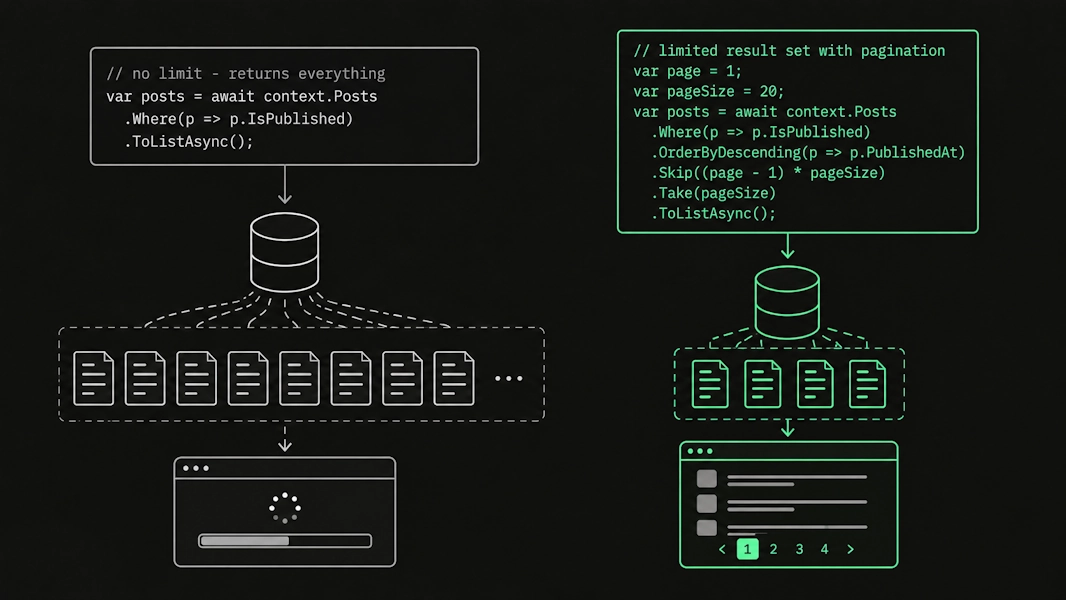
What to change. Add Take, and for anything user-facing, add real pagination. At a minimum, cap the result and tell the user more rows exist.
3. Offset pagination on deep pages
Skip(n).Take(m) becomes OFFSET / LIMIT. It is intuitive, and it is fine for the first few pages. The problem is that the database still walks and discards every skipped row, so page 5,000 reads and throws away 100,000 rows before returning yours.
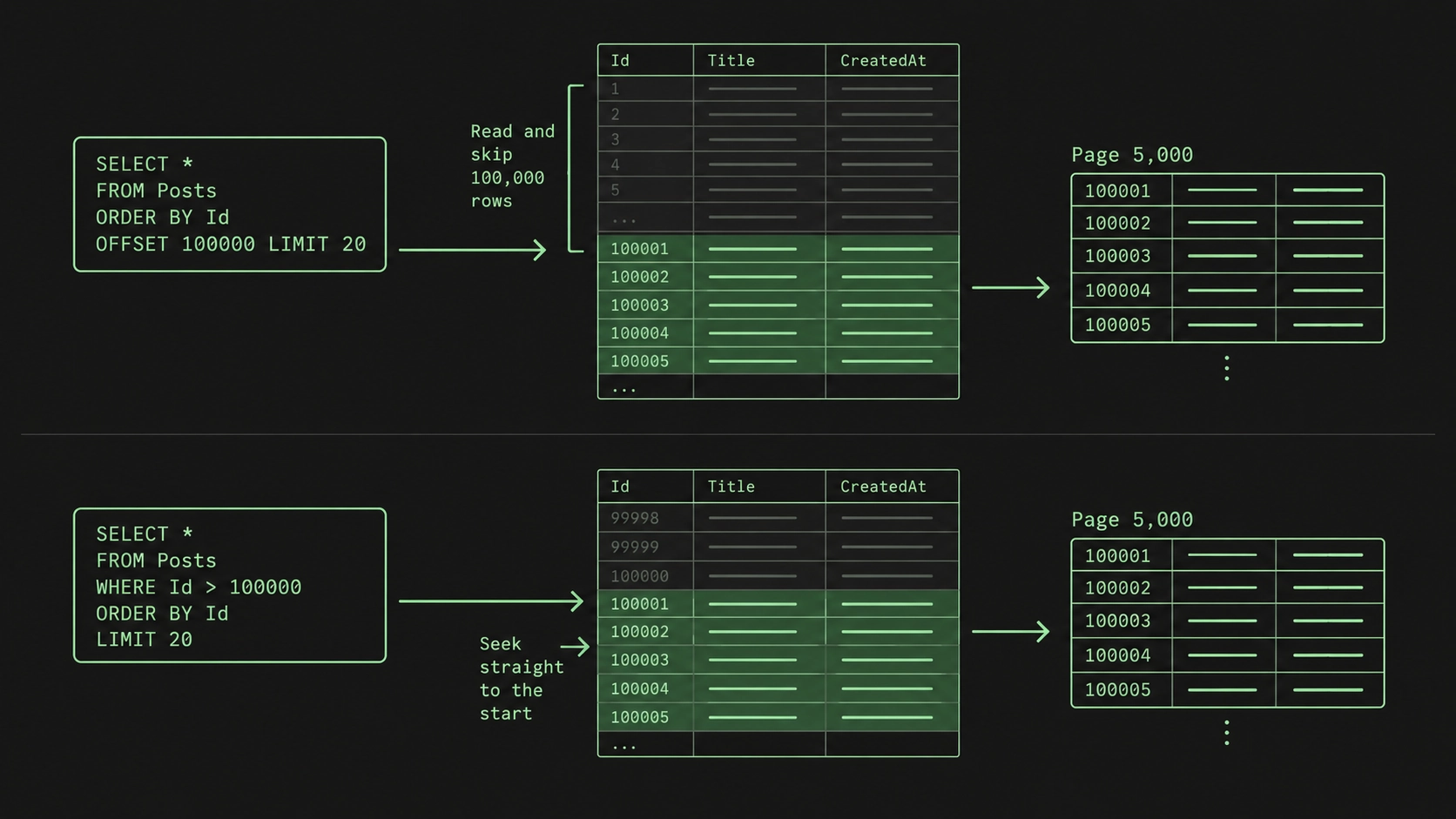
What to change. For next and previous navigation, use keyset pagination: remember the last key you saw and query for rows after it, so the database seeks straight to the start of the page instead of counting to it. Keep offset only where users really jump to arbitrary page numbers. Read more about pagination in the article: Pagination Strategies
4. Buffering when you could stream
ToList and ToArray pull the entire result set into memory. That is exactly what you want for 25 rows. It is not what you want for a report that streams 500,000 rows, where the memory cost grows with every row.
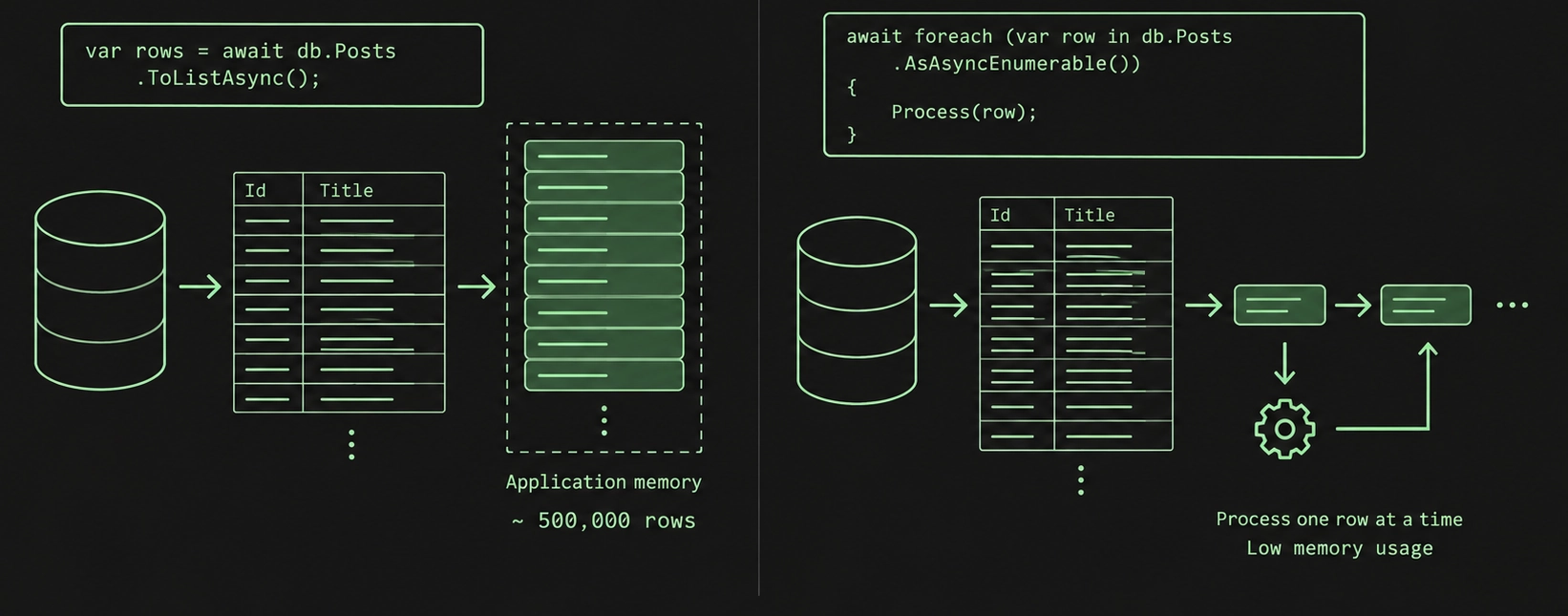
What to change. For large results, stream with AsAsyncEnumerable and process one row at a time. And do not call ToList before another LINQ operator, since that buffers everything just to filter it in memory. Use AsEnumerable when you deliberately want the rest of the query to run on the client.
Roundtrips and related data
5. N+1 from lazy loading
This is the classic one. Lazy loading fetches a navigation property the moment you touch it, which reads beautifully and hides a roundtrip on every access.
foreach (var blog in await context.Blogs.ToListAsync())
    foreach (var post in blog.Posts) // one query per blog
        Console.WriteLine($"{blog.Url}: {post.Title}");
One query loads the blogs. Then touching blog.Posts fires another query per blog. Ten blogs, eleven queries. A thousand blogs, a thousand and one. The EF Core docs are blunt about it and recommend avoiding lazy loading, because it makes this trap so easy to fall into.
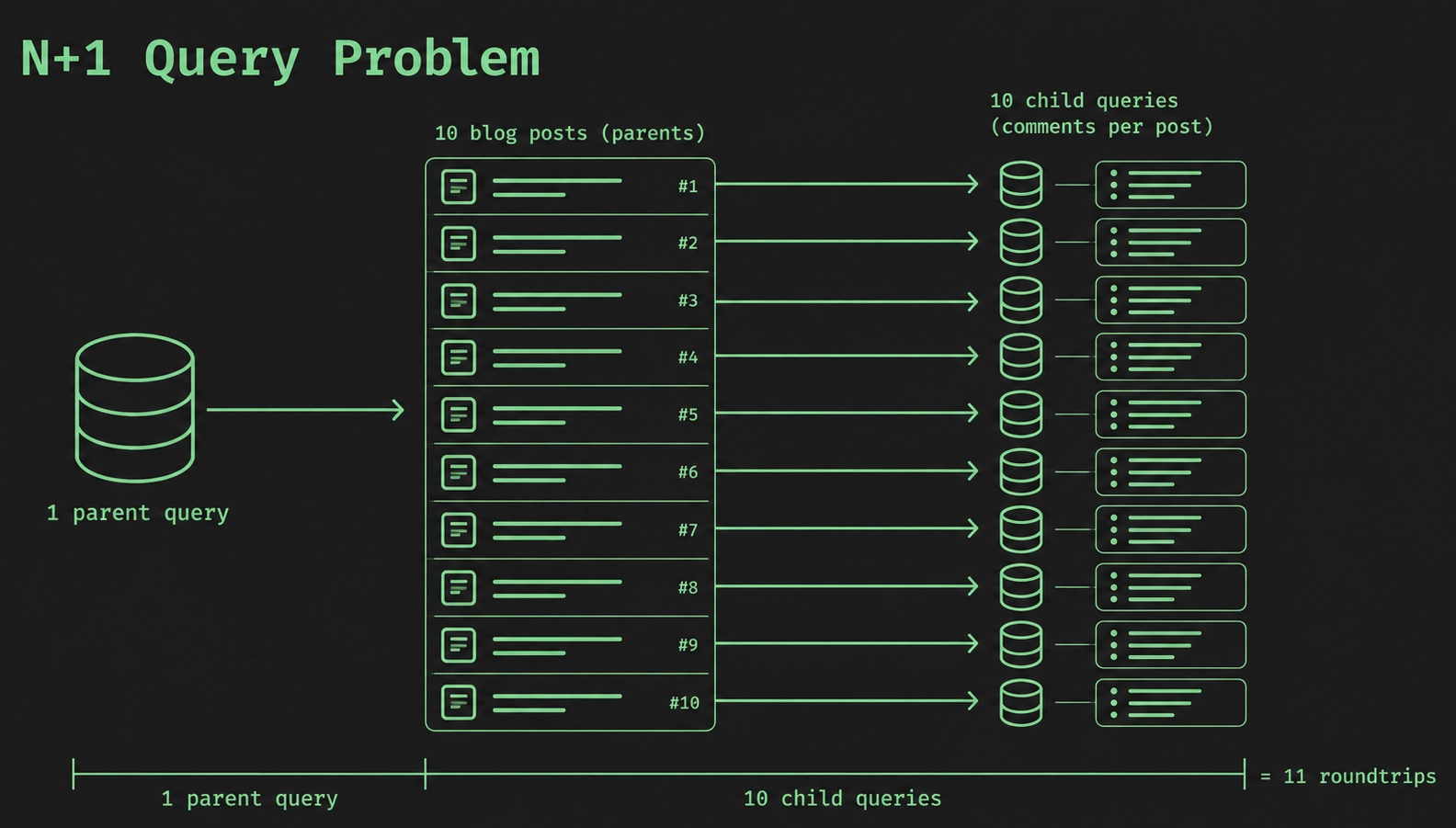
What to change. Load what you know you need eagerly with Include, or project the parents and their children in one query. Eager and explicit loading make the roundtrip visible in the code, which is the point.
6. Cartesian explosion from multiple Includes
Fix N+1 with Include and you can walk into the opposite problem. EF loads related entities by joining, and joining several one-to-many relationships in one query duplicates the parent row across every combination of children. Include a blog's posts and its tags together, and a blog with 20 posts and 10 tags comes back as 200 rows carrying the same blog data over and over.
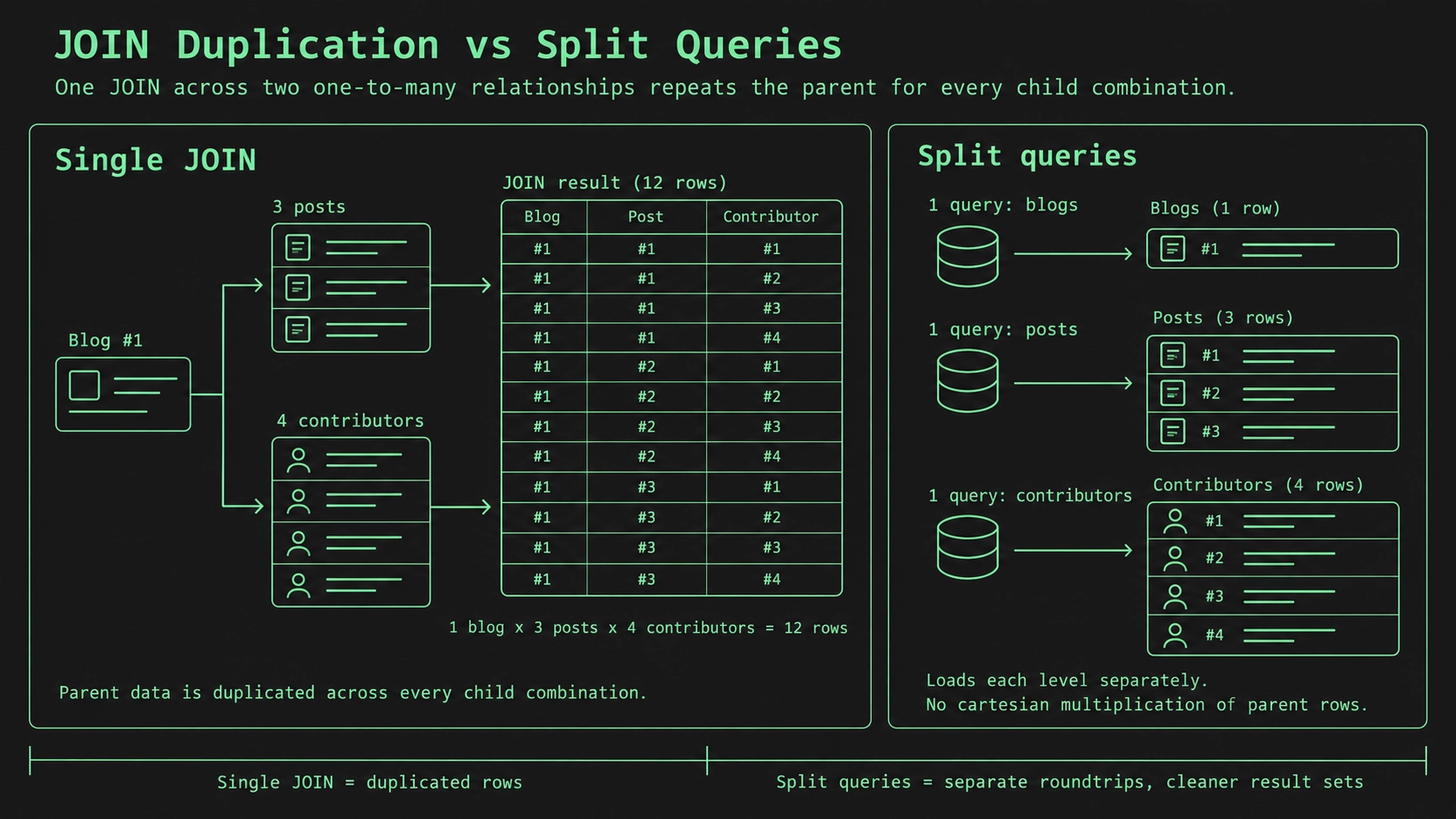
What to change. Use AsSplitQuery so EF loads each relationship in its own query and stitches them together, which removes the duplication. Know the trade-off: split queries run an extra round trip each, and EF buffers all but the last result set internally. It is duplication against roundtrips, so measure both on your data.
7. Calling SaveChanges inside a loop
EF Core already batches. Make several changes, call SaveChanges once, and it sends them together in one roundtrip. For SQL Server it batches up to 42 statements at a time by default. Call SaveChanges inside the loop, and you throw that away, paying a full roundtrip per iteration.
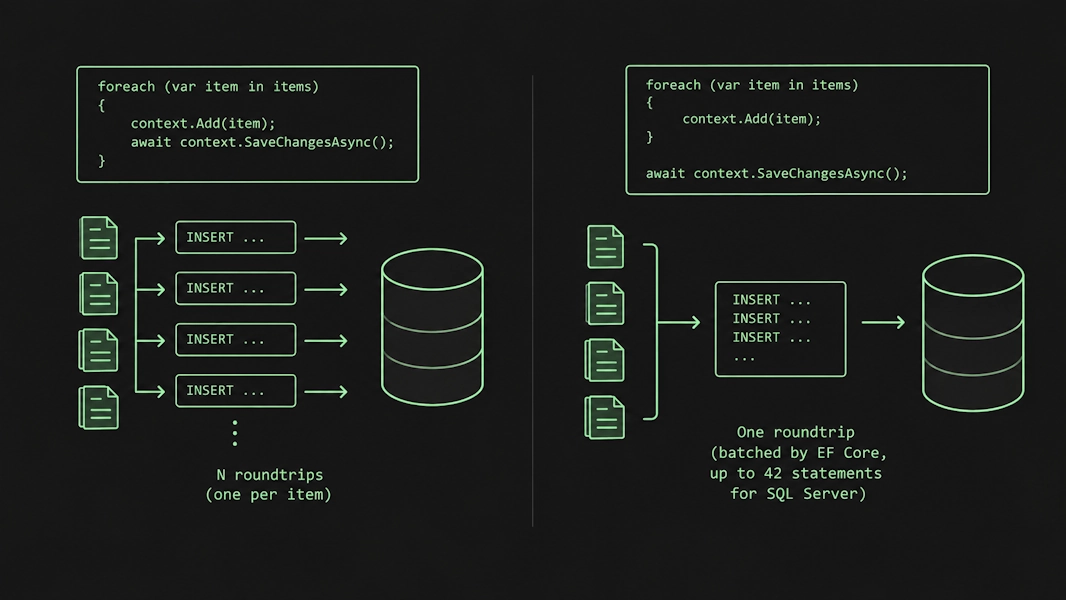
What to change. Make all your changes, then call SaveChangesAsync once at the end.
8. Loading rows just to update them
Giving every employee a raise usually looks like this: load all employees, change a property, save.
foreach (var e in context.Employees)
    e.Salary += 1000;
await context.SaveChangesAsync();
That is a roundtrip to load every row, a snapshot of each entity for change tracking, and then one UPDATE statement per employee. For a set-based change, all of that is waste.
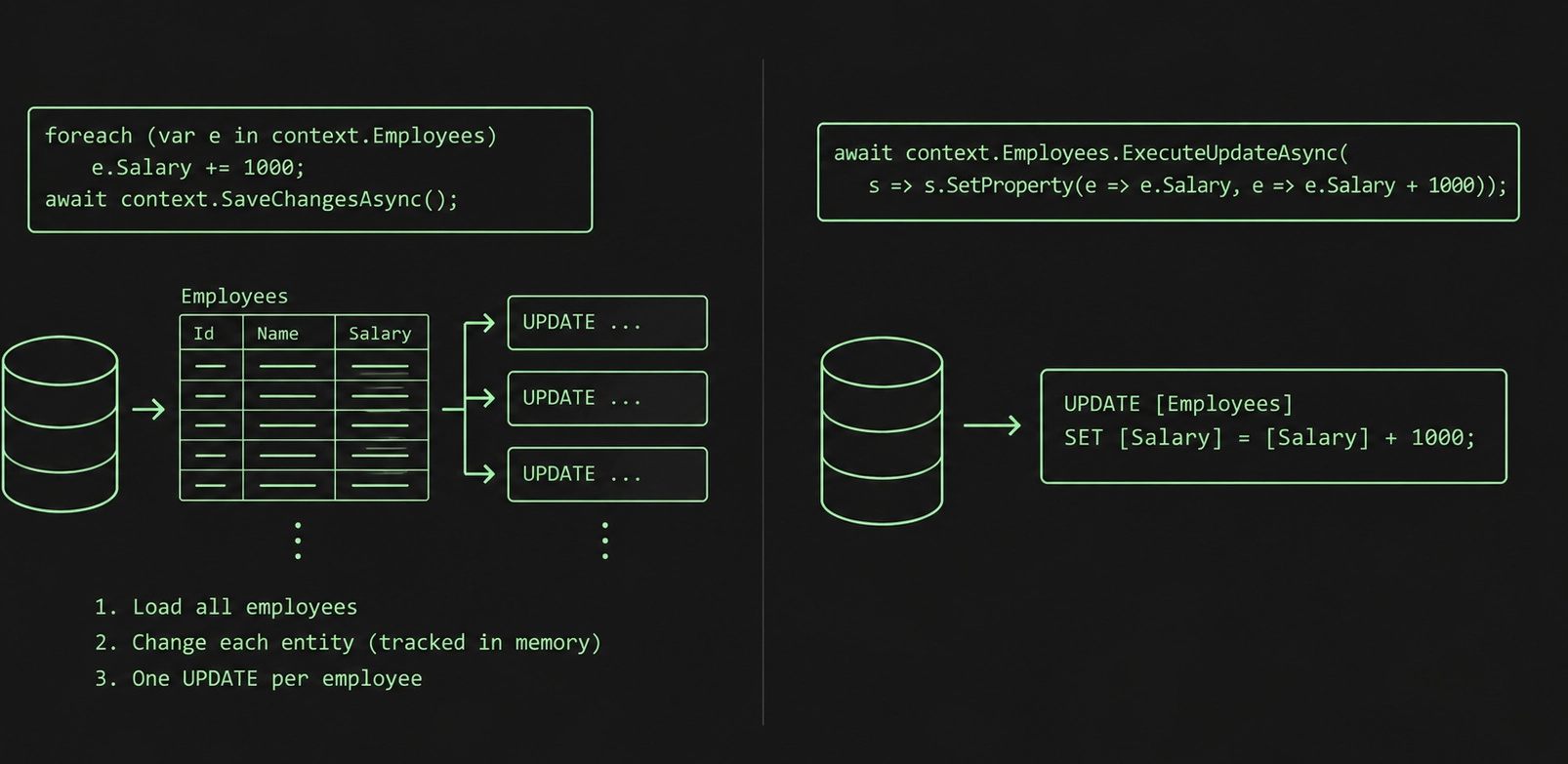
What to change. Use ExecuteUpdate / ExecuteDelete (EF Core 7 and later):
await context.Employees.ExecuteUpdateAsync(
    s => s.SetProperty(e => e.Salary, e => e.Salary + 1000));
SQL:
UPDATE [Employees] SET [Salary] = [Salary] + 1000;One statement, one roundtrip, no loading and no change tracking. Reach for it whenever the change is a set operation the database can do on its own.
Change tracking

9. Tracking on read-only queries
By default, EF tracks every entity it returns, so it snapshots each one and keeps a lookup for identity resolution. That work is exactly what you need when you plan to change and save the data. On a read that only feeds a screen, it is pure overhead.
Microsoft's own benchmark, loading 10 blogs with 20 posts each on a local SQL Server, puts tracking at about 1,415 microseconds and 380 KB against 993 microseconds and 233 KB for no-tracking. Roughly 29% faster and 39% less memory, for reads that never save.
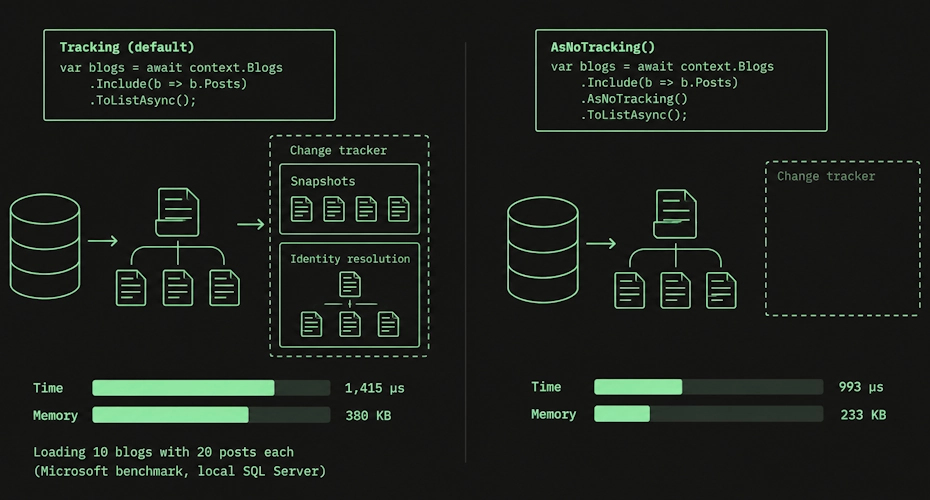
What to change. Add AsNoTracking to read-only queries. One caveat worth knowing: no-tracking skips identity resolution, so if a hundred posts reference the same blog, you get a hundred separate blog instances instead of one shared object. Write the reading code with that in mind.
10. A repository and Unit of Work wrapped over DbContext
This one is not in the performance docs; it is a design habit that costs you. A lot of projects put a generic repository and a Unit of Work on top of DbContext. If you read the EF Core source, DbContext already documents it as a combination of the Unit of Work and Repository patterns. So the wrapper reimplements what you already have, and it usually hides the very methods (AsNoTracking, Include, projections, ExecuteUpdate) you need to fix the other 17 items on this list.
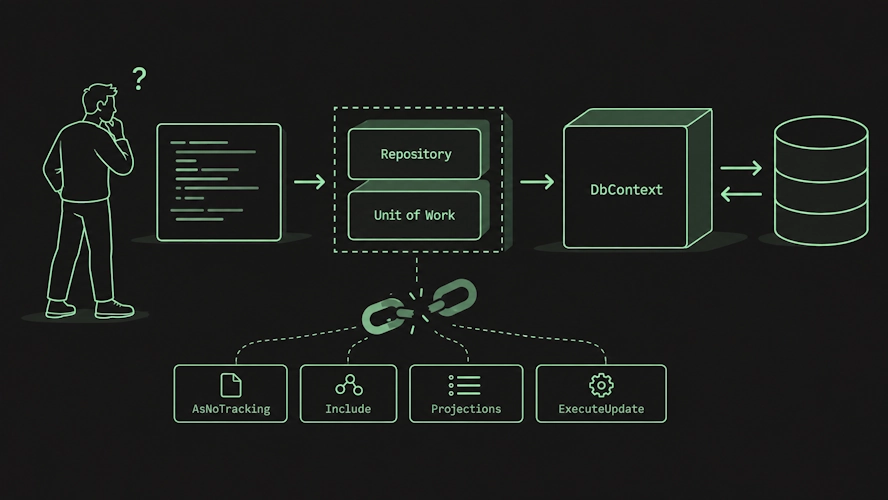
What to change. Use DbContext directly unless you have a concrete reason not to: domain rules applied to every call, several data sources behind one interface, or raw SQL you want to isolate. I wrote more about this in AbstractLess. If a layer only forwards calls, it doesn't earn its place.
Indexes and query shape

11. Predicates the index cannot use
The single biggest factor in whether a query is fast is whether it uses an index, and small LINQ choices decide that. StartsWith can use an index on SQL Server. EndsWith cannot, so it scans. Any function or arithmetic over a column (WHERE price / 2 > 100) blocks a plain index the same way.
There is no special EF knowledge here, just normal database knowledge. When a query is slow, I check the query plan first and look at whether it does an Index Seek or an Index Scan before I touch anything in C#. A scan on a large table is usually the answer.
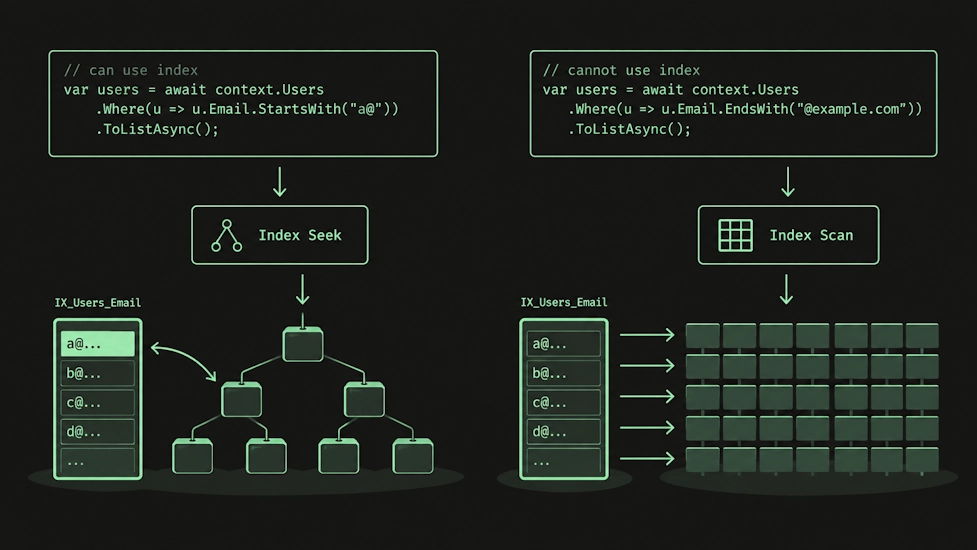
What to change. Read the query plan. Keep predicates SARGable: compare the column directly instead of wrapping it in a function. For an expression you filter on often, add a persisted computed column and index that. On composite indexes, remember column order matters: an index on (A, B) helps filters on A, and on A and B, but not on B alone.
12. Filtering in memory that belongs in SQL
Pull the results to the client and then filter, and the database hands over every row first.
var blogs = context.Blogs
    .AsEnumerable() // everything comes back here
    .Where(b => SomeDotNetMethod(b)); // filtered in the client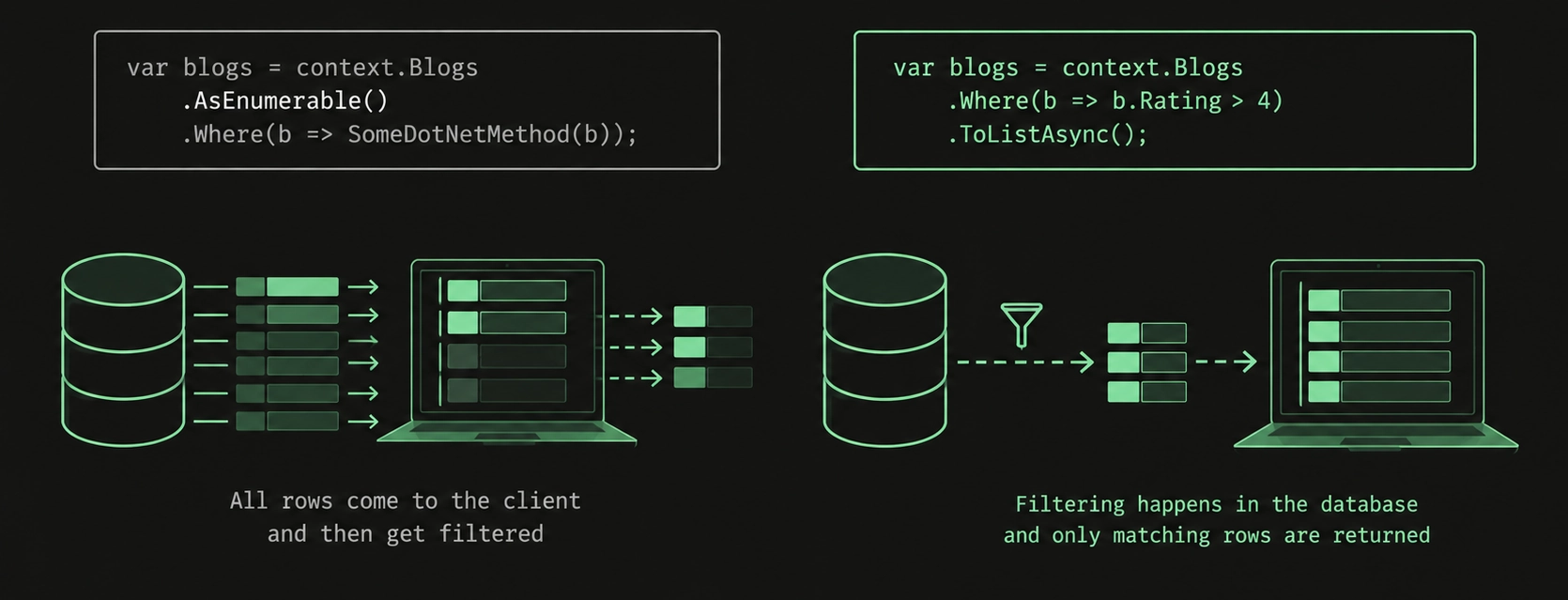
What to change. Keep filters in expressions EF can translate so they run as a WHERE in the database. Move to client evaluation only when you have to, and only after the database has already cut the result down.
13. Blocking threads with synchronous calls
SaveChanges and ToList block the calling thread for the full database round trip. Under load, blocked threads mean more threads, more context switches, and eventually thread-pool starvation.
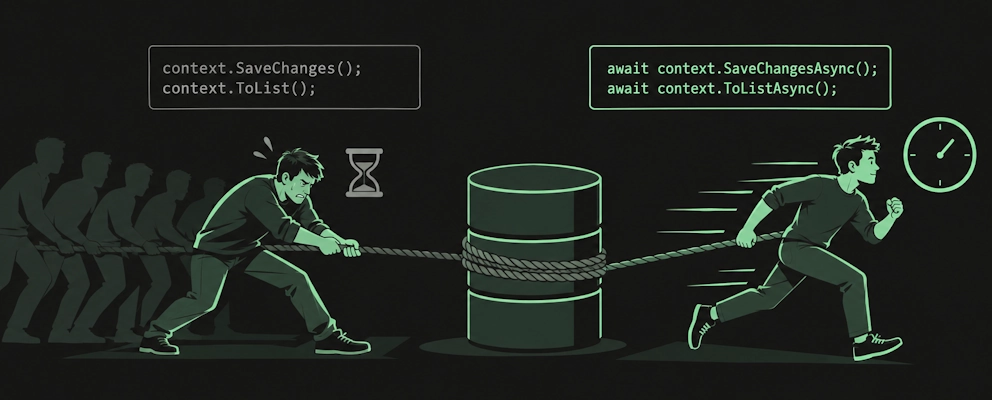
What to change. Use the async APIs (ToListAsync, SaveChangesAsync) end to end. Don't mix sync and async in the same path; it is an easy way to trigger subtle starvation.
Plan cache and query cache

14. Constants where you should parameterize
EF caches compiled queries by the shape of the expression tree, and the database caches query plans by the SQL text. Inlining a constant and every value produces different SQL, so the database cannot reuse a plan, and EF has more work matching its cache.
// two different SQL strings, two plans
var a = await context.Posts.FirstOrDefaultAsync(p => p.Title == "post1");
var b = await context.Posts.FirstOrDefaultAsync(p => p.Title == "post2");
Put the value in a variable, and EF parameterizes it, so both calls share one parameterized SQL string and one plan.
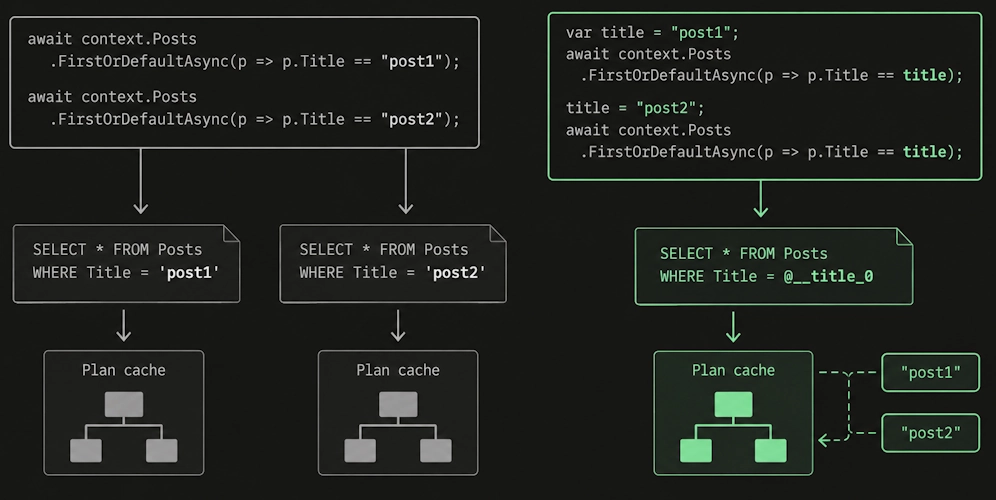
What to change. Use variables for values that change between calls. EF Core reports a Query Cache Hit Rate metric that should climb to near 100% shortly after startup. If it sits below that, something is defeating the cache.
15. Dynamic queries built with constants
Building queries dynamically is fine in principle, but the common mistake is baking a constant into an Expression tree, which produces a new shape every call. That recompiles the query each time and pollutes the database plan cache. Microsoft's benchmark shows the constant version at about 1,666 microseconds against 757 microseconds for the parameterized one, and the real cost is worse than the microseconds suggest because the pollution slows other queries too.
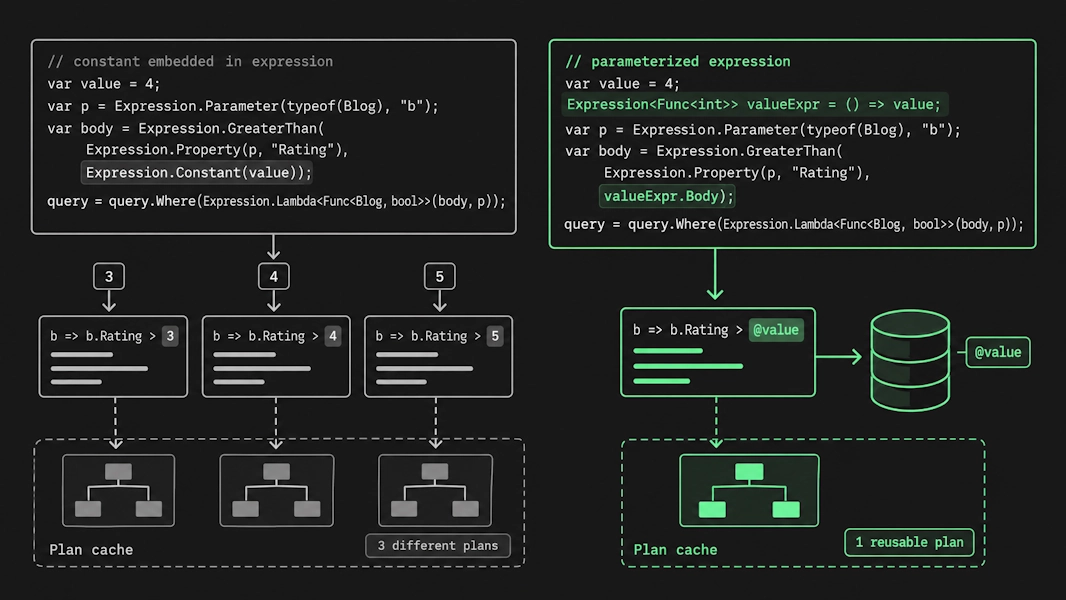
What to change. Build dynamic predicates with parameters, not constants. Better still, avoid the raw Expression API unless you truly need it, since it is easy to get this wrong.
Context and startup overhead

These matter mostly in high-throughput, low-latency services. On a normal app, they are noise next to the items above, so treat them as tuning, not defaults.
16. No DbContext pooling in a hot service
A DbContext is fairly light, but each one still sets up internal services, and at thousands of requests a second that setup adds up. Microsoft's benchmark for a single-row fetch on a local SQL Server shows about 702 microseconds and 50 KB without pooling against 350 microseconds and 4.6 KB with it.
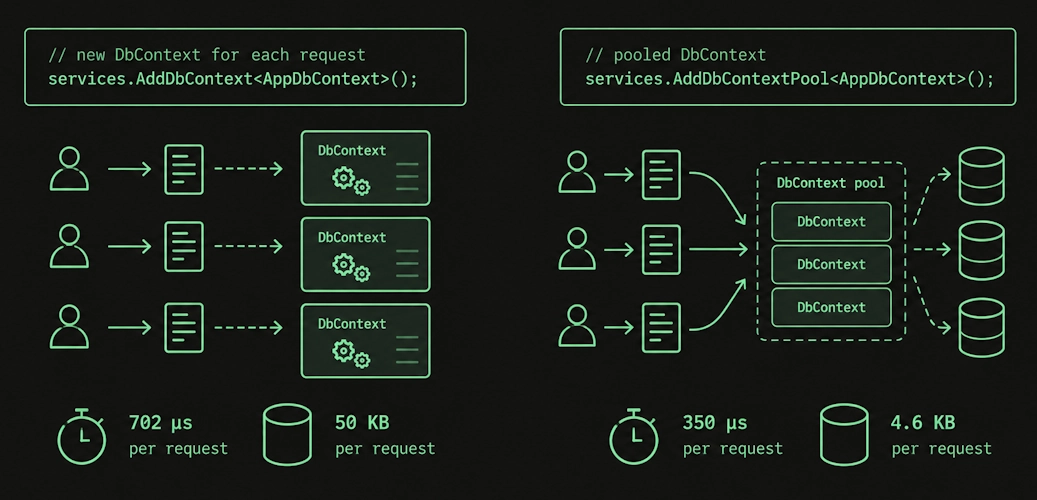
What to change. Use AddDbContextPool (or PooledDbContextFactory) so instances are reset and reused. Watch two things: size the pool for your concurrency, and handle per-request state carefully, because a pooled context is reused across requests and OnConfiguring runs only once. If you carry something like a tenant ID, inject it through a scoped factory.
17. Not compiling hot queries, and slow startup on large models
Two smaller ones. For a query on a very hot path, EF.CompileQuery / EF.CompileAsyncQuery skips the cache lookup and shaves a bit off each call, more so for large, complex queries. Separately, the first operation on a DbContext compiles the model, and on a model with hundreds or thousands of entity types that startup cost is real.
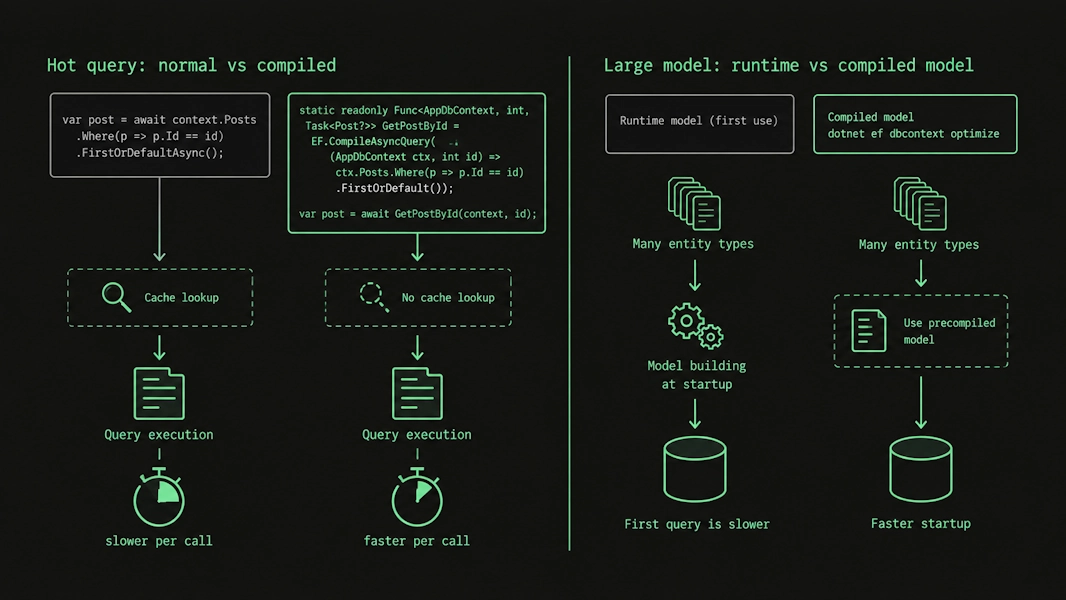
What to change. Compile the few genuinely hot queries. For a large model with slow startup, generate a compiled model with dotnet ef dbcontext optimize, keeping its limitations in mind (no global query filters, no lazy-loading proxies, and you regenerate it whenever the model changes). Skip both on a small model, where they are not worth the complexity.
18. Treating raw SQL as either forbidden or a first resort
Both extremes cost you. Sometimes EF generates worse SQL than you could write by hand, or cannot express a database-specific construct at all, and FromSql, a table-valued function, or a view is the right tool. Other times, you reach for raw SQL out of habit and create maintenance you didn't need.
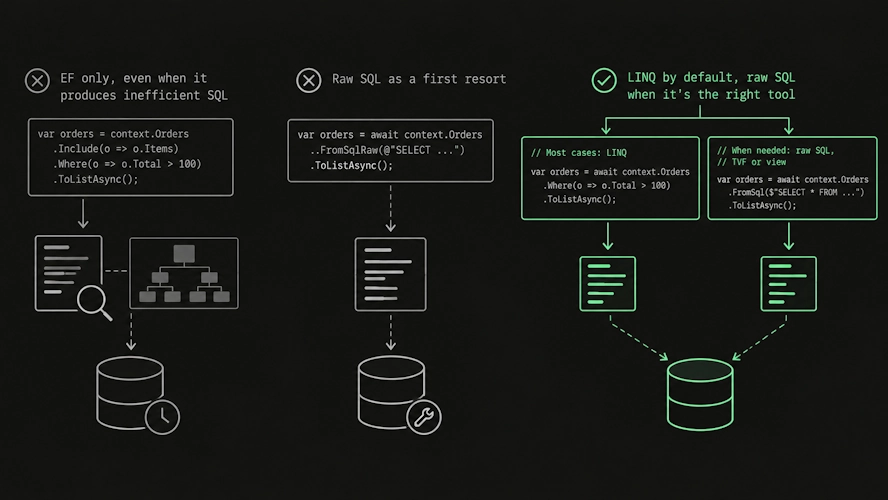
What to change. Default to LINQ. Drop to raw SQL when you have confirmed EF cannot produce the query you need and the query matters enough to justify the maintenance cost. Make it a deliberate exception, not a reflex.
Where to start

If you take one thing from this list: turn on SQL logging and read the query plan before you change any C#. Almost every item here is invisible in the LINQ and obvious in the SQL. The plan tells you about the scan, the log tells you about the N+1, and the parameter shows up in the generated text. The C# tells you nothing.
And keep it in proportion. EF Core's own overhead is rarely your bottleneck. Network latency, the query plan, and how much data you move dominate, which is why every fix above focuses on seeing the SQL and moving work to the database, not EF internals.
One more thing that helps if you write with an AI assistant: turn these into a rule your coding agent applies to every EF Core change. Drop something like this into your AGENTS.md, a Cursor rule, or a Copilot instruction file.
When writing or reviewing EF Core code, enforce these rules and flag violations:

Queries
- Project with Select to the columns needed; do not load full entities for read-only views.
- Never return unbounded result sets. Require Take or pagination; prefer keyset pagination over Skip/Take for deep pages.
- Add AsNoTracking to read-only queries.
- Keep Where/OrderBy predicates translatable to SQL; do not filter after AsEnumerable/ToList.
- Keep predicates SARGable: no functions or arithmetic on a filtered column; StartsWith over EndsWith.
- Parameterize values that change between calls; do not inline constants or build Expression trees with constants.

Related data
- Do not rely on lazy loading. Use Include or a projection, and name the roundtrip explicitly.
- With multiple one-to-many Includes, use AsSplitQuery to avoid cartesian explosion.

Saving
- Call SaveChangesAsync once per unit of work, never inside a loop.
- For set-based updates or deletes, use ExecuteUpdateAsync/ExecuteDeleteAsync instead of load-mutate-save.
- Use async EF APIs throughout; do not mix sync and async.

Review step
- For any new or changed query, show the generated SQL and confirm it uses an index seek, not a table scan.
- Treat raw SQL as a deliberate exception, only when EF cannot express the query.
Adjust it to your project. It will not catch a missing index on its own, but it stops most of the list above from reaching review in the first place.