
What is the Model Context Protocol (MCP)

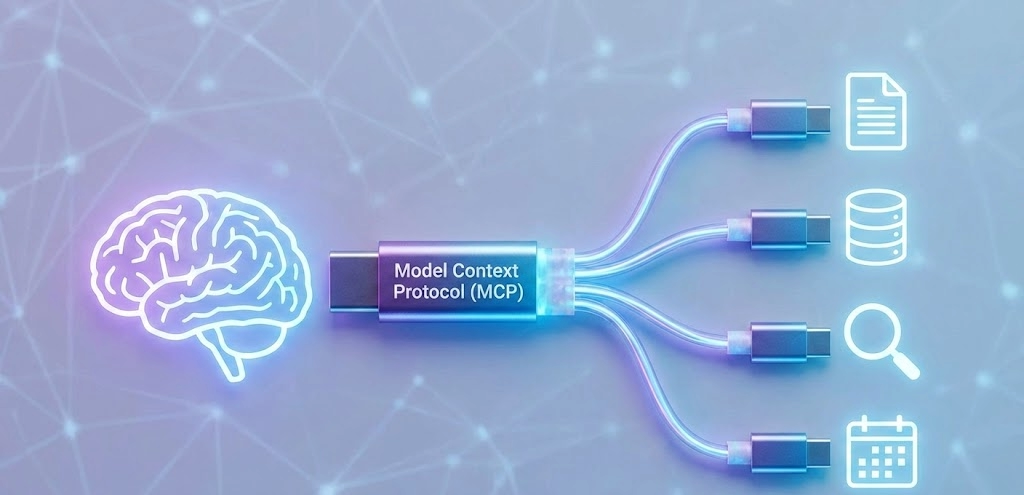
The "USB-C" for AI
MCP stands for Model Context Protocol. It's an open standard that lets AI models (like Claude, ChatGPT, or Gemini) talk to external tools, apps, and data sources in a consistent way.
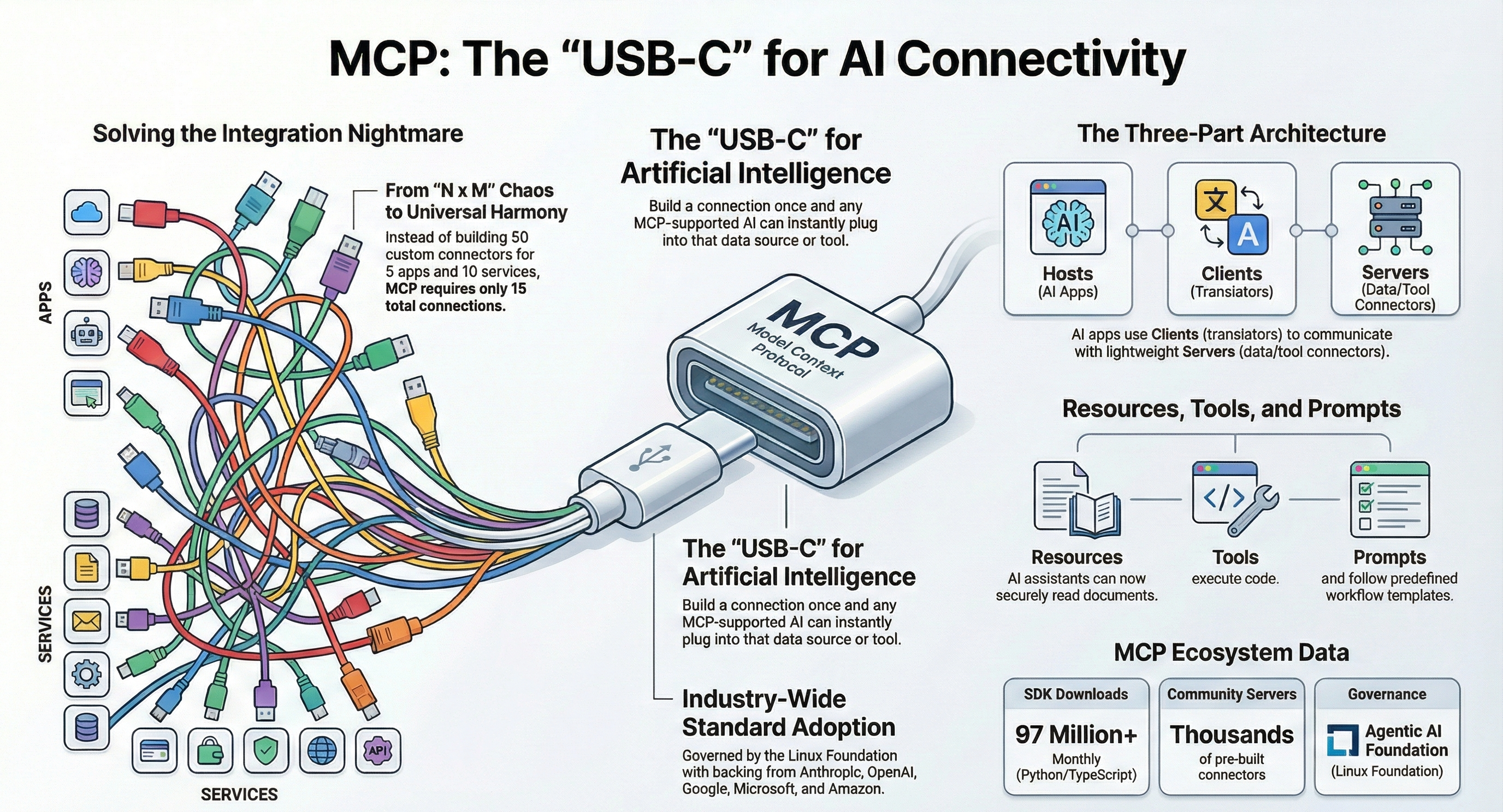
Think of it like a universal adapter. You know how you need different chargers for different phones? MCP is like USB-C for AI, one standard plug that works everywhere.
Instead of writing custom code to connect every AI model to every individual data source, developers can just use MCP. Build the connection once, and any AI app that supports MCP can instantly plug into any database, tool, or file system that also uses it.
Why Does MCP Exist?
Here's the problem it solves:
AI models are smart, but they live in a bubble. They can only work with what's in their training data or what you paste into the chat window. That's limiting. If you want your AI assistant to check your Google Drive, pull data from a database, or create a ticket in Jira, someone had to build a custom connection for each one of those things.
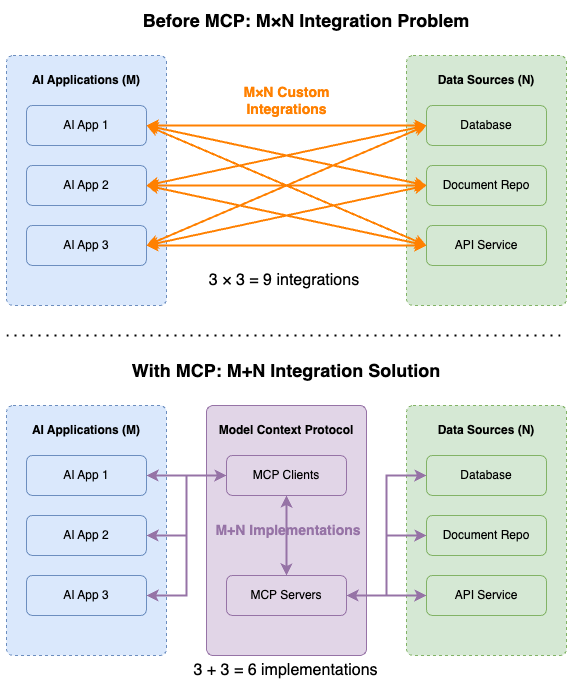
Before MCP, every AI app needed its own connector for every tool. Want to connect five AI apps to ten different services? That's fifty custom integrations. It was messy, expensive, and didn't scale.
MCP fixes this by creating one shared language. Build an MCP server for your tool once, and any AI app that supports MCP can use it. Now those fifty custom integrations become just fifteen clients plus ten servers.
How Does It Actually Work?
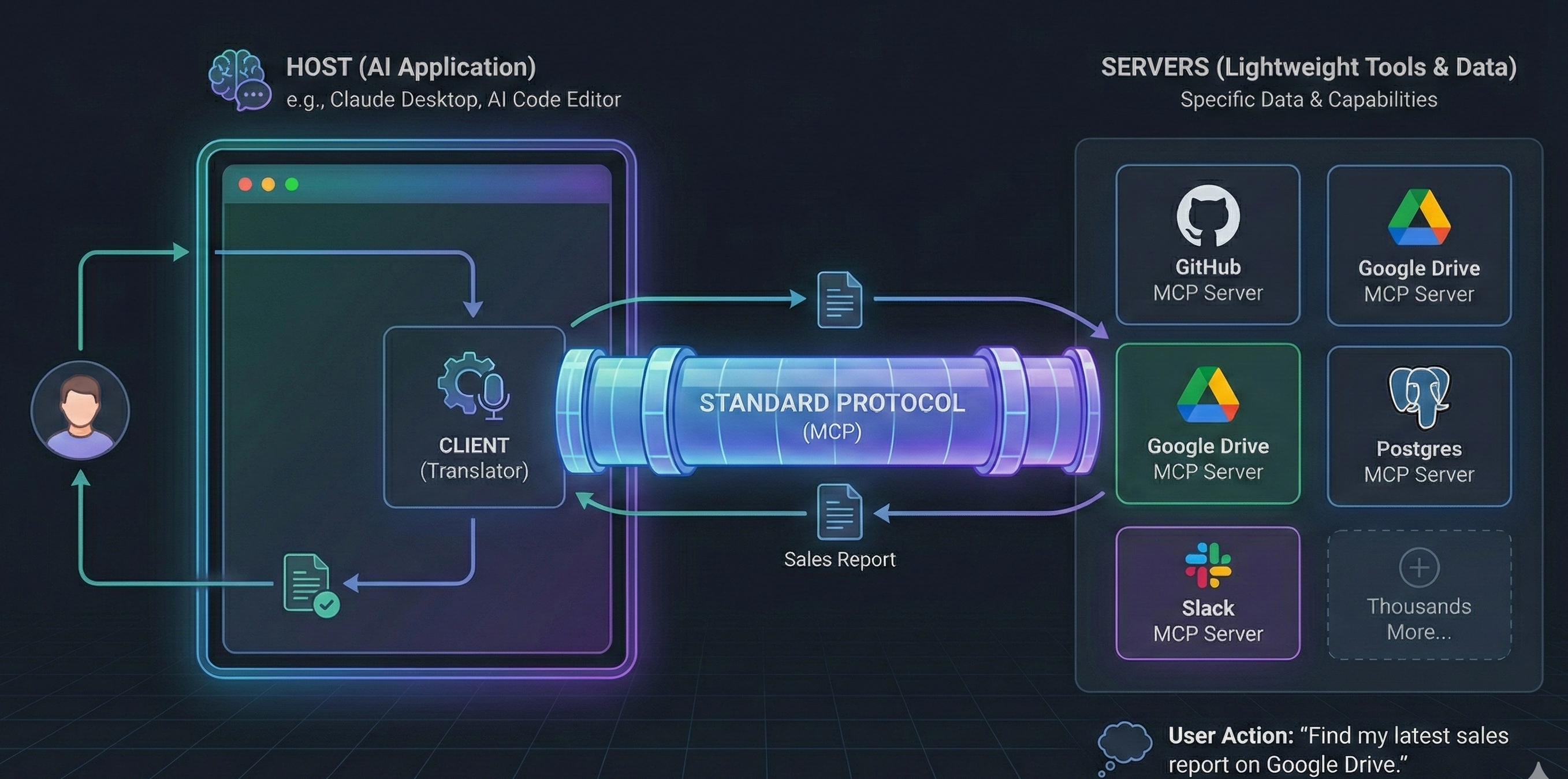
MCP has three main parts:
- Hosts are the AI applications you interact with, like Claude Desktop or an AI-powered code editor. They're the ones running the show.
- Clients live inside the host and handle the connection to MCP servers. Think of them as the translators.
- Servers are lightweight programs that expose specific tools or data. There's an MCP server for GitHub, one for Google Drive, one for Slack, one for Postgres, and thousands more.
When you ask your AI assistant something like "find my latest sales report on Google Drive," the client talks to the Google Drive MCP server, retrieves the report, and returns it to you. All through a standard protocol.
Under the hood, MCP uses JSON-RPC 2.0 for communication - the same kind of messaging pattern used in many web technologies. If that means nothing to you, don't worry. The point is: it's built on proven, well-understood tech.
A Quick Example
Let's say you're a developer and you want your AI coding assistant to better understand your project.
Without MCP, you'd copy and paste files into the chat, explain your database schema manually, and constantly switch between tools.
With MCP, your assistant connects to the MCP servers for your Git repo, database, and issue tracker. It can look at recent commits, query your database schema, and check open tickets all without you lifting a finger.
The same idea works outside of coding. A marketing team could connect its AI to analytics dashboards, content management systems, and ad platforms. A support team could connect it to their ticketing system and knowledge base.
Who's Behind It?
Anthropic introduced MCP and released it as an open-source project in November 2024. It started from a pretty relatable frustration: one of Anthropic's developers was tired of constantly copying code between Claude and his IDE.
What happened next was remarkable. Within months, the biggest names in AI jumped on board. OpenAI adopted MCP in March 2025. Google DeepMind followed in April. Microsoft and GitHub joined the Build 2025 steering committee. By the end of 2025, MCP had become the industry standard.
In December 2025, Anthropic donated MCP to the Agentic AI Foundation, a Linux Foundation project. The foundation was co-founded by Anthropic, Block, and OpenAI, with backing from Google, Microsoft, AWS, Cloudflare, and Bloomberg. That's about as close to universal buy-in as you'll see in tech.
What Can You Do with MCP Today?
The ecosystem is already huge. There are thousands of community-built MCP servers, and official SDKs are available for all major programming languages. Here are some popular use cases:
- For developers: Connect your AI assistant to GitHub, databases, file systems, and development environments. Tools like Cursor, Zed, Replit, and Sourcegraph already support MCP.
- For teams: Hook up Slack, Google Drive, email, and project management tools so your AI can work across your whole workflow.
- For businesses: Build custom MCP servers that wrap your internal APIs, giving AI models safe access to company data without exposing raw systems.
What About Security?
This is important, and the community takes it seriously.
MCP servers can execute code and access sensitive data, so there are real risks if things aren't set up carefully. The protocol itself doesn't enforce security; it's up to each implementation to handle authentication, permissions, and data boundaries properly.
Some things to keep in mind: always vet MCP servers before using them, make sure user consent is required before any tool runs, and treat tool descriptions from untrusted servers with caution.
The good news is that security is getting more attention as the ecosystem matures. There are governance structures in place, and the community is actively working on better standards for trust and verification.
MCP vs. Function Calling. What's the Difference?
If you've used OpenAI's function-calling or similar features, you might wonder how MCP differs.
Function calls are specific to a single AI provider. You define tools in the format the provider expects, but they work only within that provider's ecosystem.
MCP is provider-agnostic. Build an MCP server once, and it works with Claude, ChatGPT, Gemini, or any other AI app that supports the protocol. It's the difference between a proprietary cable and a universal standard.
Where Is MCP Headed?
MCP is evolving fast. The November 2025 spec update added async operations, stateless server support, server identity verification, and an official registry for discovering MCP servers. The Python and TypeScript SDKs alone have over 97 million monthly downloads.
The big picture? MCP is becoming the foundation for how AI agents interact with the world. As AI moves from simple chat assistants to autonomous agents capable of taking real actions, having a standard protocol for tool access isn't just a nice-to-have; it's essential.
How to Build Your Own MCP Server
Ready to get your hands dirty? Building a basic MCP server is easier than you might think. You can use either Python or TypeScript; both have official SDKs.
Here's a quick overview of the process.
Step 1: Set Up Your Project
For Python, create a project folder and install the MCP SDK:
mkdir my-mcp-server
cd my-mcp-server
python -m venv venv
source venv/bin/activate  # On Windows: venv\Scripts\activate
pip install mcp
Step 2: Create Your Server
The Python SDK includes FastMCP, which makes it really simple. Here's a minimal example a server that exposes a "greet" tool:
from mcp.server.fastmcp import FastMCP

mcp = FastMCP("My First Server")

@mcp.tool()
def greet(name: str) -> str:
    """Say hello to someone."""
    return f"Hello, {name}! Welcome to MCP."

if __name__ == "__main__":
    mcp.run()
That's it. Seriously. You define a function, decorate it with @mcp.tool()and the SDK handles the rest it registers the tool, describes it to any connecting client, and manages communication.
Step 3: Connect It to a Client
To use your server with Claude Desktop, add it to the config file. On macOS, that's at ~/Library/Application Support/Claude/claude_desktop_config.json:
{
  "mcpServers": {
    "my-server": {
      "command": "python",
      "args": ["/path/to/your/server.py"]
    }
  }
}
Restart the Claude Desktop, and your tool should appear. You can now ask Claude to use your "greet" tool, and it will.
Step 4: Build Something Real
Once you've got the basics working, the fun begins. You can expose any functionality as an MCP tool. Here are a few ideas to get you started:
- Wrap an API. Connect to your company's internal API and let AI assistants query it. A CRM lookup tool, a project management integration, or a monitoring dashboard, the options are wide open.
- Access local data. Build a server that reads files from a specific folder, queries a local database, or processes spreadsheets.
- Automate workflows. Create tools that trigger actions, send Slack messages, create Jira tickets, deploy code, or update spreadsheets.
A Few Tips
- Keep your tools focused. One tool should do one thing well. It's better to have five small, clear tools than one giant tool that tries to do everything.
- Write good descriptions. The AI model reads your tool descriptions to decide when and how to use them. Clear descriptions lead to better results.
- Handle errors gracefully. If something goes wrong, return a helpful error message instead of crashing. The AI can often work around issues if you give it useful feedback.
- Be careful with logging. If you're using stdio transport (the default), never use
print()orconsole.log()For debugging, it corrupts the communication stream. Usestderrinstead.
For full tutorials and documentation, check out modelcontextprotocol.io. It contains examples for connecting to popular services.
Key Takeaways
- MCP is a universal standard for connecting AI models to external tools and data. It eliminates the need for custom integrations.
- It's open source and vendor-neutral, now governed by the Linux Foundation with backing from every major AI company.
- The ecosystem is massive, with thousands of servers, SDKs in every major language, and adoption across the industry.
- Security matters. MCP gives AI powerful access to real systems. Use it responsibly and vet your servers.
- It's still early, but it's already won. When Anthropic, OpenAI, Google, and Microsoft all agree on one standard, that's a pretty clear signal.
If you're building with AI in any capacity, MCP is worth understanding. It's not just another protocol; it's becoming the plumbing that makes AI agents actually useful in the real world.