
AI Conversation History: 4 Strategies with .NET samples

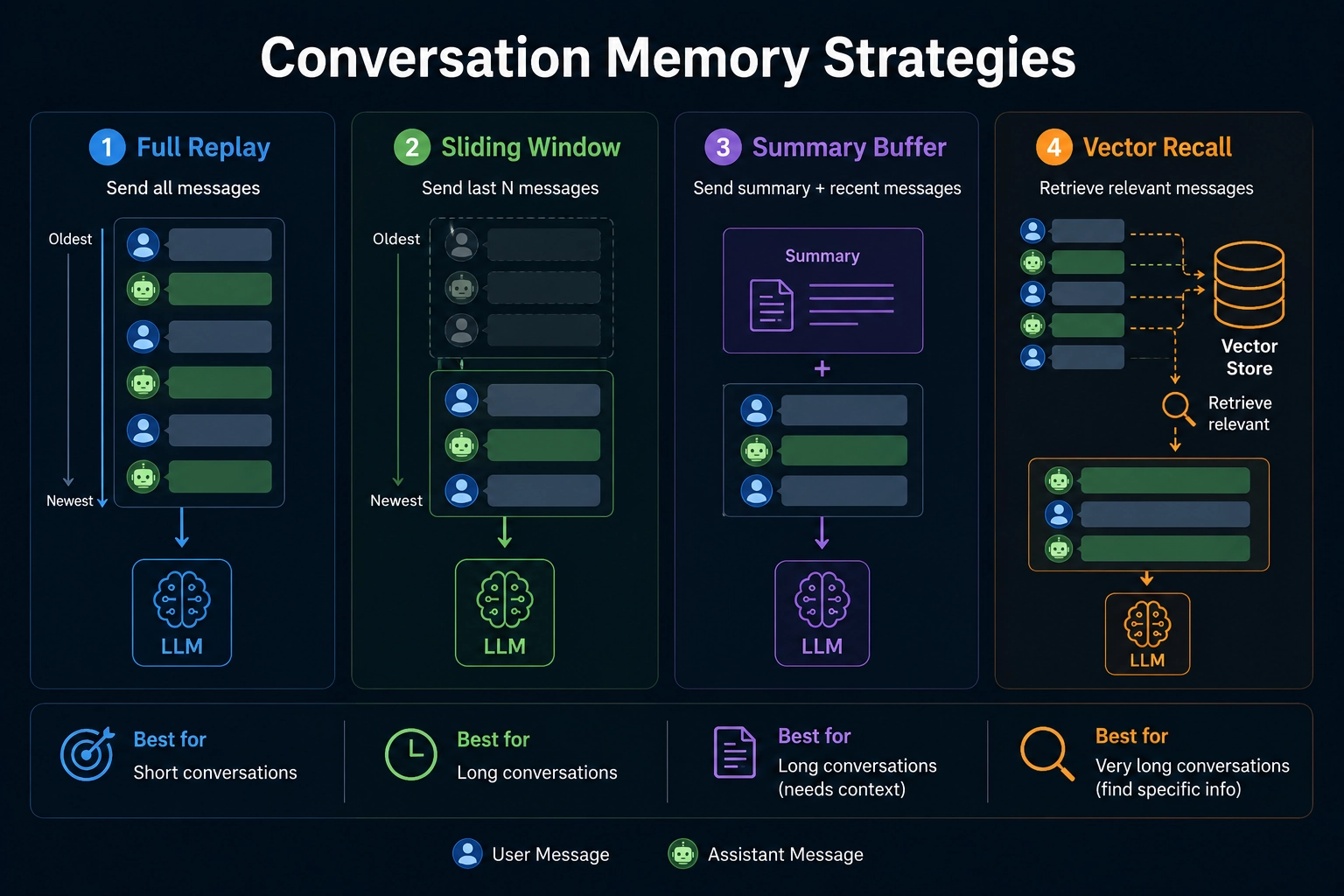
Every message in a conversation costs tokens. If you build chatbots or AI assistants, you hit this problem fast. And once your conversation gets too long, you hit the context window limit, and the request fails.
So how do you keep conversations going without spending too much or losing important info? Here are four ways to handle this, plus the practical bits most articles skip.
The core problem
LLMs have no memory between calls. Every time you ask the model a question, you send the full conversation history with your request. The model reads it, replies, and forgets everything.
This works fine for 5 messages. At 500 messages? Token costs grow fast. Past 2000? You hit the context limit, and the API call fails.
You need a strategy.
Before you choose: count your tokens
Pick the strategy after you know the numbers. Token usage depends on three things:
- Average message length in your app
- Typical session length
- Your model's context window
One token equals roughly 4 characters of English text. A 500-word message runs around 650 tokens. A 20-message back-and-forth often hits 10K to 20K tokens.
Use a tokenizer library before you pick a strategy. For .NET, Microsoft.ML.Tokenizers works well. Count tokens on real conversation samples from your app.
For example (C#):
using Microsoft.ML.Tokenizers;

var tokenizer = TiktokenTokenizer.CreateForModel("gpt-4o");
int tokenCount = tokenizer.CountTokens(message);
Console.WriteLine($"Message uses {tokenCount} tokens");
Once you know your average session size, the right strategy becomes more obvious.
Strategy 1: Full replay
Send every message, every time.
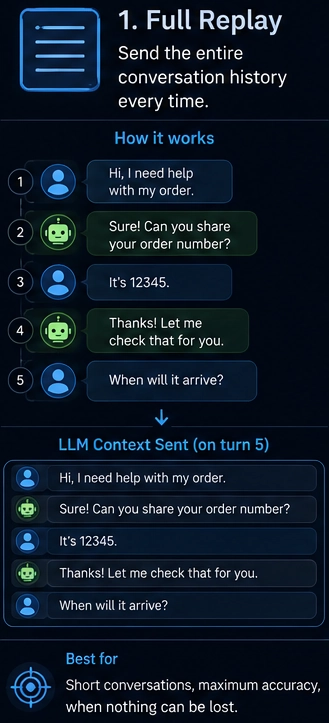
When to use this:
- Short conversations under 20 messages
- Dev and debugging where you want full context
- High-stakes apps where missing info costs more than tokens
When to avoid this:
- Token cost grows with each message
- You hit context limits fast
- No fallback when you reach the limit
Example (C#):
public class FullReplayHistoryManager
{
    private readonly List<ChatMessage> _messages = new();

    public void AddSystem(string content)
        => _messages.Insert(0, new SystemChatMessage(content));

    public void AddUser(string content)
        => _messages.Add(new UserChatMessage(content));

    public void AddAssistant(string content)
        => _messages.Add(new AssistantChatMessage(content));

    public IReadOnlyList<ChatMessage> GetHistory() => _messages.AsReadOnly();
}
Strategy 2: Sliding window
Keep the last N messages. Drop older ones as new ones come in.
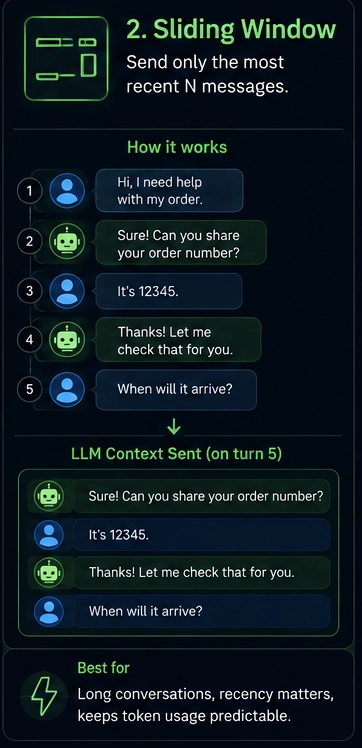
When to use this:
- General chat apps
- When recent context matters more than old context
- You want predictable token usage
When to avoid this:
- The model forgets early facts
- No idea what was important vs filler
- Drops happen silently with no warning
Example (C#):
public class SlidingWindowHistoryManager(int maxMessages = 20)
{
    private readonly SystemChatMessage _system;
    private readonly Queue<ChatMessage> _window = new();
    private readonly int _maxMessages = maxMessages;

    public SlidingWindowHistoryManager(string systemPrompt, int maxMessages = 20)
        : this(maxMessages)
    {
        _system = new SystemChatMessage(systemPrompt);
    }

    public void Add(ChatMessage message)
    {
        if (_window.Count >= _maxMessages)
            _window.Dequeue();

        _window.Enqueue(message);
    }

    public IReadOnlyList<ChatMessage> GetHistory()
    {
        var messages = new List<ChatMessage> { _system };
        messages.AddRange(_window);
        return messages;
    }
}
Tip: Always keep the system message pinned outside your window. Most bugs in sliding-window setups stem from devs forgetting this and watching their bot lose its instructions after 20 messages.
Strategy 3: Summary buffer
Keep recent messages full. Compress older ones into a short summary. Send both with each request.
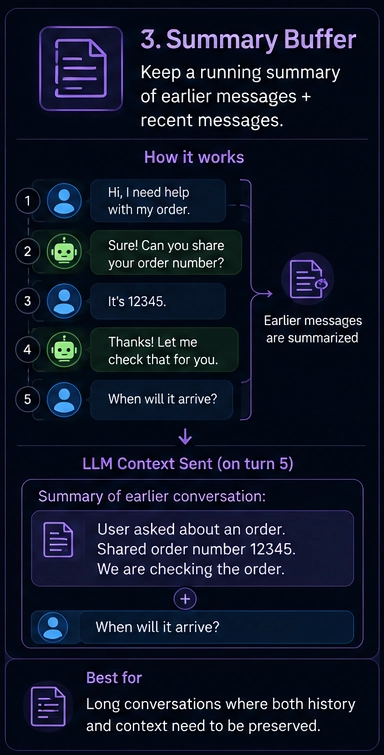
When to use this:
- Long support sessions
- Coding assistants over many turns
- Tutoring flows where early context matters
When to avoid this:
- Summary quality depends on the summarizer model
- Each summary costs an extra API call
- You lose exact details like numbers, names, and IDs
Example (C#):
public class SummaryBufferHistoryManager(ChatClient client, int verbatimCount = 10)
{
    private readonly List<ChatMessage> _verbatimMessages = new();
    private string _summary = string.Empty;
    private readonly int _verbatimCount = verbatimCount;
    private readonly ChatClient _client = client;

    public void Add(ChatMessage message) => _verbatimMessages.Add(message);

    public async Task<IReadOnlyList<ChatMessage>> GetHistoryAsync(string systemPrompt)
    {
        if (_verbatimMessages.Count > _verbatimCount)
            await CompressOldMessagesAsync();

        var messages = new List<ChatMessage>
        {
            new SystemChatMessage(systemPrompt)
        };

        if (!string.IsNullOrEmpty(_summary))
            messages.Add(new SystemChatMessage($"Summary of earlier conversation:\n{_summary}"));

        messages.AddRange(_verbatimMessages);
        return messages;
    }

    private async Task CompressOldMessagesAsync()
    {
        var countToCompress = _verbatimMessages.Count - _verbatimCount;
        var oldMessages = _verbatimMessages.Take(countToCompress).ToList();

        var historyText = string.Join("\n", oldMessages.Select(m => m switch
        {
            UserChatMessage u => $"User: {u.Content[0].Text}",
            AssistantChatMessage a => $"Assistant: {a.Content[0].Text}",
            _ => string.Empty
        }));

        var summaryRequest = new List<ChatMessage>
        {
            new SystemChatMessage("Summarize this conversation history in 3-5 sentences. Preserve key facts, decisions, and names."),
            new UserChatMessage(historyText)
        };

        var result = await _client.CompleteChatAsync(summaryRequest);
        _summary = result.Value.Content[0].Text;

        _verbatimMessages.RemoveRange(0, countToCompress);
    }
}
You get better recall than a sliding window at a similar cost. Trade-off: the summary loses detail.
Tip: Use a smaller, cheaper model for summarization. You don't need GPT-4 to compress a chat. A mini model handles it for a fraction of the price.
Strategy 4: Vector recall
Save every message as a vector embedding in a database. When the user asks a new question, search the DB for the most semantically relevant past messages. Send only those.
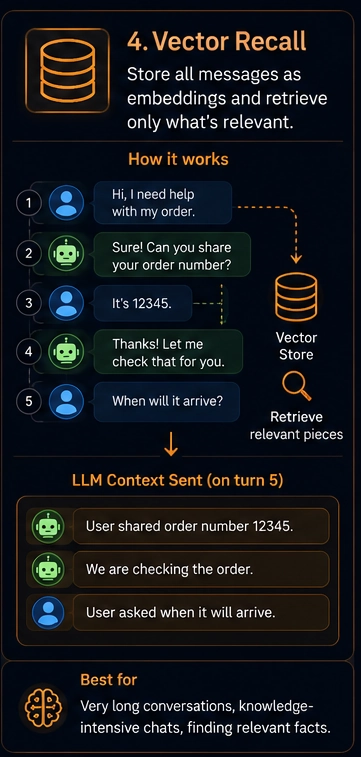
When to use this:
- Sessions lasting hours or days
- Knowledge-heavy assistants
- History too large for any context window
- Cross-session memory, where the bot remembers a user across days
When to avoid this:
- Hardest to build and maintain
- Needs a vector DB like Qdrant, Weaviate, or Azure AI Search
- Wrong embeddings return wrong context with no warning
Example (C#):
public class VectorRecallHistoryManager(
    ChatClient chatClient,
    EmbeddingClient embeddingClient,
    QdrantClient vectorDb,
    string collectionName)
{
    public async Task StoreMessageAsync(string sessionId, string role, string content)
    {
        var embedding = await embeddingClient.GenerateEmbeddingAsync(content);

        var point = new PointStruct
        {
            Id = new PointId { Uuid = Guid.NewGuid().ToString() },
            Vectors = embedding.Value.Vector.ToArray(),
            Payload =
            {
                ["session_id"] = sessionId,
                ["role"] = role,
                ["content"] = content,
                ["timestamp"] = DateTimeOffset.UtcNow.ToUnixTimeSeconds()
            }
        };

        await vectorDb.UpsertAsync(collectionName, new[] { point });
    }

    public async Task<IReadOnlyList<ChatMessage>> RecallRelevantHistoryAsync(
        string sessionId,
        string currentUserMessage,
        int topK = 5)
    {
        var queryEmbedding = await embeddingClient.GenerateEmbeddingAsync(currentUserMessage);

        var searchResults = await vectorDb.SearchAsync(
            collectionName,
            queryEmbedding.Value.Vector.ToArray(),
            filter: MatchValue("session_id", sessionId),
            limit: (ulong)topK
        );

        return searchResults
            .OrderBy(r => (long)r.Payload["timestamp"].IntegerValue)
            .Select(r => r.Payload["role"].StringValue == "user"
                ? (ChatMessage)new UserChatMessage(r.Payload["content"].StringValue)
                : new AssistantChatMessage(r.Payload["content"].StringValue))
            .ToList();
    }
}
This handles a huge amount of history but adds complexity. Each request now calls the embedding API, then the vector DB, then the LLM. More components, more chances for bugs.
Tip: Always include the last 3-5 messages verbatim alongside the recalled ones. Vector search alone breaks short-term flow because the immediately preceding turn often won't rank highly for semantic similarity.
Prompt caching changes the math
Most major providers now support prompt caching. If you send the same system prompt and stable context with each request, the API caches those tokens. You pay much less for cached portions, often around 10% of the regular price.
This shifts the trade-offs:
- Full replay gets cheaper for stable contexts
- Sliding window loses some advantage if you drop cacheable content
- Summary buffer pairs well with caching since the summary stays stable across turns
Check your provider's docs before you build your strategy. The cost numbers vary widely when caching is in play.
The hybrid approach
Here's the setup most production apps end up with. Sliding window for the last 15 messages. Summary for everything older. No vector DB unless you need memory across separate sessions.
public class HybridHistoryManager
{
    private readonly List<ChatMessage> _recentMessages = new();
    private string _summary = string.Empty;
    private readonly int _recentLimit;
    private readonly int _summaryTrigger;
    private readonly ChatClient _summarizerClient;
    private readonly string _systemPrompt;

    public HybridHistoryManager(
        ChatClient summarizerClient,
        string systemPrompt,
        int recentLimit = 15,
        int summaryTrigger = 25)
    {
        _summarizerClient = summarizerClient;
        _systemPrompt = systemPrompt;
        _recentLimit = recentLimit;
        _summaryTrigger = summaryTrigger;
    }

    public void Add(ChatMessage message) => _recentMessages.Add(message);

    public async Task<IReadOnlyList<ChatMessage>> GetHistoryAsync()
    {
        if (_recentMessages.Count >= _summaryTrigger)
            await CompressOldestAsync();

        var messages = new List<ChatMessage>
        {
            new SystemChatMessage(_systemPrompt)
        };

        if (!string.IsNullOrEmpty(_summary))
            messages.Add(new SystemChatMessage($"Earlier conversation summary:\n{_summary}"));

        messages.AddRange(_recentMessages);
        return messages;
    }

    private async Task CompressOldestAsync()
    {
        var toCompress = _recentMessages.Count - _recentLimit;
        var oldMessages = _recentMessages.Take(toCompress).ToList();

        var historyText = string.Join("\n", oldMessages.Select(m => m switch
        {
            UserChatMessage u => $"User: {u.Content[0].Text}",
            AssistantChatMessage a => $"Assistant: {a.Content[0].Text}",
            _ => string.Empty
        }));

        var prompt = string.IsNullOrEmpty(_summary)
            ? $"Summarize this conversation in 3-5 sentences. Keep names, numbers, decisions:\n{historyText}"
            : $"Update the summary with new context. Keep it under 5 sentences.\n\nCurrent summary: {_summary}\n\nNew messages:\n{historyText}";

        var request = new List<ChatMessage>
        {
            new SystemChatMessage("You compress conversation history without losing key facts."),
            new UserChatMessage(prompt)
        };

        var result = await _summarizerClient.CompleteChatAsync(request);
        _summary = result.Value.Content[0].Text;
        _recentMessages.RemoveRange(0, toCompress);
    }
}
The trigger is set to 25 messages, but compression only fires once you exceed the recent limit of 15. So you compress 10 older messages at a time. Tune the numbers based on your average message size.
Start simple. Use a sliding window first. Add summarization once users complain about the bot forgetting things. Add vector recall only when you have proof you need it.
Common mistakes
- Forgetting the system prompt counts toward your token budget
- Not handling tool or function call results, which often run larger than user messages
- Dropping the system message along with old user messages
- Summarizing too aggressively and losing details that users reference later
- Building vector recall before you need it
- Not testing how the bot behaves at message 50, 100, 500
Build a script to simulate 100 messages of a real conversation. Watch what the bot remembers. Watch your token usage. Most history bugs show up only at scale.
Final thought
Don't build complexity you don't need. The best history strategy is the simplest one your use case allows. Start with a sliding window. Move up when users force you to.
And always measure. Token logs and recall quality tests beat any architectural opinion.