
What Is a Large Language Model (LLM)?

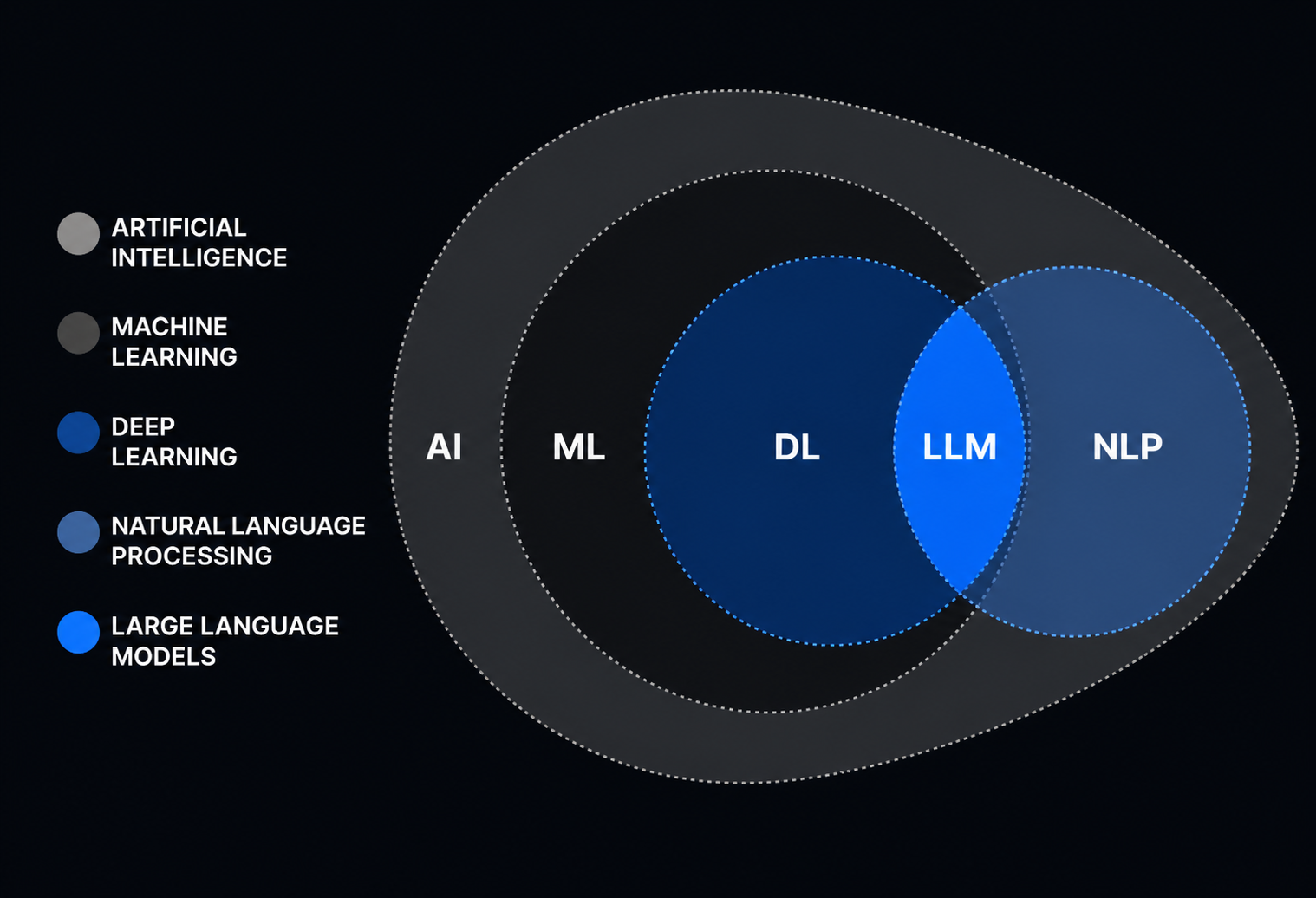
ChatGPT, Claude, Gemini, and GitHub Copilot all use Large Language Models.
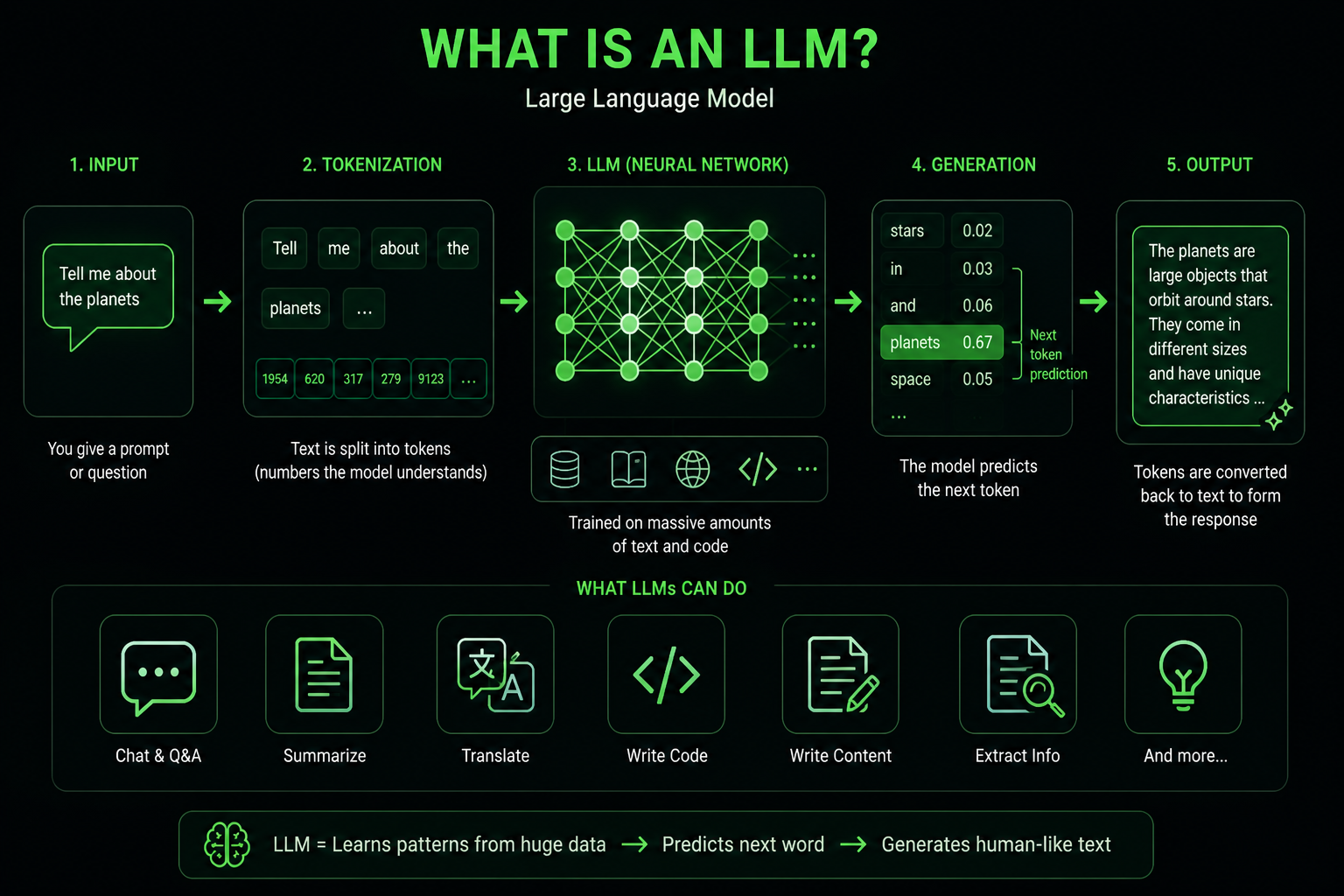
An LLM reads text, finds patterns, and generates new text. Use LLMs for explanations, summaries, code, translation, data extraction, or research. An LLM predicts the next part of the text based on your input. Training uses large datasets to teach the model how to extend text in context.
What is an LLM
Large language models (LLMs) are advanced AI systems that understand and generate natural language, or human-like text, using the data they have been trained on through machine learning techniques. LLMs can automatically generate text-based content for myriad use cases across industries, resulting in greater efficiencies and cost savings for organizations worldwide.
How it works:
You give input. The model predicts the next token, then the next, until it builds a full answer.
A token is a small chunk of text. It might be:
- a word
- part of a word
- punctuation
- a code fragment
- another small unit of text
So when you ask:
Explain dependency injection in simple terms.
The model does not think like a human.
The model predicts a response based on patterns from training.
Here is visual representation:
Why It Is Called “Large”
“Large” refers to three things:
- Data: huge collections of text, code, books, articles, documents, and other sources.
- Parameters: internal numbers that store learned patterns.
- Compute: the processing power needed to train and run the model.
Parameters store the patterns the model learns.
These are not like human memory. They are weights that help the model choose outputs that match the input.
A larger model handles more tasks and more complex instructions. Size helps, but other factors affect performance.
Other things matter too:
- training quality
- model architecture
- data quality
- alignment
- tools around the model
- context window size
- product integration
Pattern Learning in LLMs
- LLMs train on millions of books, tutorials, emails, bug reports, support tickets, and code examples.
- The model does not memorize sentences.
- The model learns patterns. For example, after “the sky is,” the model predicts “blue” or “cloudy.”
- They know that a recipe usually starts with ingredients.
- They know that a formal email sounds different from a Slack message.
- C# code includes braces, types, methods, and namespaces.
- An LLM learns patterns from data and uses them to generate output.
- LLMs do not understand the world.
- The model does not understand the world the way you do.
- The model only understands statistical relationships between pieces of text.
How LLM Training Works
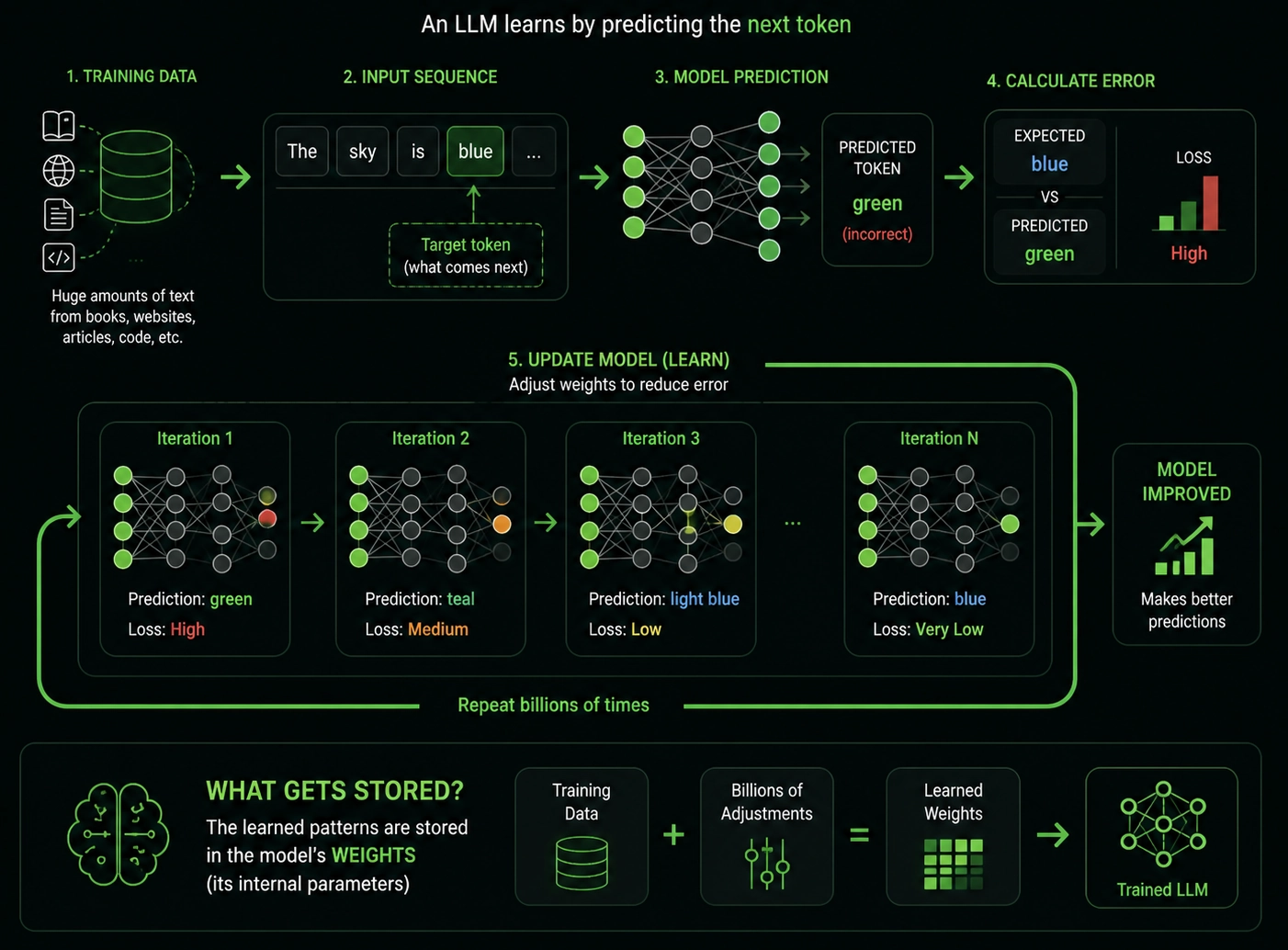
Before an LLM answers your prompt, it goes through training. During training, the model sees huge amounts of text. It tries to predict the next token in a sequence. When it gets the answer wrong, its internal parameters change a little.
Then it tries again. And again. Billions of times.
The model improves through practice and by correcting mistakes.
The model tries, fails, and adjusts. After enough attempts, the adjustment stays.
For an LLM, these adjustments are stored in its weights.
What a Context Window?
The context window is the amount of information the model processes in a single request. The context window is the model’s working memory for the current conversation. If you paste a small email, the model sees the whole thing. If you paste a large document, the model might process only part of it unless the context window is sufficiently large.
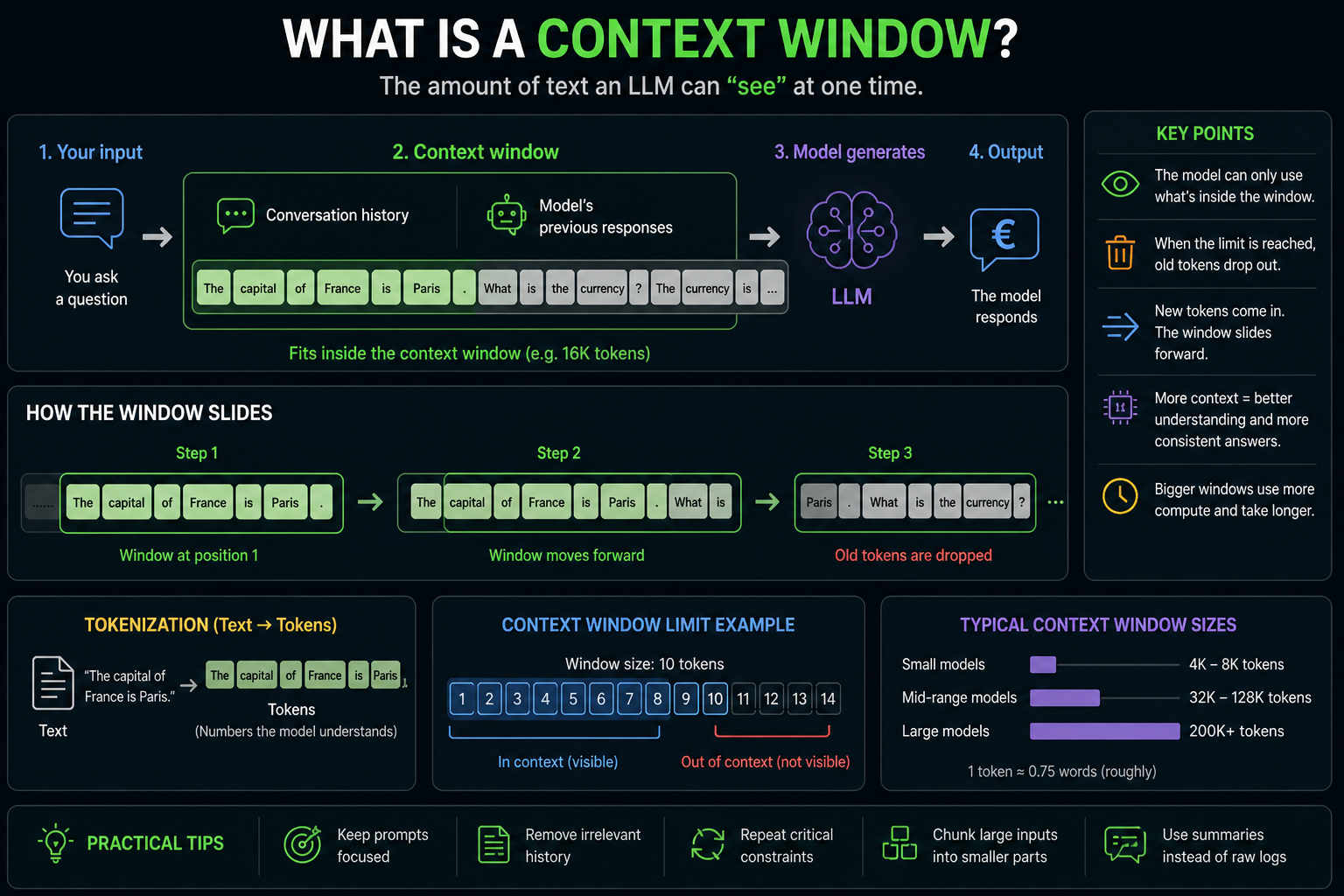
Context size affects LLM features like:
- document analysis
- legal review
- support automation
- code assistance
- knowledge base search
- long chat history
- summarization workflows
A larger context window lets the model process more information at once. A larger context window does not guarantee better answers. The model still needs relevant, clear, and structured input.
What LLMs Are Good At
LLMs help with tasks involving language, structure, or patterns.
They are good at:
- summarizing long documents
- writing first drafts
- explaining complex topics
- translating text
- extracting structured data from messy text
- writing and reviewing code
- generating test cases
- classifying support tickets
- creating chat assistants
- helping users search internal knowledge bases
- Rewriting text for a specific tone
- turning rough notes into clear documents
What LLMs Are Bad At
- LLMs also have clear limits.
- They do not automatically know what happened today.
- They do not always know your company’s internal data.
- They do not verify every fact before answering.
- They do not have feelings, opinions, or lived experience.
- LLMs make mistakes.
- Some mistakes are minor.
- Some mistakes are costly.
- An AI hallucination happens when a model gives an answer that sounds correct but is false or made up.
Use it as:
- a draft
- an assistant
- a tool for quick drafts
- a text transformation tool
- a helper for repetitive language work
For important facts, verify the answer.
LLM vs Traditional Software
Traditional software follows explicit rules.
Example:
if paymentStatus == "Paid"
    showReceipt()
An LLM works differently. It learns patterns from data. It does not follow a fixed set of business rules. This makes the model feel flexible and harder to control.
LLM vs Generative AI vs Machine Learning
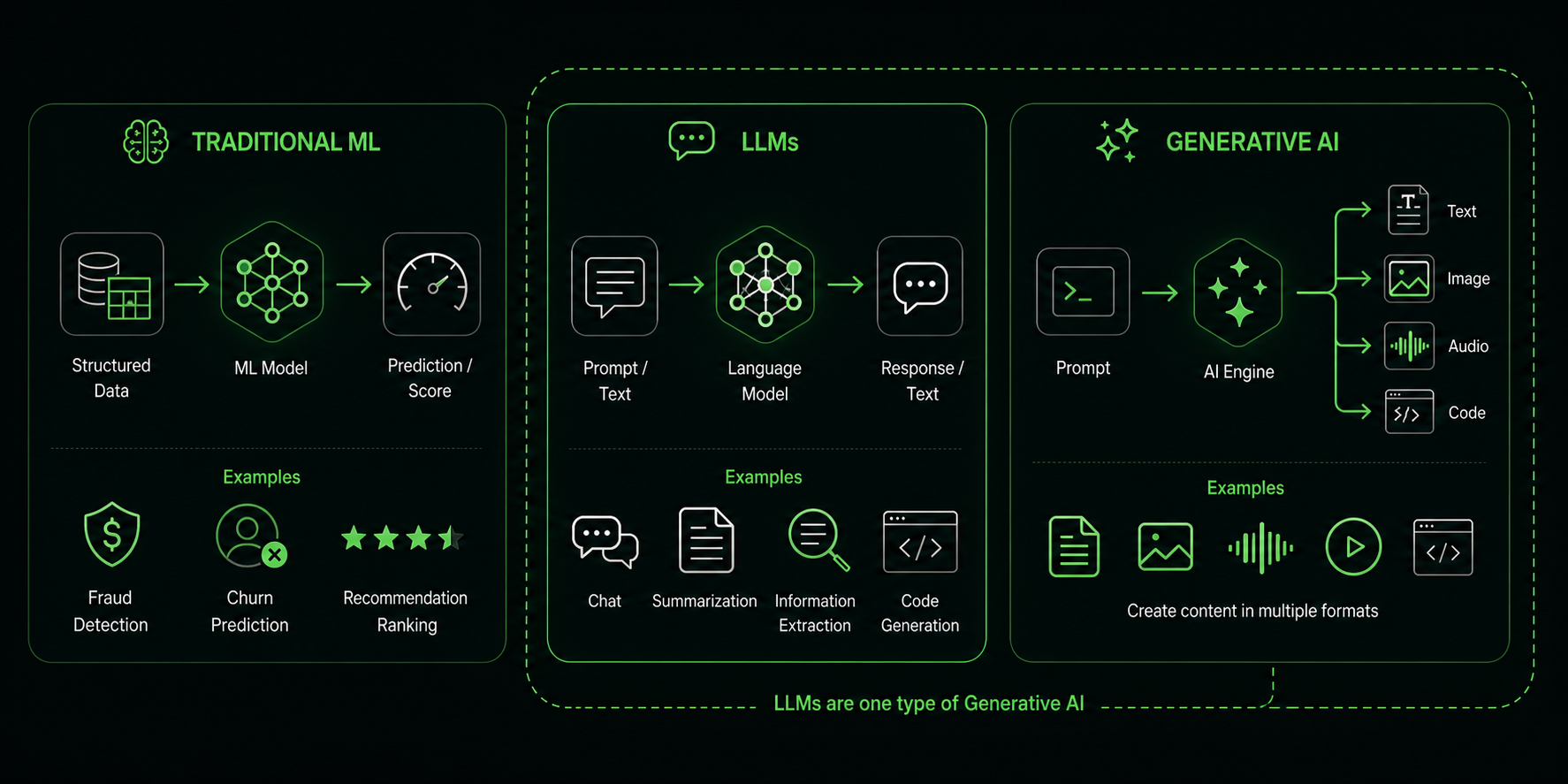
Machine Learning is a wider field. A model learns patterns from data and uses them for prediction, classification, ranking, anomaly detection, recommendations, and other tasks.
Generative AI creates content. This includes text, images, code, audio, video, or structured data.
LLMs are a type of generative AI focused on language and text data.
For understanding:
- All LLMs are machine learning models.
- Not all machine learning models are LLMs.
- Not all generative AI systems are LLMs.
- LLMs are a popular form of generative AI.
What RAG (Retrieval-Augmented Generation)
RAG means Retrieval-Augmented Generation.
Instead of asking the model to answer only based on training data, you first retrieve relevant information from trusted sources. Then you give that information to the model as context.
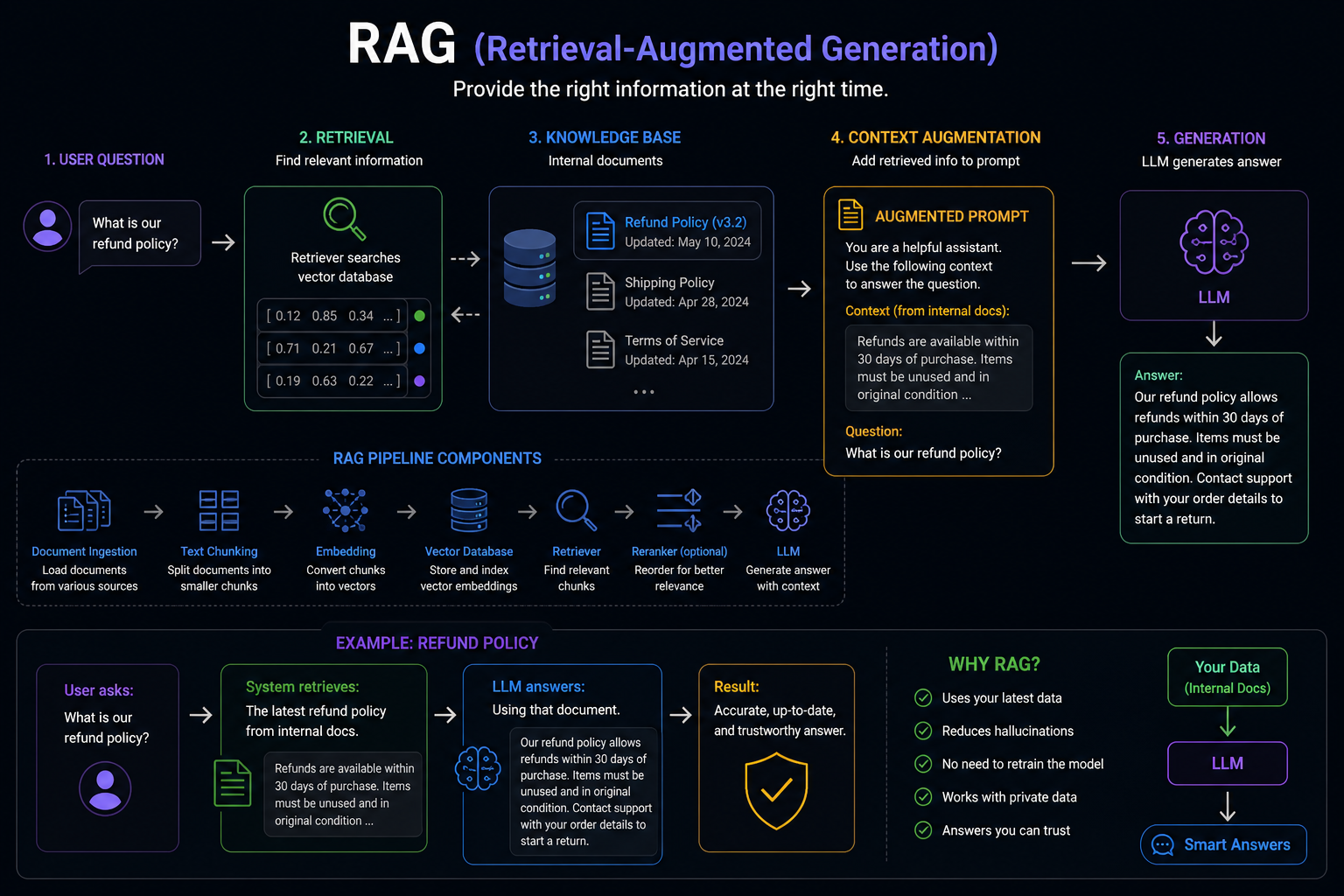
Example:
User asks:
What is our refund policy?
System retrieves:
The latest refund policy from internal docs.
LLM answers:
Using that document.
The system works by providing the right information at the right time.
RAG is useful when the answer must depend on:
- internal documents
- private company data
- fresh information
- source-backed answers
- product documentation
- support knowledge bases
- legal or policy documents
Fine-Tuning vs RAG
Fine-tuning and RAG solve different problems. Fine-tuning changes the model’s behavior.
It is useful when you need the model to follow a specific:
- format
- tone
- domain pattern
- task style
- classification scheme
- output structure
RAG gives the model external knowledge at runtime.
It is useful when answers must use:
- fresh information
- private data
- internal documentation
- trusted sources
- user-specific context
Simple rule:
- Need better behavior? Think about fine-tuning.
- Need company-specific knowledge? Think about RAG.
- If you need both, use both. Start simple.
Most teams should start with prompting and RAG before fine-tuning.
Fine-tuning adds:
- cost
- evaluation work
- versioning
- operational complexity
- model lifecycle management