
Microservices And Distributed Systems Interview Questions and Answers for .NET Developers (2026)

Welcome to the our .NET Interview Questions and Answers series exploring the ins and outs of C# and .NET! In this article, we explore microservices and distributed systems interview questions and answers, and what every .NET engineer should know, from service boundaries and BFF to sagas, events, service discovery, and communication patterns.
The Answers are split into sections: What 👼 Junior, 🎓 Middle, and 👑 Senior .NET engineers should know about a particular topic.
Also, please take a look at other articles in the series: C# / .NET Interview Questions and Answers
- Part 1: Core Language & Platform Fundamentals
- Part 2: Types and Type Features
- Part 3: Collections and Data Structures
- Part 4: Async & Parallel Programming
- Part 5: Design Patterns
- Part 6: ASP.NET Core
- Part 7: SQL Database
- Part 8: NoSQL Databases
- Part 10: Testing
- Part 11: Desktop Development
- Part 12: Mobile Development
- Part 13: AI
- Part 14: Agile & Scrum
Service Architecture and Boundaries
❓ When does it make sense to isolate background processing into a separate microservice?
Isolating background processing makes sense when async work has different scaling, reliability, or lifecycle needs than the main request path. The goal is to protect user-facing flows and let background work evolve independently.

When isolation is a good idea
- Different scaling profile. Background jobs are CPU- or IO-intensive, or bursty. They should scale independently from the API that serves users.
- Long-running or unpredictable duration. Jobs run for seconds or minutes. Keeping them in the same service risks thread starvation, timeouts, and noisy neighbor effects.
- Failure isolation. Retries, poison messages, or backpressure in background work should not affect request latency or the API's availability.
- Different deployment cadence. Background logic changes more often or less often than the API. Separate services reduce coordination and risk.
- Different operational needs. Background workers need different limits, queues, schedules, or runtime settings than web APIs.
- Security and access boundaries. Workers may need broader access to internal systems that public-facing services should not expose.
When isolation is not needed
- Background work is trivial and short-lived.
- Throughput is low and predictable.
- Failures do not impact user experience.
- The operational overhead of another service outweighs the benefits.
Common patterns
- Queue-based workers that pull jobs and process them asynchronously.
- Separate consumer services per workload type.
- Dedicated batch services with checkpointing and retries.
- Outbox in the API service and workers consuming events.
What .NET engineers should know
- 👼 Junior: Know that unisolated background tasks can destabilize APIs; use basics like
BackgroundServiceor simple queues for separation. - 🎓 Middle: Apply queues/workers for differing workloads; use tools like Hangfire or MassTransit, monitoring dead-letters.
- 👑 Senior: Assess based on scaling/failures/ownership; design resilient systems with Polly, Dapr, ensuring security and consistency.
📚 Resources
❓ How do you decide between a modular monolith and microservices?
A modular monolith is one deployable unit with well-defined internal boundaries. Microservices split the system into independently deployed services. The choice depends on domain maturity, team structure, and scaling needs — not trends.
When a modular monolith is a good choice

- The domain is still changing fast, and boundaries are unclear.
- The team is small, and coordination is easy.
- You want simple debugging, local development, and transactional consistency.
- You want to avoid the complexity of distributed systems (networking, retries, tracing, eventual consistency).
When microservices are a good choice

- Domain boundaries are stable, and teams can own services independently.
- Different parts of the system need different scaling profiles or SLAs.
- Release coupling becomes painful: one deploy blocks multiple teams.
- The system has real hotspots (search, billing, ML pipelines).
Bad reasons to choose microservices
“Everyone uses microservices now.”
“We want Kubernetes.”
“Monolith doesn’t scale” — without evidence.
Trying to fix the bad design by distributing it.
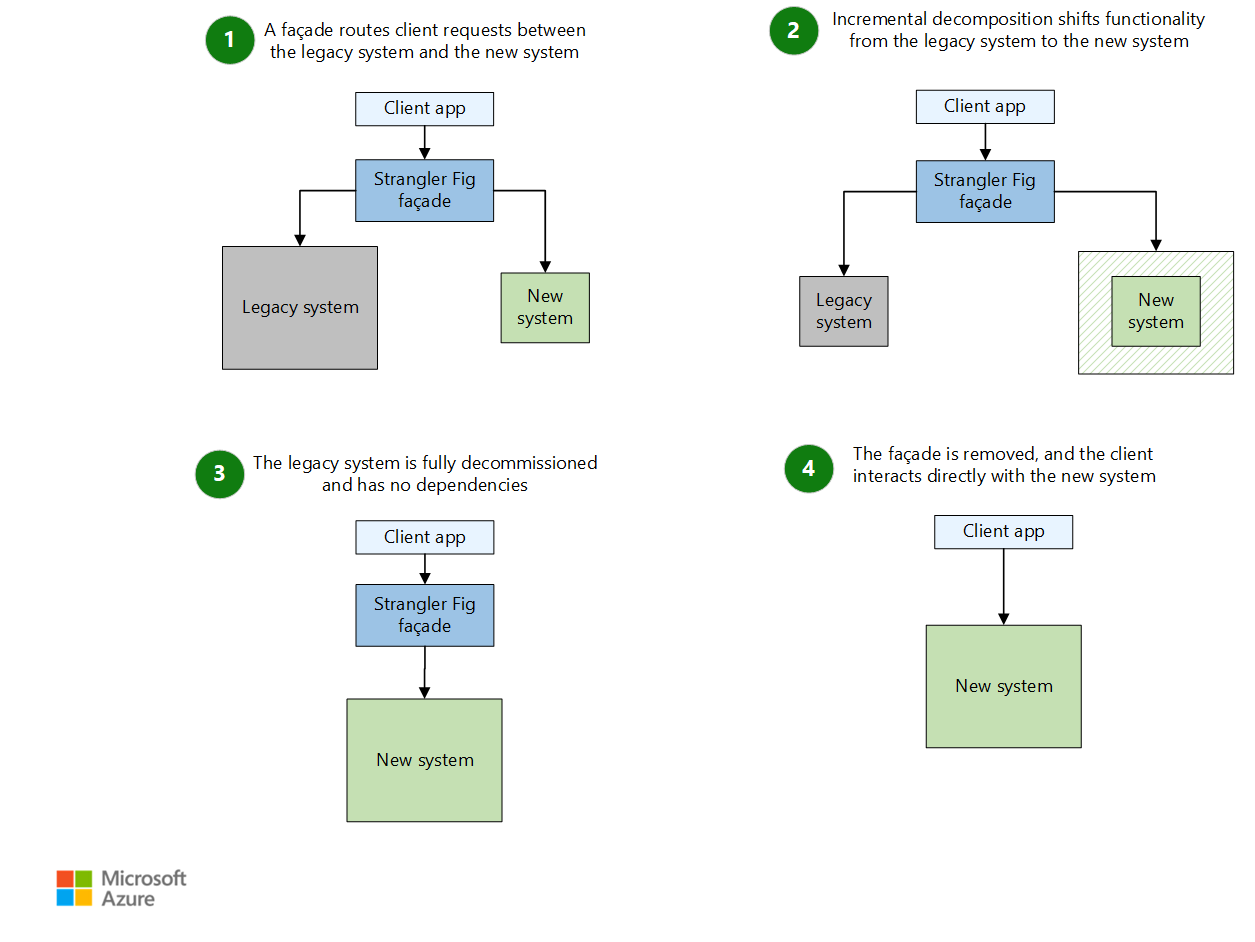
Extraction is usually incremental using the Strangler Fig pattern: route a small slice to a new service, keep the rest inside the monolith, grow slowly.
What .NET engineers should know
- 👼 Junior: Know monoliths are simpler for starters, using modules like separate projects in one solution; microservices split into apps, but add complexity.
- 🎓 Middle: Identify boundaries with DDD in .NET (e.g., bounded contexts); use microservices when scaling differs, via tools like ASP.NET Core APIs and Docker.
- 👑 Senior: Decide via domain analysis, team alignment (Conway's Law), and metrics; implement hybrids with .NET tools like Ocelot for gateways or Azure Service Fabric for orchestration.
📚 Resources:
❓ What is the Strangler Fig pattern, and how do you use it to migrate a legacy system?
The Strangler Fig pattern is a gradual migration approach where you build new functionality around a legacy system and slowly “strangle” the old parts until they disappear. Instead of a risky, significant rewrite, the old system and the new one run side by side. Traffic is routed to the new service only when its replacement is ready.
How the pattern works
- Identify a slice of functionality. A small, self-contained part of the legacy system (for example: authentication, invoice generation, reporting API).
- Add a facade/proxy to route requests.
- Implement a new service for that slice. Build the replacement in your new architecture (for example: .NET microservices).
- Switch traffic from legacy to new.
- Repeat slice by slice. Over time, the legacy system shrinks until nothing meaningful remains.
Why is this useful
- No “big bang” rewrite.
- Less risk — you replace functionality incrementally.
- You preserve business continuity.
- You can gradually test new services in production.
- Typical tools in .NET environments
- API Gateway (YARP, Ocelot)
- Reverse proxy routing rules
- Feature flags to move traffic gradually
- Message brokers to decouple old and new parts
Common mistakes
- Migrating too large a slice at once.
- Touching the database schema too early.
- Running both systems but failing to define a clear “source of truth”.
- Forgetting that routing rules are now part of your architecture.
What .NET engineers should know
- 👼 Junior: Understand the idea of replacing old functionality step by step.
- 🎓 Middle: Know how to introduce a facade, isolate a functional slice, and migrate APIs safely.
- 👑 Senior: Strategize migrations with data sync, observability (e.g., App Insights), and de-risking via canary releases or flags.
📚 Resources: Strangler Pattern
❓ How do you define service boundaries using DDD Bounded Contexts?
Bounded Contexts are a core idea in Domain-Driven Design. They describe clear, consistent “language zones” inside your domain. Each context has its own models, rules, and meaning. When you use them for microservices, each service becomes responsible for one context and nothing else.
The goal is simple: avoid a giant shared model and let each domain area evolve independently.
How to find Bounded Contexts
- Look at how language changes
In one part of the business, “Order” might mean a customer purchase. In another, “Order” could mean a warehouse picking task. Same word, different meaning — that is a natural boundary. - Map responsibilities. Group workflows that constantly change together. For example, pricing rules, inventory logic, and shipping logic change in blocks.
- Identify external dependencies when a part of the domain integrates with specific systems, as this usually indicates a separate context.
- Observe team structure. Teams are often aligned with business capabilities. Their ownership boundaries usually become good service boundaries.
- Keep models independent. No shared database schemas, no shared domain models. Each context can have its own representations, even if terms look similar.
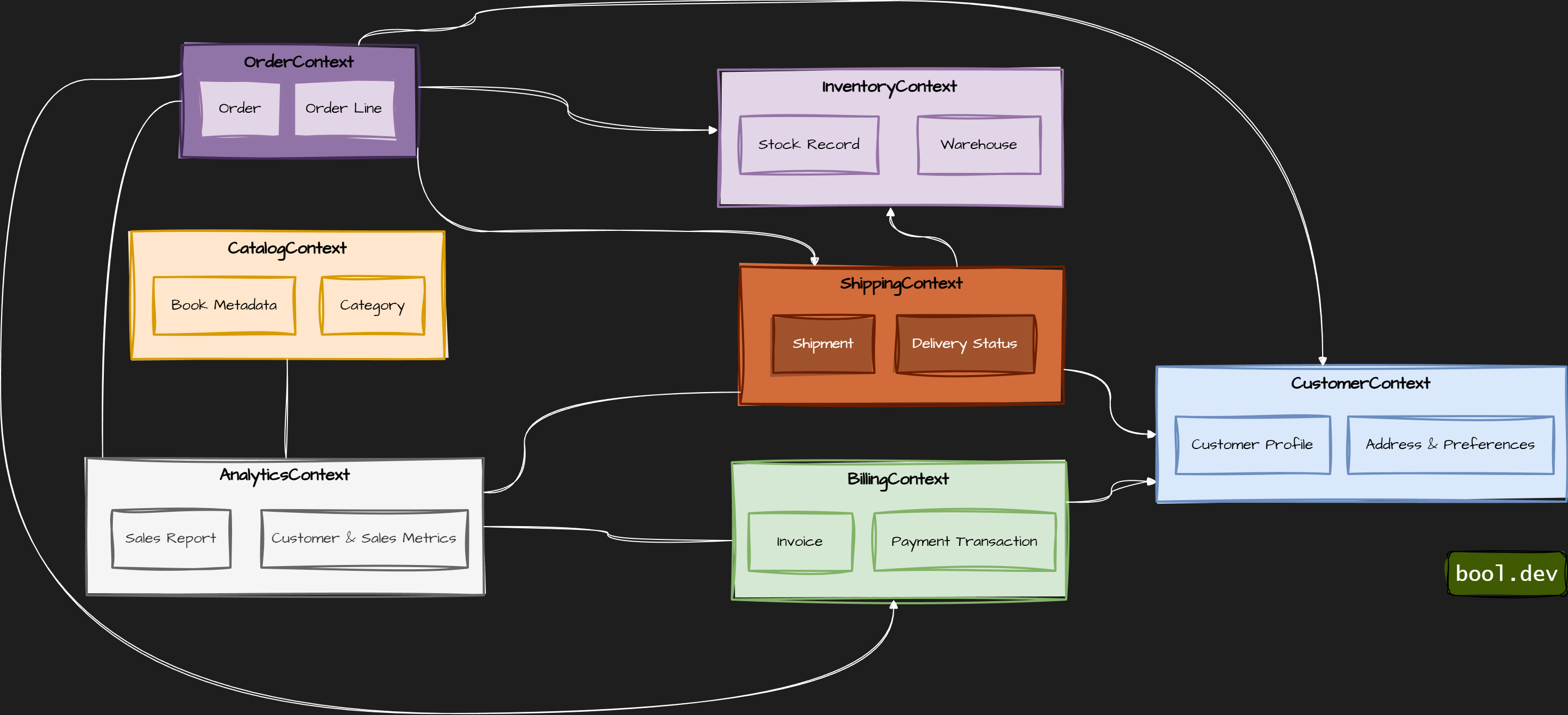
Example: book store
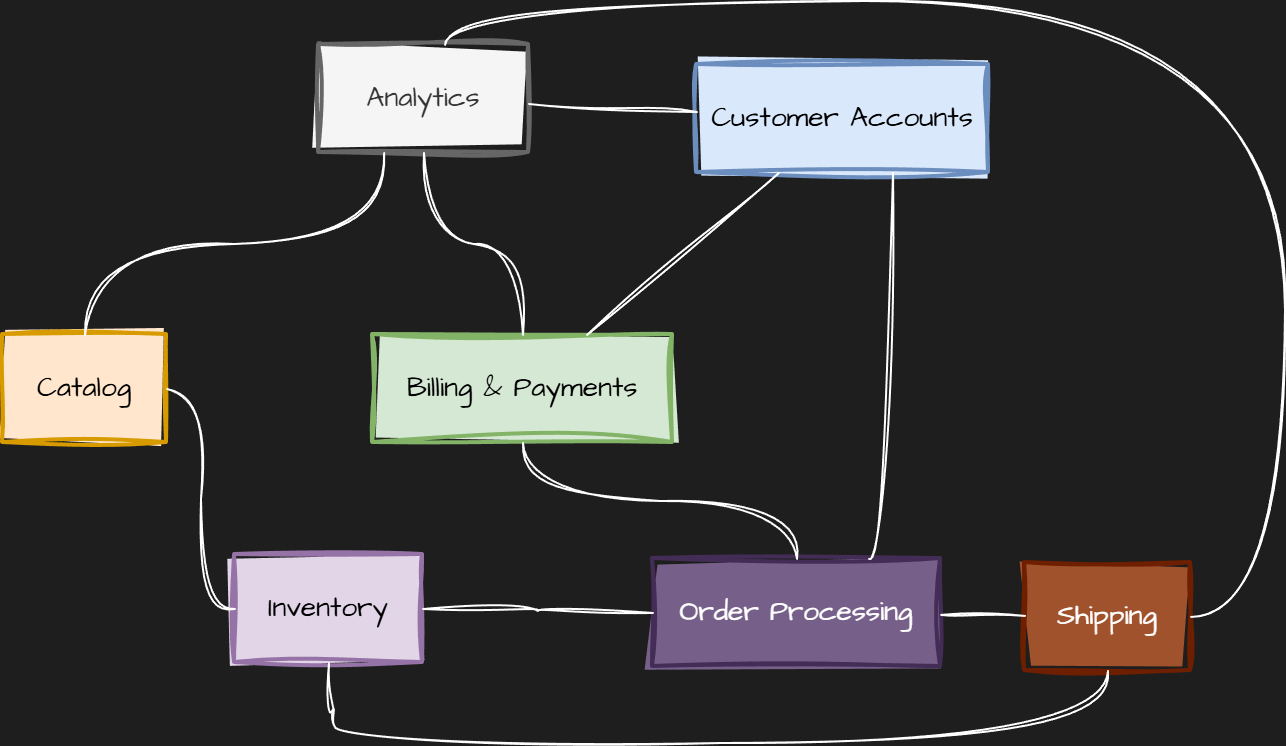
- CatalogContext — book metadata, categories, authors
- InventoryContext — stock levels, warehouses, reservations
- OrderContext — customer orders, order lifecycle, history
- CustomerContext — user profiles, addresses, preferences
- BillingContext — payments, invoices, billing history
- ShippingContext — shipment scheduling and status
- AnalyticsContext — sales stats, usage data, reporting
Bounded context for bookstore:
Common mistakes
- Defining contexts as technical layers (API, DB, Frontend). These are not domain contexts.
- Splitting too finely, too early, ending with many tiny services.
- Sharing domain models across contexts destroys separation.
- Designing boundaries around REST endpoints instead of domain behavior.
What .NET engineers should know
- 👼 Junior: Understand that the Bounded Contexts group domain logic belongs together and use separate models.
🎓 Middle: Know how to identify contexts based on language, workflows, and change patterns.
👑 Senior: Shape domain boundaries, enforce autonomy, and design contracts and events so contexts stay decoupled.
📚 Resources: Design Microservices: Using DDD Bounded Contexts
❓ What is Backends-for-Frontends (BFF), and where does it help?
Backends-for-Frontends (BFF) is an architectural pattern in which each frontend has its own dedicated backend. Instead of a single generic API serving all clients, you create a backend tailored to the needs of a specific UI, such as web, mobile, or admin.
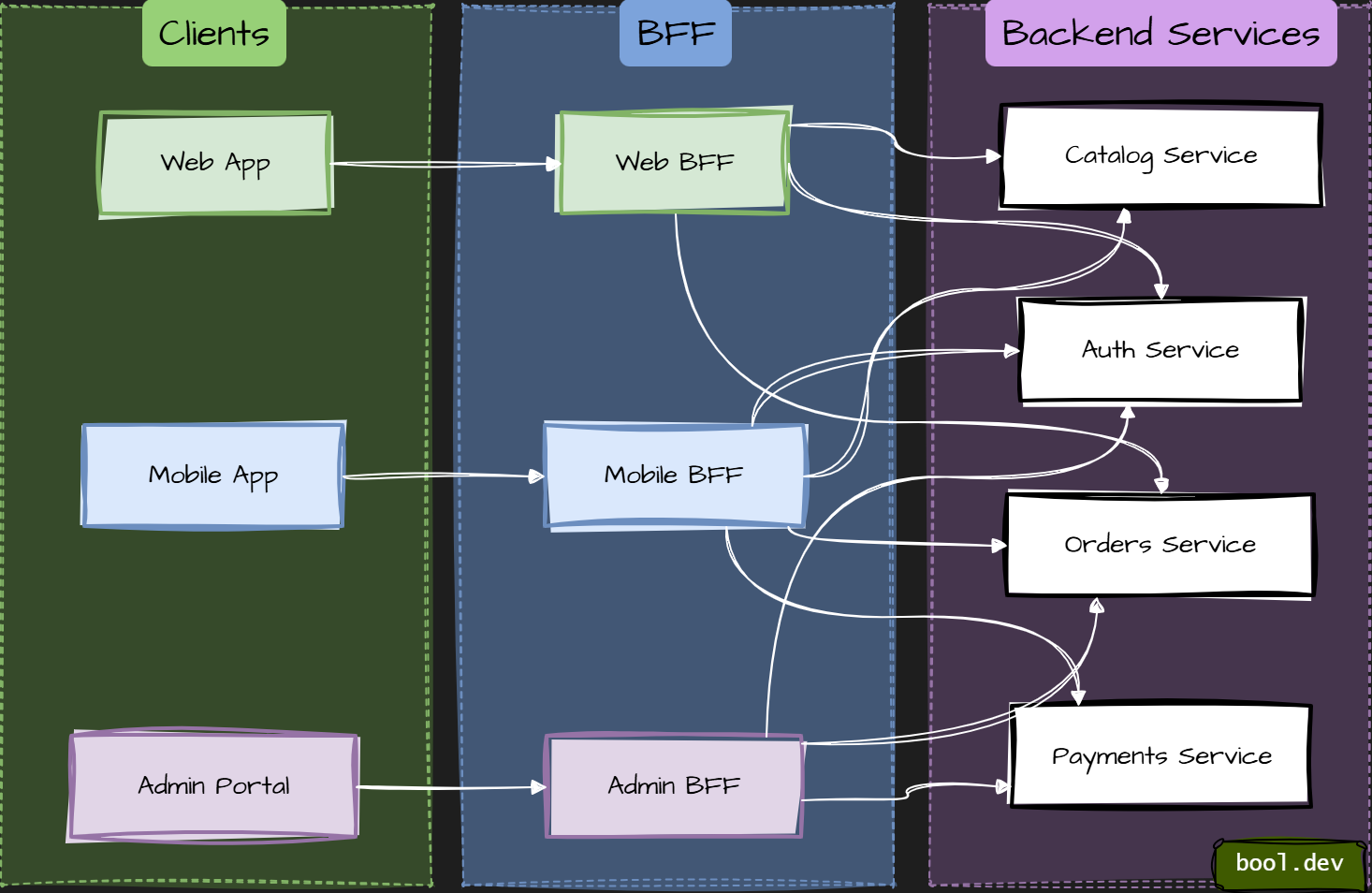
The key idea: optimize APIs for user experience, not for reuse.
Why BFF exists
- Different frontends have different needs:
- Mobile apps want fewer calls and smaller payloads.
- Web apps may need richer data and faster iteration.
- Admin UIs often need bulk operations and detailed views.
- A single shared backend usually becomes bloated, full of conditionals, and hard to evolve. BFF avoids that.
What a BFF typically does
- Aggregates data from multiple services into one response.
- Shapes responses exactly for a specific UI.
- Handles auth, permissions, and user context for that frontend.
- Translates backend models into UI-friendly DTOs.
- Notably, a BFF contains no core business logic. It orchestrates, not decides.
Where BFF helps most
- Multiple frontends with very different requirements (Web, iOS, Android).
- Microservice architectures where UIs otherwise talk to many services.
- Teams that want the frontend and backend to evolve independently.
- High-latency environments where reducing round-trips matters.
- Typical .NET setup
- One ASP.NET Core app per frontend.
- Uses REST or gRPC to talk to internal services.
- Often sits behind an API Gateway or acts as one itself.
- Can be deployed and versioned together with the frontend.
Common mistakes
- Putting business rules into the BFF.
- Treating BFF as a generic shared API.
- Sharing BFFs between multiple frontends.
- Letting frontend teams bypass the BFF and call services directly.
What .NET engineers should know
👼 Junior: Know that BFF adapts backend APIs for a specific frontend.
🎓 Middle: Understand when one shared API becomes a bottleneck and how BFF reduces frontend complexity.
👑 Senior: Design BFFs as thin orchestration layers, align them with team ownership, and prevent business logic leakage.
📚 Resources: Backends for Frontends pattern
❓ What is the difference between a Domain Event and an Integration Event in a microservices architecture?
At the core, they are the same thing: “A representation of something that happened in the past. However, their purposes, use-cases, and implementation details are different:
Domain Events
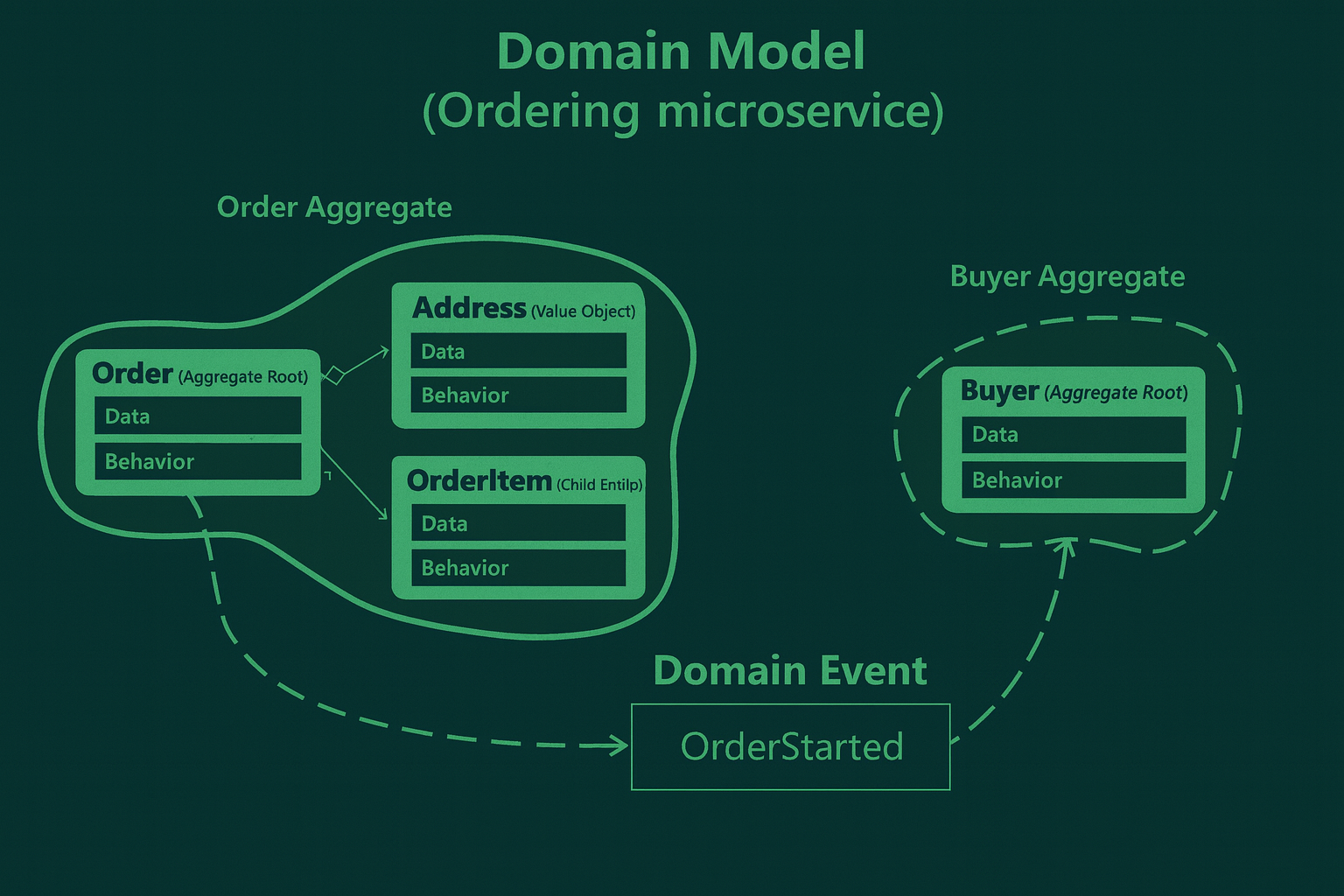
- Domain Events are published and consumed within a single domain.
- You publish and subscribe to the event within the same application instance.
- They are strictly within the microservices/domain boundary.
- They typically indicate something that has happened within the aggregate.
- Domain events occur in-process and synchronously, sent via an in-memory message bus. Example: OrderStarted event
Integration Events
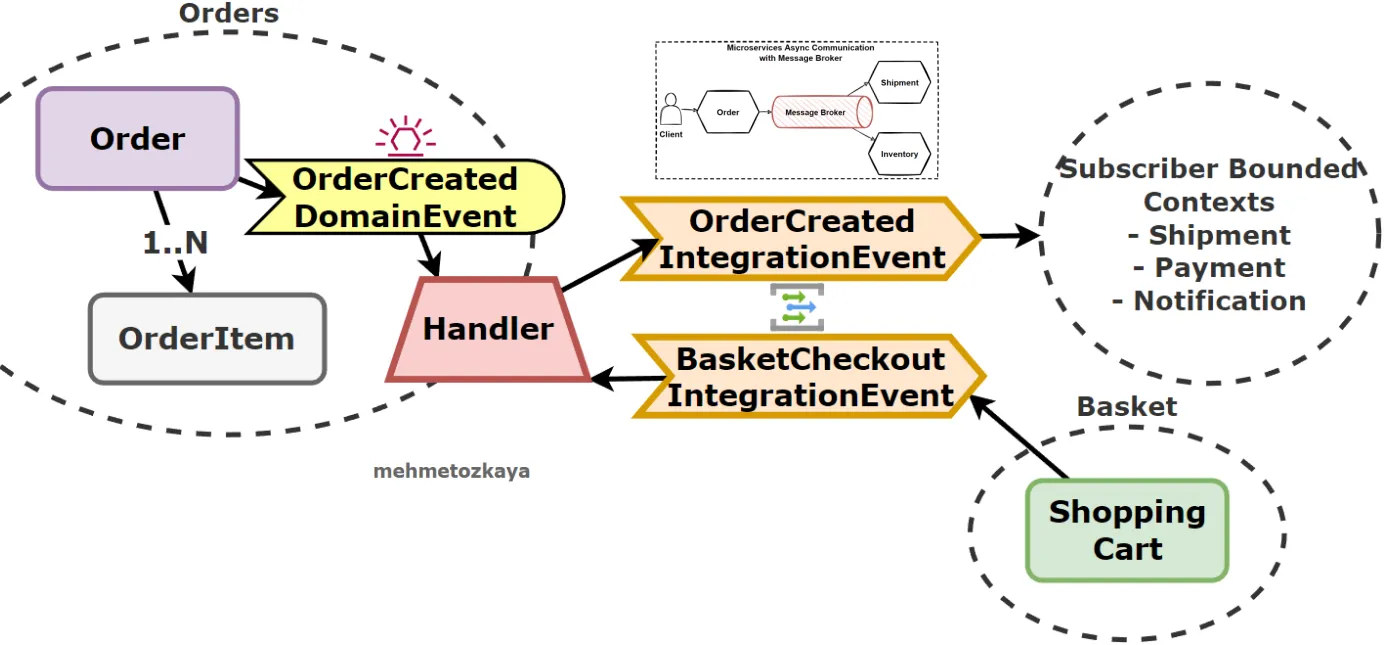
- They are used to communicate state changes or events between different bounded contexts or microservices.
- They are more about the overall system’s reaction to certain domain events.
- Integration Events should be sent asynchronously via a message broker using a queue.
- Other subsystems consume integration events.
- Example: After handling OrderPlacedEvent, an OrderPlacedIntegrationEvent might be published to a message broker like RabbitMQ, which other microservices could then consume.
What .NET engineers should know:
- 👼 Junior: Should understand that Domain Events describe internal events, and Integration Events are used for communication between services.
- 🎓 Middle: Expected to know how to publish and handle both kinds, and the need for eventual consistency in distributed systems.
- 👑 Senior: Should design systems using both patterns correctly, ensuring transactional safety with Domain Events and resilience/decoupling with Integration Events. Knows when to apply outbox patterns, message deduplication, and retry policies.
📚 Resources:
❓ What architectural smells appear when teams split a monolith into services?
When a monolith is split into services without clear domain boundaries, the same problems reappear. They move across the network. These problems are architectural smells. They signal that the system is distributed, but not truly decoupled.
Common architectural smells:
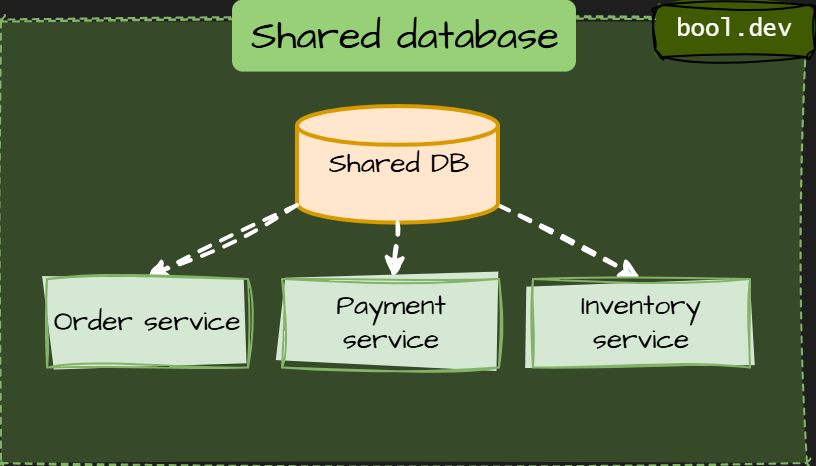
Shared database
Multiple services read and write the same database or schema. This creates hidden coupling and forces coordinated releases. It is the fastest way to rebuild a distributed monolith.
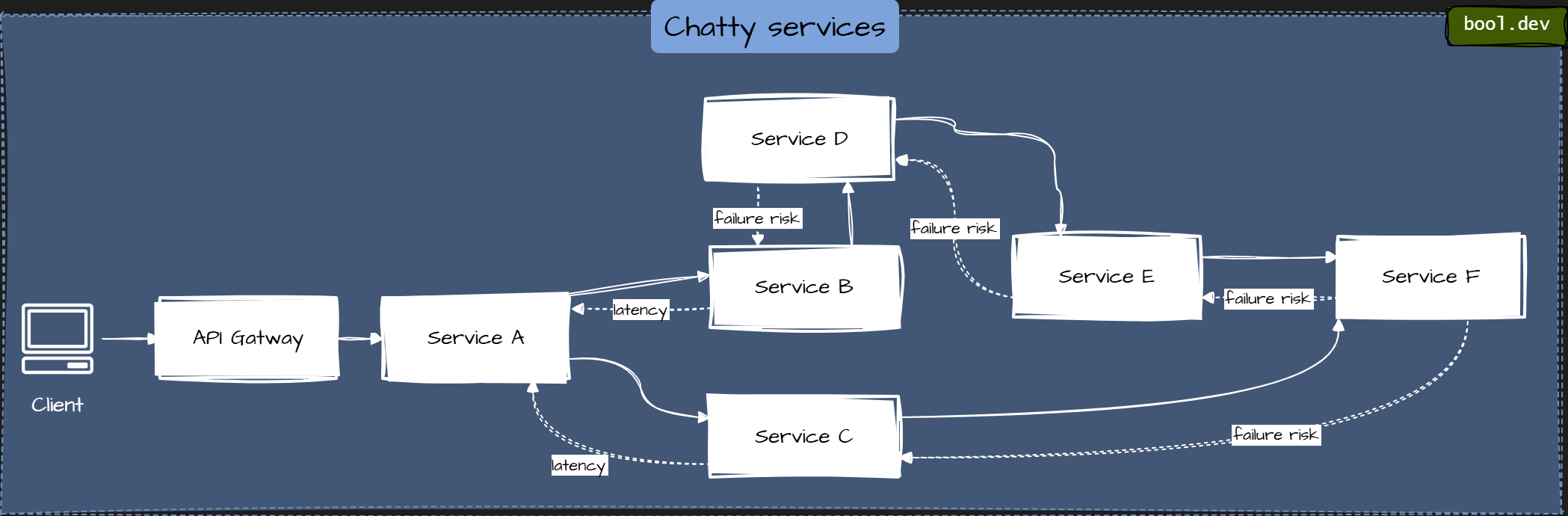
Chatty services
One user request triggers dozens of synchronous service calls. Latency grows, failures cascade, and simple features become fragile.
Business logic in the wrong place
Rules leak into API gateways, BFFs, or orchestration layers. Services become CRUD wrappers rather than owning behavior.
Tight deployment coupling
Services must be deployed together because changes in one break others. This usually means contracts are unstable or boundaries are wrong.
Distributed transactions everywhere
Two-phase commits or manual transaction coordination across services. This often hides poor service boundaries and leads to complex failure modes.
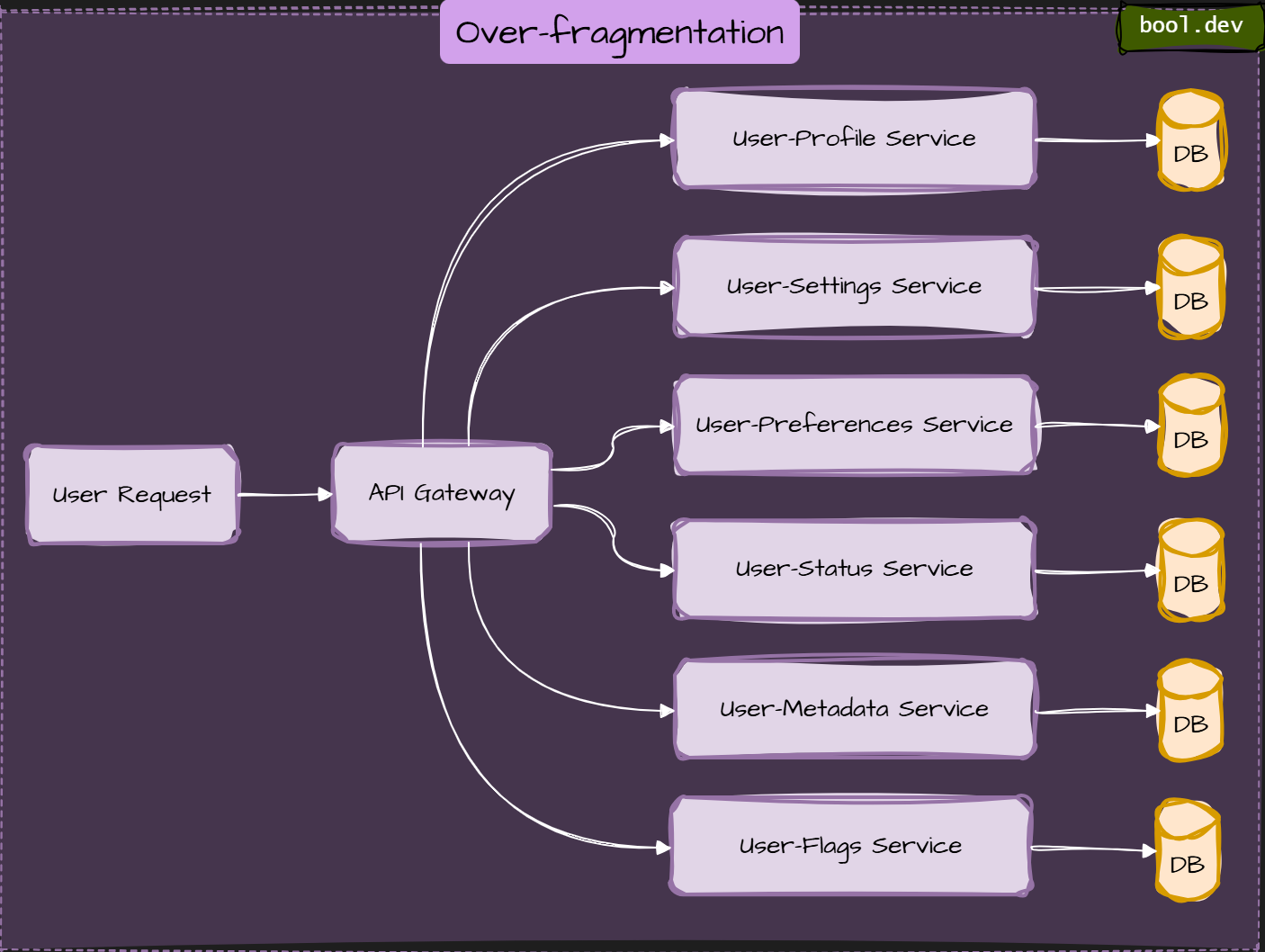
Over-fragmentation
Too many tiny services with no clear ownership. Operational cost grows faster than business value.
Anemic services
Services expose data but no behavior. All real logic lives in a central “core” service, which becomes the new monolith.
Why do these smells appear
- Splitting by technical layers instead of domain boundaries.
- Reusing old monolith models across services.
- Premature optimization or blind copying of “microservices at scale” examples.
- Fear of data duplication and eventual consistency.
How to spot problems early
- Every change requires touching multiple services.
- Teams hesitate to deploy independently.
- Performance issues appear after adding “just one more service.
- Debugging requires jumping through many logs without clear ownership.
What .NET engineers should know
- 👼 Junior: Recognize shared databases and chatty calls as warning signs.
- 🎓 Middle: Identify coupling, misplaced logic, and unstable service contracts.
- 👑 Senior: Redesign boundaries, reduce synchronous dependencies, and align services with business capabilities.
❓ Compare Saga orchestration vs choreography for distributed transactions.
The Saga design pattern helps maintain data consistency in distributed systems by coordinating transactions across multiple services to ensure data integrity. A saga is a sequence of local transactions in which each service performs its operation and initiates the next step via events or messages. If a step in the sequence fails, the saga performs compensating transactions to undo the steps that have already completed. This approach helps maintain data consistency.
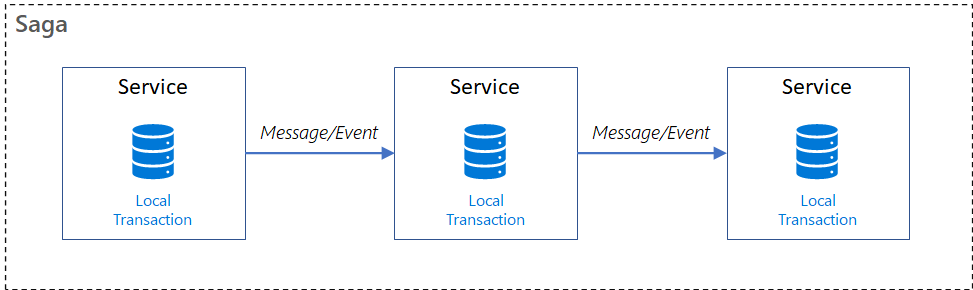
There are two main coordination styles: orchestration and choreography.
Orchestration:
A central orchestrator controls the flow.
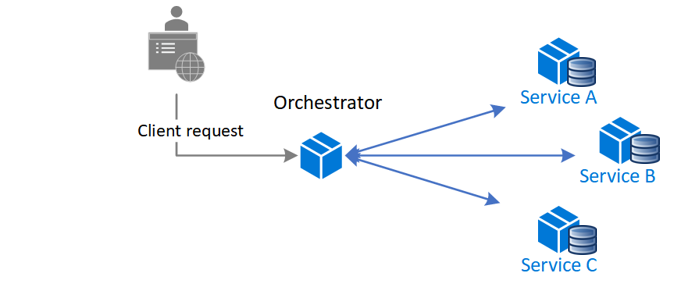
How it works:
- The orchestrator instructs each service on what to do (e.g., “Create Order” and then “Reserve Inventory”).
- It waits for each step to succeed or fail.
- If something goes wrong, it triggers compensating actions in reverse.
Pros:
- Central logic is easy to follow and manage.
- Good for debugging and visibility
- Easier to enforce business rules
Cons:
- Tight coupling to the orchestrator
- Can become a “god service” if not modularized
Example:
// Pseudocode
await orchestrator.ExecuteSagaAsync(orderId);
Choreography
Each service responds to events and determines its next course of action.
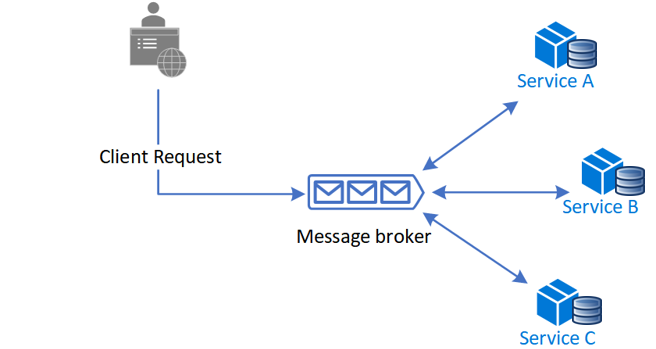
How it works:
- There’s no central coordinator.
- Services publish and listen to events.
- Flow is driven by events like “OrderCreated → InventoryReserved → PaymentProcessed”.
Pros:
- Loosely coupled and scalable
- Services own their behavior
- Easy to evolve independently
Cons:
- Harder to trace the full flow
- Business logic is spread across services
- Error handling and compensation are more complex
Example:
// InventoryService listens for "OrderCreated"
public void OnOrderCreated(OrderCreatedEvent evt) =>
    bus.Publish(new InventoryReservedEvent(evt.OrderId));
Used in event-driven architectures with tools like Azure Service Bus, Kafka, or NServiceBus.
📚 Resources:
❓ What is Event-Carried State Transfer, and how does it reduce temporal coupling?
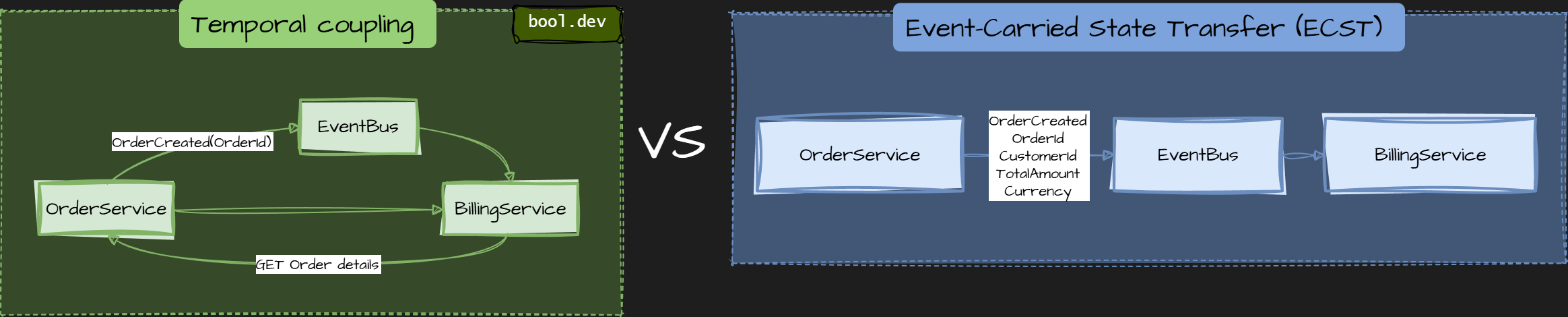
Temporal coupling occurs when Service B can process a message only if Service A is available at the same time. This usually appears when events contain only IDs and force consumers to make follow-up calls.
Event-Carried State Transfer (ECST) is a messaging pattern where an event contains all the data that consumers need, not just an identifier. Instead of publishing “something changed, go fetch the rest,” the service publishes the state itself.
The key idea: move data with the event so consumers do not depend on the producer being available later.
Trade-offs
- Events are larger.
- You may duplicate data across services.
- Schema evolution must be handled carefully with versioning.
Common mistakes
- Publishing only IDs and calling it event-driven.
- Publishing internal database models.
- Mutating past events or relying on consumers to “fix” missing data.
- Treating events as commands.
What .NET engineers should know
- 👼 Junior: Understand that events can carry data, so consumers do not call back.
- 🎓 Middle: Know how ECST reduces runtime dependencies and improves resilience.
- 👑 Senior: Design event schemas, version them safely, and balance payload size with decoupling.
📚 Resources: What do you mean by “Event-Driven”?
Communication, Messaging, and Networking
❓ What is service discovery, and how do client-side and server-side discovery differ?
Service discovery is the mechanism that enables services to find and communicate with each other without hardcoding network addresses. In dynamic environments like containers or cloud platforms, service instances come and go, so IPs and ports cannot be assumed to be static.
A Service Registry (like Consul, Eureka, or Kubernetes DNS) acts as a "phone book" that keeps track of the current network locations of all available service instances.
Service discovery answers a simple question:
“How does one service know where another service is right now?”
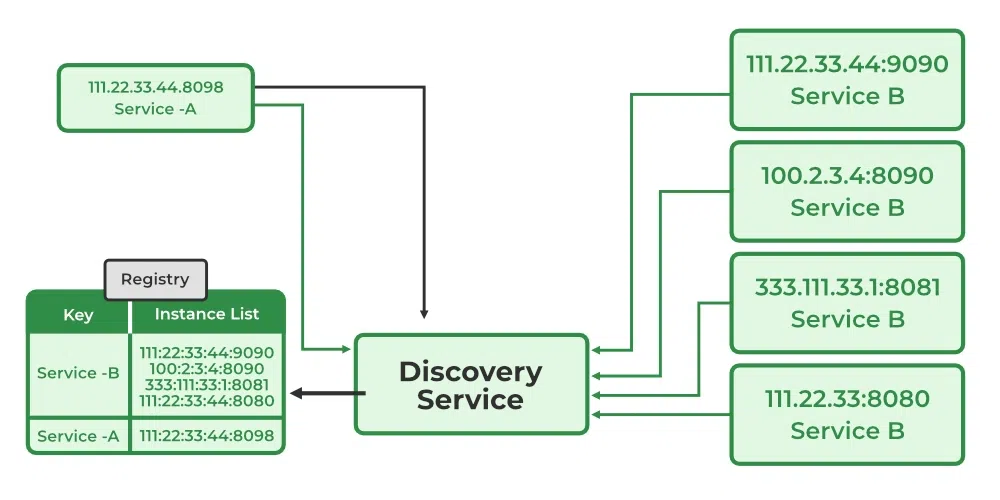
💻 Client-Side Discovery
In this pattern, the Client (the service making the call) is responsible for determining the network locations of available service instances and load-balancing requests.
- Register: Service instances register themselves with the Service Registry on startup.
- Lookup: The Client queries the Registry for a list of healthy instances for "Service B."
- Select: The Client uses a load-balancing algorithm (like Round Robin) to pick one instance.
- Call: The Client makes the request directly to that instance's IP.
Pros: Fewer network hops; the client can make intelligent, application-specific load-balancing decisions.
Cons: Couples the client to the Service Registry; you must implement the discovery logic in every programming language used in your system.
🌐 Server-Side Discovery
In this pattern, the client requests a Router or Load Balancer. The client doesn't even know the Service Registry exists.
- Register: Service instances register with the Service Registry.
- Call: The Client sends the request to a dedicated Load Balancer (e.g., NGINX, AWS ALB, or Kubernetes Service).
- Lookup: The Load Balancer queries the Registry (or uses its own internal list) to find available instances.
- Forward: The Load Balancer forwards the request to a healthy instance.
Pros: Simplifies client code, centralizes discovery logic, and works flawlessly across different programming languages.
Cons: Adds an extra network hop (the Load Balancer), which becomes a critical piece of infrastructure that must be highly available.
What .NET engineers should know
- 👼 Junior: Know that services should not use hardcoded addresses.
- 🎓 Middle: Understand how clients resolve services dynamically and how load balancing works.
- 👑 Senior: Choose client-side or server-side discovery based on platform maturity and operational complexity.
📚 Resources:
❓ Why is DNS discovery not ideal in dynamic systems?
In dynamic systems like microservices, DNS isn't ideal because caching and TTLs can cause stale records and traffic to dead instances; there's no native health-aware load balancing (just round-robin); changes propagate slowly; and there's no app-level health checks, leading to black-holed requests.
Use alternatives like load balancers, Kubernetes Services, or service meshes for real-time scaling, health routing, and control.
Modern platforms need:
- Instant reaction to scaling events.
- Health-based routing.
- Fine-grained traffic control.
- Consistent behavior across languages.
This is why most systems use server-side discovery with load balancers, Kubernetes Services, or service meshes, often using DNS only as a stable entry point.
What .NET engineers should know
- 👼 Junior: DNS caching in .NET apps can send requests to failed instances; prefer simple registries for basics.
- 🎓 Middle: DNS lacks health awareness and fast reaction to scaling.
- 👑 Senior: Use DNS for stable endpoints, not for fast-changing service discovery.
📚 Resources:
❓ When is a service mesh worth the complexity?
A service mesh adds infrastructure for traffic, security, and observability in microservices. Use when: chatty calls cause latency/failures; need retries/circuit breakers without code; mTLS for secure comms; high tracing needs; mixed protocols (REST/gRPC).
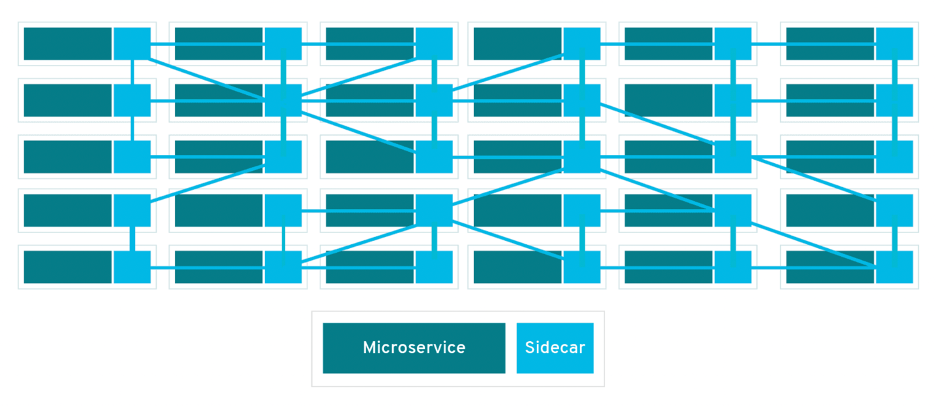
In a microservices architecture, a service mesh is generally worth the complexity when the following conditions are met:
- When "Chatty Services" Become a Bottleneck: If a single user request triggers dozens of synchronous service calls, the resulting latency and fragile failure cascades make observability and traffic management in a service mesh necessary.
- Need for Advanced Reliability without Code Bloat: If you are manually implementing retries, circuit breakers, and timeouts across dozens of .NET services, a service mesh can offload this logic to the infrastructure layer, preventing "business logic in the wrong place".
- Complex Security Requirements (mTLS): In environments where every service-to-service call must be encrypted and authenticated, a service mesh automates mutual TLS (mTLS) without requiring each service team to manage certificates.
- High Observability Needs: When debugging requires "jumping through many logs without clear ownership," a service mesh provides standardized distributed tracing and metrics across all services by default.
- Hybrid Communication Styles: When a system heavily uses a mix of REST, gRPC, and Messaging, a service mesh helps manage the different performance profiles and discovery needs of these protocols in one place.
When to Avoid a Service Mesh
According to the article's logic on Over-fragmentation, a service mesh is likely not worth it if:
- The system is a Modular monolith or has very few services.
- The operational costs of the mesh grow faster than the business value it delivers.
- The team is small and can handle coordination through simpler tools like API Gateways (YARP/Ocelot).
What .NET engineers should know
- 👼 Junior: A service mesh handles networking concerns outside application code.
- 🎓 Middle: Understand when retries, mTLS, and traffic control should move to infrastructure.
- 👑 Senior: Decide based on scale, security, and operational maturity, not trends.
📚 Resources:
❓ What is a sidecar, and how is it used in distributed systems?
A sidecar is a design pattern in which a helper component runs alongside a service instance and extends its behavior without changing the service's code. The service and the sidecar are deployed, scaled, and restarted together, but they have separate responsibilities.
The idea is runtime separation of concerns.
What a sidecar does
A sidecar handles cross-cutting concerns that should not live in business code, such as:
- Service-to-service communication logic.
- Retries, timeouts, and circuit breaking.
- mTLS and certificate rotation.
- Metrics, logging, and distributed tracing.
- Configuration reloads or secrets management.
The application focuses only on business logic. The sidecar handles infrastructure concerns.
How it works in practice
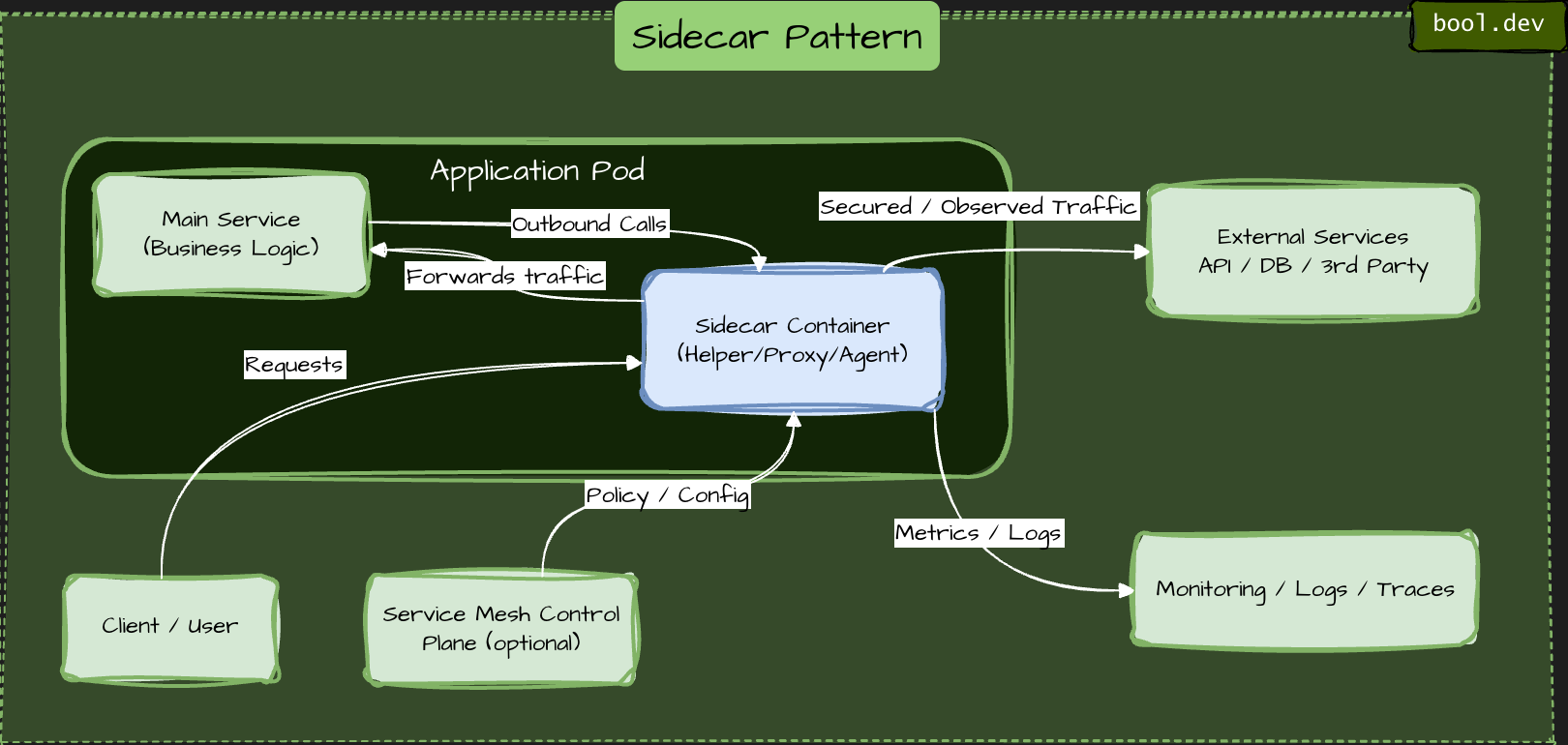
- Each service instance runs next to its own sidecar.
- All inbound and outbound traffic goes through the sidecar.
- The sidecar intercepts, enriches, or controls traffic transparently.
- The service is unaware of most networking or security logic.
- In container platforms, services and sidecars typically run in the same pod or on the same host.
Where sidecars are commonly used
- Service meshes. Sidecars act as data-plane proxies that provide consistent networking across all services.
- Observability. Sidecars collect metrics, logs, and traces without modifying application code.
- Security. Sidecars enforce mTLS, authentication, and authorization policies centrally.
- Protocol adaptation. Sidecars can translate protocols or apply policies without changing the service itself.
Why sidecars are useful
- No duplication of infrastructure logic across services.
- Consistent behavior across languages and teams.
- Easier rollout of networking or security changes.
- Cleaner application code.
Trade-offs to be aware of
- Extra resource usage per service instance.
- More moving parts to operate and debug.
- Added latency on the request path.
- Requires solid platform maturity.
- Sidecars simplify applications but shift complexity to the platform.
What .NET engineers should know
- 👼 Junior: Sidecars extend .NET services (e.g., via Dapr) for networking/security without code changes; run in the same pod in Kubernetes.
- 🎓 Middle: Use sidecars for cross-cutting concerns, such as tracing with OpenTelemetry or mTLS in ASP.NET Core integrate via tools like Envoy proxies.
- 👑 Senior: Decide when sidecars reduce duplication versus when they add unnecessary operational cost.
📚 Resources:
❓ What role does an API Gateway play in microservices?
An API Gateway acts as a single entry point (a "front door") for all external client requests. Instead of a mobile app or web browser calling dozens of individual microservices directly, they call the Gateway. The Gateway then routes the request to the correct internal service, aggregates the results, and returns them to the client.
What problems does an API Gateway solve?
- Hides internal architecture. Clients do not need to know how many services exist or how they are structured. Internal services can change without breaking clients.
- Centralizes cross-cutting concerns
The gateway commonly handles:- Authentication and authorization
- Rate limiting and throttling
- Request validation
- Logging and metrics
- SSL termination
- Reduces client complexity. Without a gateway, clients often need to call multiple services and coordinate responses. The gateway can aggregate responses or expose client-friendly APIs.
- Improves security. Internal services are not exposed to the public network. The gateway becomes a controlled boundary where security policies are enforced.
- Supports multiple client types. Different clients (web, mobile, partners) can be served through different gateway routes or even separate gateways.
What an API Gateway should not do
- It should not contain core business logic.
- It should not become a “god service” that everyone depends on.
- It should not replace proper service boundaries.
What .NET engineers should know
- 👼 Junior: Understand that the Gateway is a Reverse Proxy. Know that it prevents "leaking" internal IP addresses/ports to the public internet and provides a single URL for the frontend to call.
- 🎓 Middle: Able to implement a Gateway using tools like YARP (Yet Another Reverse Proxy) or Ocelot. Understands the difference between a Gateway and a Load Balancer. Knows how to configure "BFF" (Backend for Frontend) patterns for different devices.
- 👑 Senior: Can discuss Resiliency Patterns (Retries, Circuit Breakers) at the Gateway level. Can architect for high availability so the Gateway isn't a single point of failure. Understands the trade-offs between "Service Mesh" (e.g., Istio/Linkerd) and "API Gateway."
📚 Resources:
❓ How do feature flags influence deployments and testing?
Feature flags decouple deployment from release. Deployment becomes a low-risk technical event (moving code to production), while release becomes a controlled business decision (turning code on for users).
Influence on Deployments
- Decoupling Deployment from Release: Feature flags allow code to be deployed to production in a "hidden" or "off" state. This means developers can push code frequently without immediately impacting end users.
- Gradual Rollouts (Canary Releases): They enable the gradual migration of traffic from a legacy system to a new service, which is essential for patterns like the Strangler Fig. You can help a new feature for a small percentage of users and increase that percentage as you gain confidence in the system's stability.
- Instant Rollbacks: If a new feature causes issues in production, it can be instantly disabled via a feature flag without requiring a new deployment or a rollback of the entire application.
- Reduced Risk: By gradually moving traffic, feature flags de-risk the process of switching traffic between services.
Influence on Testing:
- Testing in Production: Feature flags allow teams to safely test new services or features in the actual production environment with a limited subset of users or internal staff before a full release.
- A/B Testing: They facilitate running multiple versions of a feature simultaneously to gather data on user behavior and system performance.
- Environment Parity: Since code is deployed but not necessarily active, it helps maintain parity between development, staging, and production environments, as the same binaries can be used across all stages with different flag configurations.
C# example: feature flags in ASP.NET Core
Use Microsoft feature management.
dotnet add package Microsoft.FeatureManagement.AspNetCoreConfigure feature flags in appsettings.json
{
  "FeatureManagement": {
    "NewCheckoutFlow": false
  }
}
Register feature management in Program.cs
builder.Services.AddFeatureManagement();Use a feature flag in code. Controller example:
using Microsoft.FeatureManagement;

[ApiController]
[Route("checkout")]
public class CheckoutController : ControllerBase
{
    private readonly IFeatureManager _featureManager;

    public CheckoutController(IFeatureManager featureManager)
    {
        _featureManager = featureManager;
    }

    [HttpPost]
    public async Task<IActionResult> Checkout()
    {
        if (await _featureManager.IsEnabledAsync("NewCheckoutFlow"))
        {
            return Ok("New checkout flow");
        }

        return Ok("Old checkout flow");
    }
}
What .NET engineers should know
- 👼 Junior: Feature flags allow code to be deployed without being active.
- 🎓 Middle: Use flags for gradual rollout, testing, and fast rollback.
- 👑 Senior: Enforce lifecycle management, observability, and flag hygiene.
📚 Resources:
❓ What is a control plane vs a data plane in distributed systems?
The control plane and data plane split responsibilities between decision-making and execution. This separation helps systems scale, stay reliable, and evolve without changing business code.
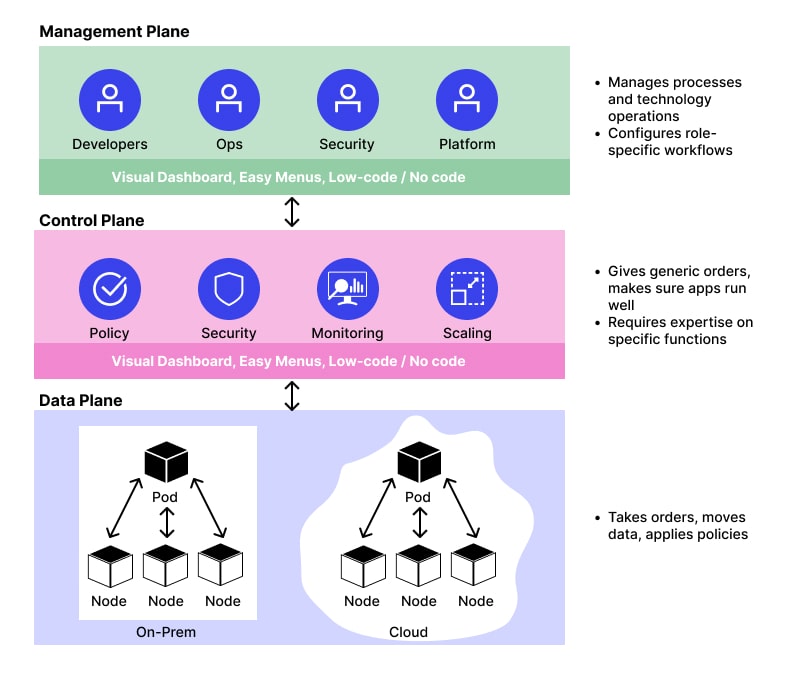
Data plane
The data plane is responsible for handling real traffic and executing operations.
- Processes requests and responses.
- Moves data between services.
- Applies policies to live traffic.
- Must be fast, stable, and always available.
Examples:
- Service-to-service HTTP calls.
- Message consumption and processing.
- Sidecar proxies forwarding requests.
- Database read and write operations.
- The data plane is on the hot path. Any slowdown here affects users directly.
Control plane
The control plane manages configuration, policies, and coordination for the data plane.
- Defines routing rules and traffic policies.
- Manages service discovery and topology.
- Distributes configuration and certificates.
- Controls rollout, retries, timeouts, and security rules.
Examples:
- Service mesh controllers.
- API Gateway configuration.
- Kubernetes control components.
- Feature flag and traffic management systems.
The control plane is not in the request path. It changes behavior without touching application code.
How they work together
- The control plane sets rules and policies.
- The data plane enforces them at runtime.
- Changes in the control plane propagate safely to the data plane.
For example:
- A retry policy is defined in the control plane.
- Sidecars in the data plane apply it to live traffic.
Why this separation matters
- Safer changes without redeploying services.
- Centralized governance and consistency.
- Faster data paths with minimal logic.
- Better scalability and operational control.
What .NET engineers should know
- 👼 Junior: Knows that the Data Plane is where the application code lives and traffic flows. Understands that infrastructure tools manage the "how."
- 🎓 Middle: Understands how service discovery and configuration providers (like Consul or Azure App Config) act as a control plane for their .NET apps.
- 👑 Senior: Can design for "Static Stability"—ensuring the data plane remains functional even if the control plane is unreachable. Able to choose between centralizing logic in a Gateway (Control) or a Sidecar (Data).
📚 Resources:
- Control Plane vs Data Plane: Key Differences Explained
- Control & Data Plane - How do They Differ?
- Difference between Control Plane and Data Plane
❓ What is the difference between synchronous and asynchronous service communication?
The difference is about waiting, coupling, and failure behavior.
Synchronous communication
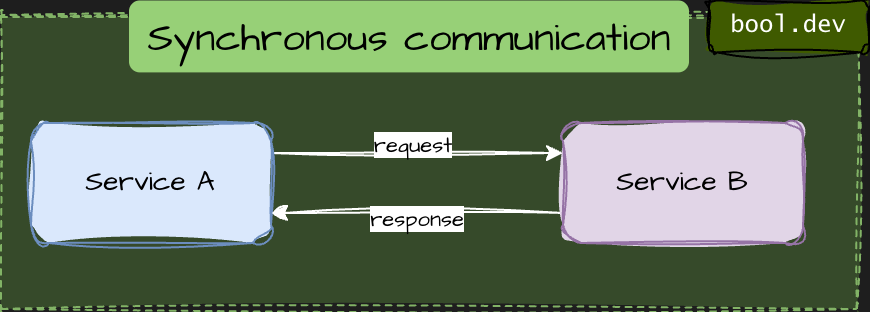
- Caller waits for a response (HTTP, gRPC).
- Strong temporal coupling: both services must be available.
- Failures and latency propagate immediately.
- Best for user-facing requests and validations.
Asynchronous communication
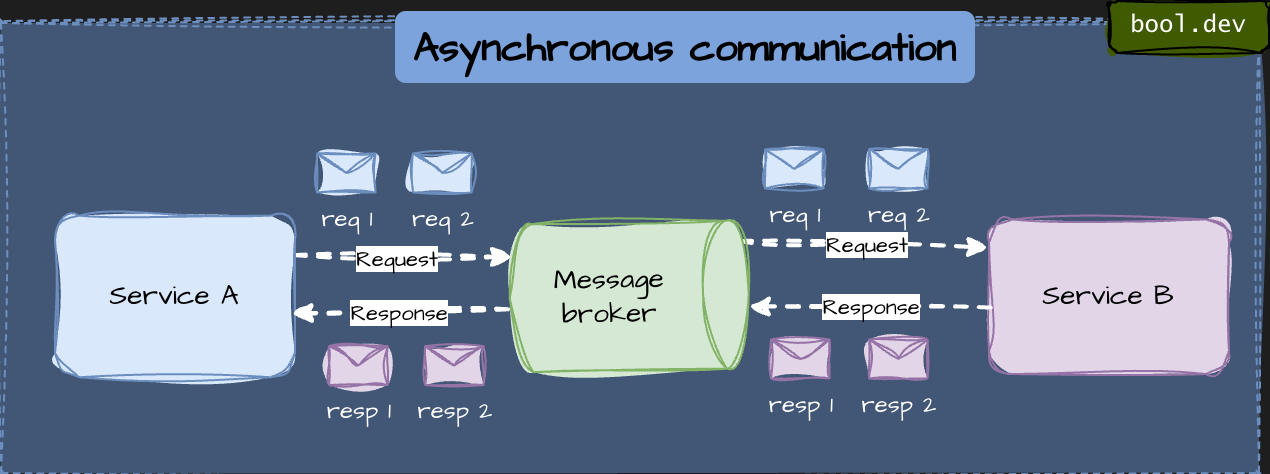
- Caller sends a message and continues (events, queues).
- Loose temporal coupling: services do not need to be online at the same time.
- Better resilience and scalability.
- Best for background work and cross-service side effects.
What .NET engineers should know
- 👼 Junior: Sync waits for a response, async does not.
- 🎓 Middle: Choose based on coupling, latency, and consistency needs.
- 👑 Senior: Combine both to avoid cascading failures and blocking workflows.
📚 Resources: Design interservice communication for microservices
❓ When do you choose REST, gRPC, or messaging?
REST (HTTP + JSON)
A synchronous request–response style over HTTP using JSON. Simple, readable, and widely supported.
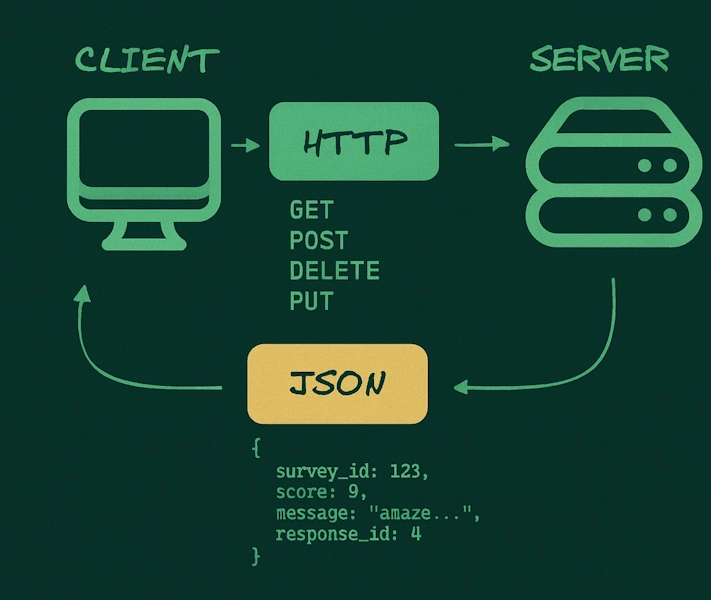
- Best for public APIs and browser or mobile clients.
- Easy to debug and integrate.
- Higher latency and larger payloads.
Use it when interoperability and simplicity matter most.
A high-performance synchronous RPC protocol over HTTP/2 using Protobuf. Strongly typed and optimized for service-to-service calls.
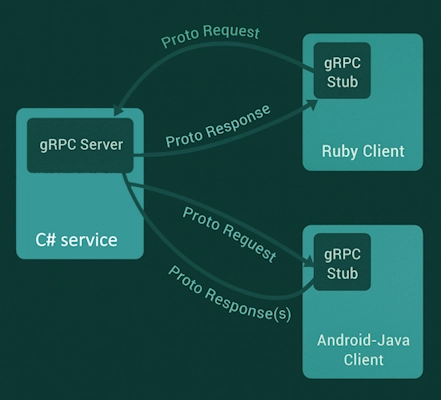
- Best for internal service-to-service communication.
- Low latency, small payloads, strong contracts.
- Requires shared schemas and client generation.
Use it when you control both sides and need performance.
Messaging (events, queues)
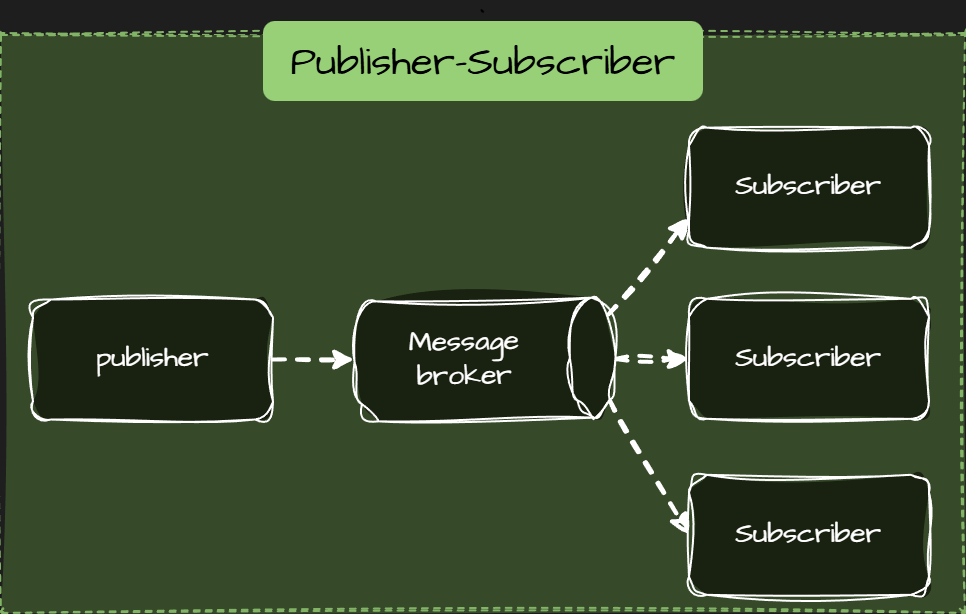
Asynchronous communication via a broker. Producers send messages or events without waiting for consumers.
- Best for async workflows and side effects.
- Decouples services in time and failures.
- No immediate response, eventual consistency.
Use it when work can happen later.
What .NET engineers should know
- 👼 Junior: Know what HTTP, gRPC, and messaging are and their basic use cases.
- 🎓 Middle: Choose based on latency, coupling, and ownership.
- 👑 Senior: Combine styles deliberately and avoid forcing one pattern everywhere.
❓ When should you use gRPC streaming?
Use gRPC streaming when data is continuous, incremental, or long-lived, and you want to avoid repeated request–response calls.
What gRPC streaming does is keep a single HTTP/2 connection open and sends multiple messages over it. Data flows as a stream instead of discrete requests.
When to use gRPC streaming
- Real-time updates
Live metrics, progress updates, notifications, status feeds. - Large datasets
Sending or receiving data in chunks instead of loading everything into memory. - High-frequency communication
Many small messages where HTTP request overhead would be wasteful. - Bidirectional workflows
Client and server exchange messages continuously (chat, coordination, control signals).
When not to use it
- Simple CRUD or short request–response calls.
- Public APIs or browser-first scenarios.
- When clients cannot reliably keep long-lived connections.
Types of gRPC streaming
- Server streaming: the client makes a single request, and the server streams responses.
- Client streaming: the client streams data; the server responds once.
- Bidirectional streaming: both streams are independent.
C# Example:
Use case: a client requests a report; the server streams progress updates.
Proto definition
syntax = "proto3";

service ReportService {
  rpc GenerateReport(ReportRequest) returns (stream ReportProgress);
}

message ReportRequest {
  string reportId = 1;
}

message ReportProgress {
  int32 percent = 1;
  string status = 2;
}
Server-side implementation (ASP.NET Core)
public class ReportService : ReportService.ReportServiceBase
{
    public override async Task GenerateReport(
        ReportRequest request,
        IServerStreamWriter<ReportProgress> responseStream,
        ServerCallContext context)
    {
        for (int i = 0; i <= 100; i += 20)
        {
            await responseStream.WriteAsync(new ReportProgress
            {
                Percent = i,
                Status = $"Progress {i}%"
            });

            await Task.Delay(500);
        }
    }
}
Client-side consumption
var channel = GrpcChannel.ForAddress("https://localhost:5001");
var client = new ReportService.ReportServiceClient(channel);

using var call = client.GenerateReport(new ReportRequest
{
    ReportId = "report-123"
});

await foreach (var update in call.ResponseStream.ReadAllAsync())
{
    Console.WriteLine($"{update.Percent}% - {update.Status}");
}
What .NET engineers should know
- 👼 Junior: Know that streaming sends multiple messages over one connection.
- 🎓 Middle: Choose streaming for real-time or large data flows, not CRUD.
- 👑 Senior: Design backpressure, timeouts, and failure handling for long-lived streams.
📚 Resources: Create gRPC services and methods
❓ Why are message brokers used in distributed systems?
message brokers are used to decouple services, improve reliability, and handle asynchronous work. They let services communicate without needing to be online or fast simultaneously.
Main reasons to use a message broker:
- Loose coupling. Producers send messages without knowing who consumes them. Services can evolve independently.
- Failure isolation. If a consumer is down, messages wait in the broker instead of failing requests or losing data.
- Asynchronous processing. Long-running or slow work moves out of the request path. Users get faster responses.
- Scalability. Consumers can scale horizontally and process messages in parallel.
- Traffic smoothing. Brokers absorb spikes—services process messages at their own pace.
- Reliable delivery. Most brokers support retries, acknowledgements, and dead-letter queues.
Typical use cases
- Event-driven architectures.
- Background jobs and workflows.
- Integration between bounded contexts.
- Audit logs and event streams.
What .NET engineers should know
- 👼 Junior: Understands the "Fire and Forget" concept. Knows how to use a basic library like MassTransit or MediatR (for in-memory) to send a message.
- 🎓 Middle: Understands At-least-once vs. At-most-once delivery. Knows how to handle retries and move failing messages to a Dead Letter Queue.
- 👑 Senior: Designs for Idempotency (ensuring the same message processed twice doesn't break data). Can discuss the trade-offs between Queues (Point-to-point) and Topics (Pub/Sub) and can manage distributed transactions via the Saga Pattern.
📚 Resources: Event-driven architecture style
❓ What are at-least-once, at-most-once, and exactly-once delivery semantics?
This is a core concept in distributed systems and message queuing. Delivery semantics define the guarantee a message system provides about how many times a message will be delivered to a consumer, particularly in the presence of failures.
Here are the three standard delivery semantics:
At-most-once
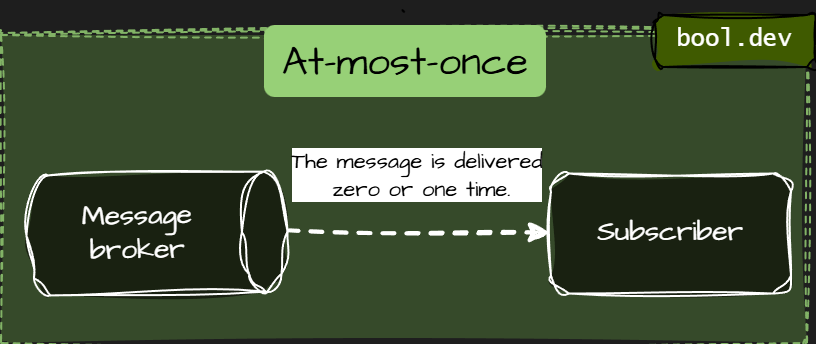
- The message is delivered zero or one time.
- No retries. If delivery fails, the message is lost.
- Fast and simple, but unreliable.
- Use it when occasional loss is acceptable (logs, metrics).
At-least-once
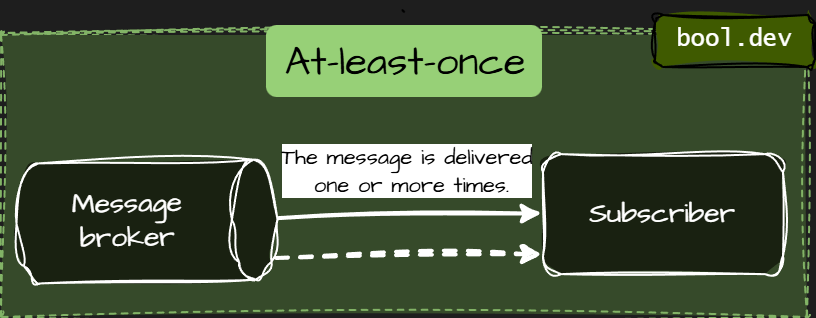
- The message is delivered one or more times.
- Retries are allowed. Duplicates can happen.
- The most common and practical model.
- Use it when correctness matters, and consumers can handle duplicates.
Exactly-once
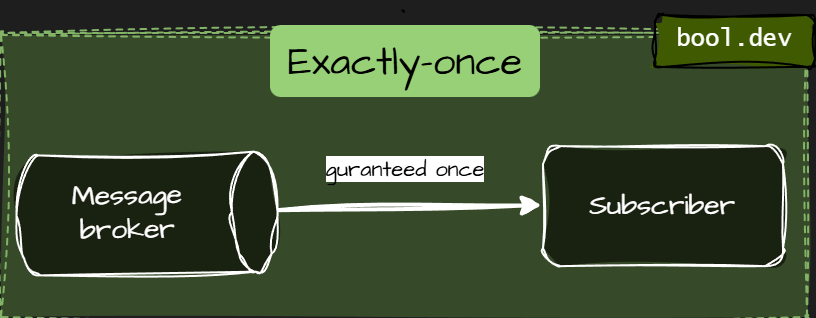
- The message is delivered once and only once.
- No loss, no duplicates.
- Very hard and expensive to achieve in distributed systems.
- Usually implemented as at-least-once + idempotency, not actual magic delivery.
What .NET engineers should know
- 👼 Junior: Messages may be lost or duplicated depending on the guarantee.
- 🎓 Middle: Design consumers to be idempotent and safe for retries.
- 👑 Senior: Choose semantics consciously and design end-to-end consistency, not just broker settings.
📚 Resources: At most once, at least once, exactly once
❓ How do you ensure idempotency in a .NET message consumer?
Idempotency means that processing the same message multiple times produces the same result. This is required because most brokers use at least one delivery.
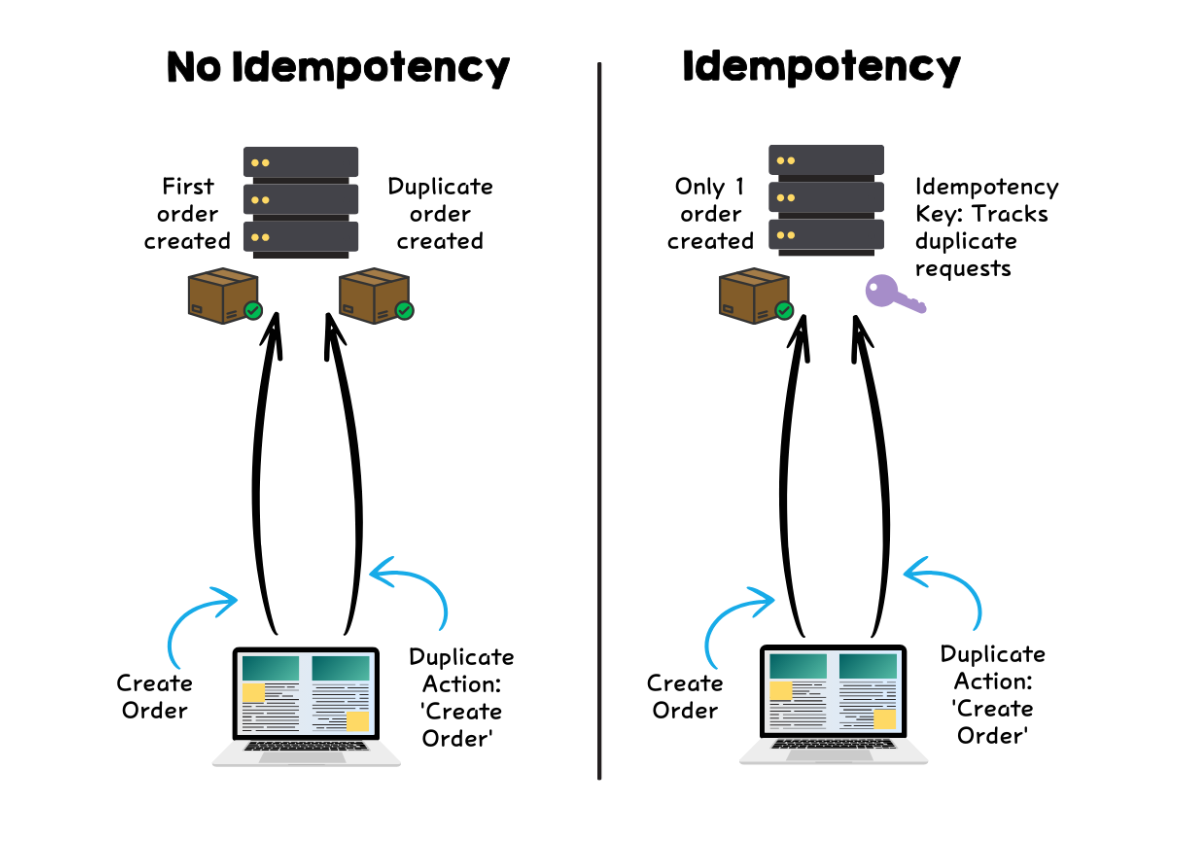
Core techniques to handle idempotency:
- Message ID deduplication. Store processed message IDs and skip duplicates.
- Idempotent writes. Design database operations so that repeating them does not change the outcome.
- Atomic processing. Persist side effects and the “processed” marker in one transaction.
- Natural idempotency. Use business keys (OrderId, PaymentId) instead of auto-generated IDs.
Simple C# example (deduplication)
public async Task HandleAsync(OrderCreated message)
{
    if (await _db.ProcessedMessages.AnyAsync(x => x.Id == message.MessageId))
        return;

    using var tx = await _db.Database.BeginTransactionAsync();

    _db.Orders.Add(new Order
    {
        OrderId = message.OrderId,
        Total = message.Total
    });

    _db.ProcessedMessages.Add(new ProcessedMessage
    {
        Id = message.MessageId,
        ProcessedAt = DateTime.UtcNow
    });

    await _db.SaveChangesAsync();
    await tx.CommitAsync();
}
Common mistakes
- Relying on the broker for exactly-once delivery.
- Deduplicating in memory instead of persistent storage.
- Using side effects before marking the message as processed.
- Forgetting idempotency for retries after partial failures.
What .NET engineers should know
- 👼 Junior: Messages may arrive multiple times and must be handled safely.
- 🎓 Middle: Use message IDs, transactions, and idempotent writes.
- 👑 Senior: Design end-to-end idempotency across services, storage, and workflows.
📚 Resources:
❓ What is the Competing Consumers pattern, and when is it useful?
The Competing Consumers pattern involves multiple instances of the same service (consumers) listening to a single message queue. When a message arrives, the broker ensures that only one consumer receives and processes it. The consumers "compete" for the next available task, allowing the system to process many messages in parallel.
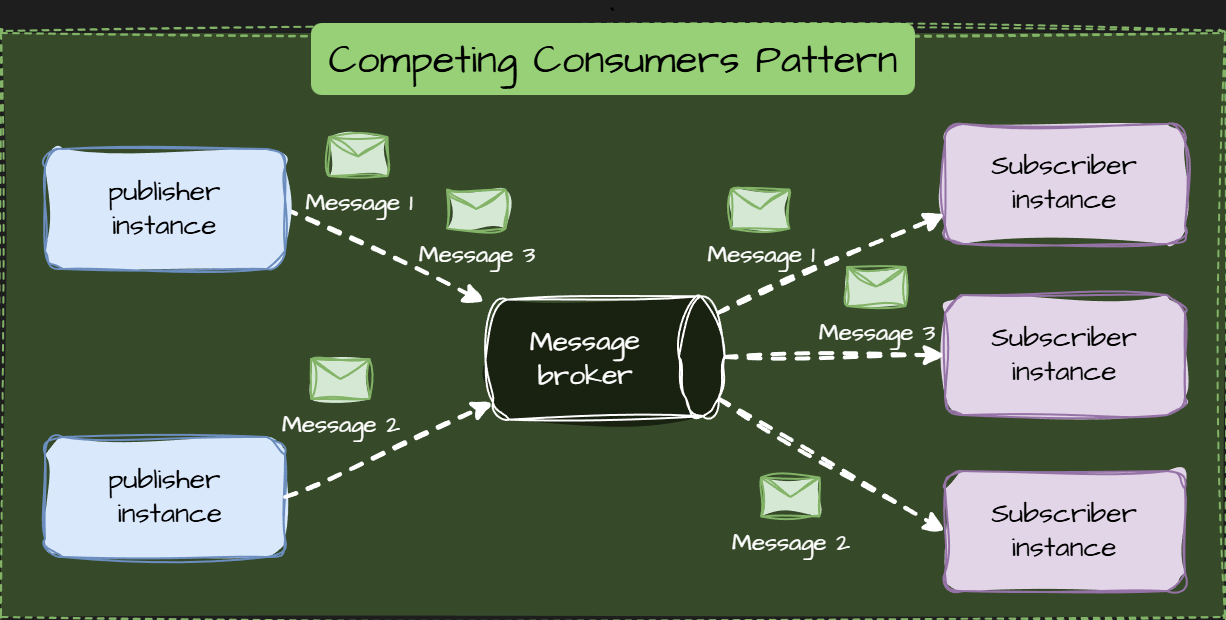
How It Works
- Producer: Sends messages (tasks) to a single message queue.
- Queue/Broker: Stores the messages and acts as a buffer. It handles load balancing by ensuring messages are distributed efficiently among the available consumers.
- Consumers (The Pool): Multiple instances of the same consumer application run in parallel. When one consumer finishes a task, it immediately polls the shared queue for the following available message. The queue marks the message as locked or invisible until the receiving consumer acknowledges its processing, preventing other consumers from picking it up.
Why use it?
- High Throughput: It allows you to process a large volume of messages faster by distributing the work across multiple worker instances.
- Scalability: You can dynamically scale the number of consumers based on the queue size (auto-scaling).
- Resiliency: If one consumer instance crashes while processing, the broker can return the message to the queue for another consumer to handle.
Key Trade-Offs
- Message Ordering is Not Guaranteed: Since multiple consumers process messages concurrently, the order in which messages are processed is generally not guaranteed to be FIFO (First-In, First-Out).
- Idempotency Required: Because of "at-least-once" delivery, a consumer might receive the same message twice. The code must be safe to run multiple times with the same input.
What .NET engineers should know
- 👼 Junior: Understands that adding more instances of a worker service speeds up message processing. Knows the difference between Competing Consumers and Pub/Sub.
- 🎓 Middle: Knows how to configure Prefetch Count (how many messages a consumer grabs at once) to prevent one worker from being overwhelmed while others are idle. Understands the "Visibility Timeout" or "Lock" period.
- 👑 Senior: Can solve the Ordering Problem using techniques like Message Sessions (Azure Service Bus) or Partitioning (Kafka/RabbitMQ Sharding) when sequential processing is required within a specific context (e.g., per user).
📚 Resources: Competing Consumers Pattern
❓ What is a Dead Letter Queue, and how do you design reprocessing logic?
A Dead Letter Queue (DLQ) is a special queue where messages are sent when they cannot be processed successfully. Instead of blocking the main flow or losing data, failed messages are isolated for later analysis and recovery.
DLQs are common in message-driven systems using Azure Service Bus, RabbitMQ, Kafka, or AWS SQS.
Reprocessing involves two phases:
1. Automatic Retries (In-Queue)
This handles transient failures (e.g., connection timeouts).
- Mechanism: The message broker retries delivery a fixed number of times (e.g., 3-5).
- Strategy: Use exponential backoff between retries to avoid overwhelming a struggling dependency.
- Goal: Resolve temporary issues before the message is exiled to the DLQ.
2. Manual/Scheduled Reprocessing (From DLQ)
This handles permanent failures (e.g., data bugs, sustained dependency outages).
- Strategy: Messages remain in the DLQ until the root cause is confirmed to be fixed.
- Manual Fix: A developer inspects the message, fixes the code or data, and manually pushes the message back to the main queue.
- Scheduled Job: A batch process periodically attempts to re-queue the messages, typically after a known external outage has resolved.
Key Principle: Never automatically re-queue from the DLQ without confirming the original error has been resolved, as this risks creating a retry loop.
What .NET engineers should know
- 👼 Junior: Know that DLQ stores messages that failed processing and protects the main flow.
- 🎓 Middle: Understand retry strategies, idempotency, and when to reprocess messages.
- 👑 Senior: Design safe replay mechanisms, classify failures, and ensure observability and back-pressure control.
📚 Resources:
- Transient fault handling
- Using dead-letter queues in Amazon SQS
- Overview of Service Bus dead-letter queues
❓ What is the Outbox pattern, and why do distributed systems rely on it?
The Outbox pattern is a reliability pattern that guarantees messages or events are published only after the local database transaction commits. It solves the classic problem where data is saved successfully, but the message meant to notify other services is lost. In distributed systems, this pattern is critical for consistency.
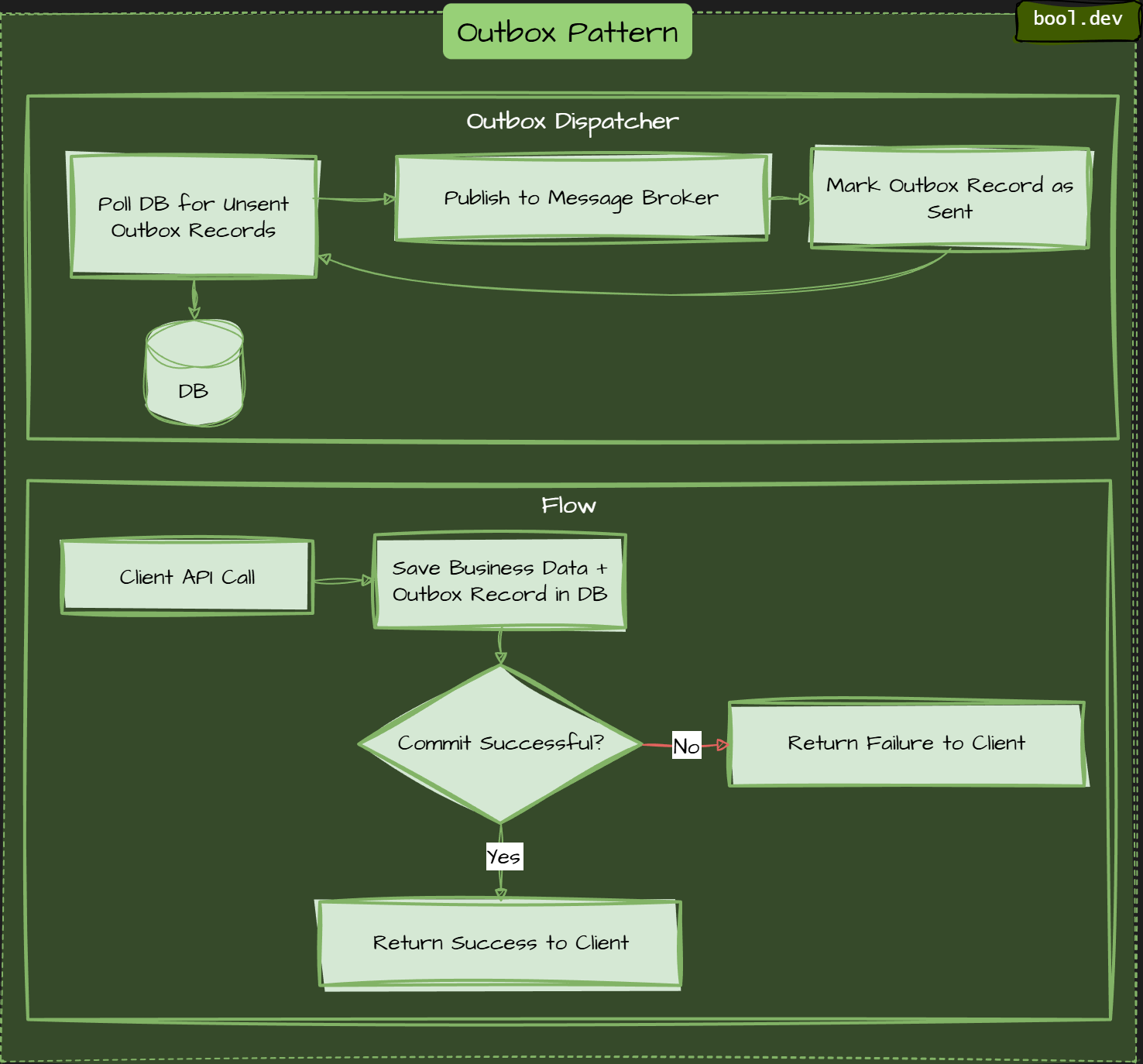
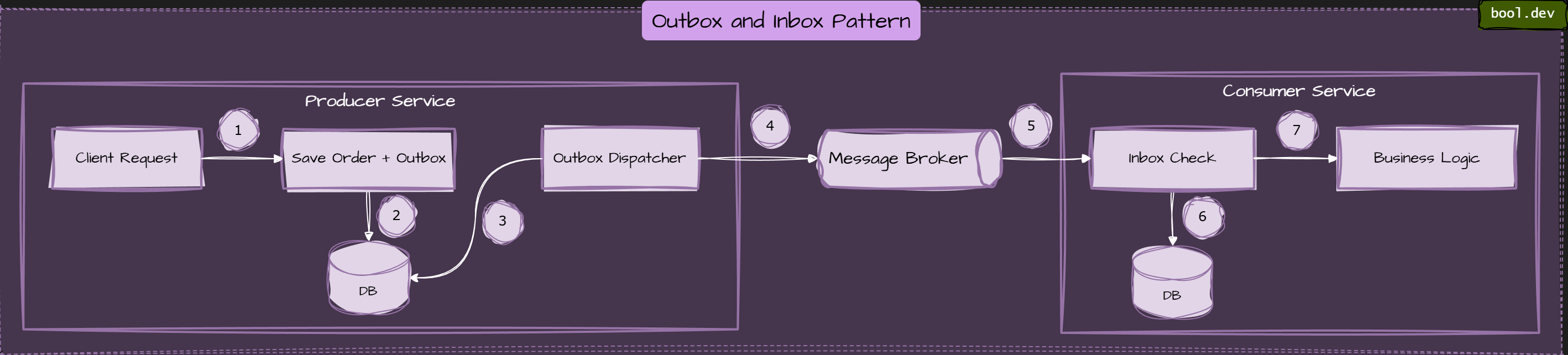
Outbox dispatcher runs separately, picks up pending messages, publishes them, marks them as sent.
Without Outbox, a service usually does this:
- Save data to the database.
- Publish an event to a message broker.
If the process crashes between these steps, the system becomes inconsistent. Data is stored, but no event is sent. Other services never find out. The Outbox pattern removes this gap.
How the Outbox pattern works:
- Write business data and the outbox record in one transaction. The service saves Domain changes (orders, payments, users) in an Outbox record containing the event payload. Both writes happen in the same database transaction.
- Commit the transaction. If the commit succeeds, both the data and the event are safely stored.
- Publish asynchronously. A background process reads Outbox records and publishes them to the message broker.
- Mark as published. After successful publishing, the Outbox record is marked as sent or removed.
What .NET engineers should know
- 👼 Junior: Know that Outbox prevents lost messages after DB commits.
- 🎓 Middle: Implement Outbox with background publishing and retries.
- 👑 Senior: Combine Outbox with Inbox, idempotency, and monitoring for complete reliability.
📚 Resources: Transactional Inbox and Outbox Patterns: Practical Guide for Reliable Messaging
❓ What is the Inbox pattern, and how does it support end-to-end consistency?
Inbox pattern ensures that a message received by a consumer service is processed and recorded atomically with the consumer's state change, preventing message loss or duplicate processing.
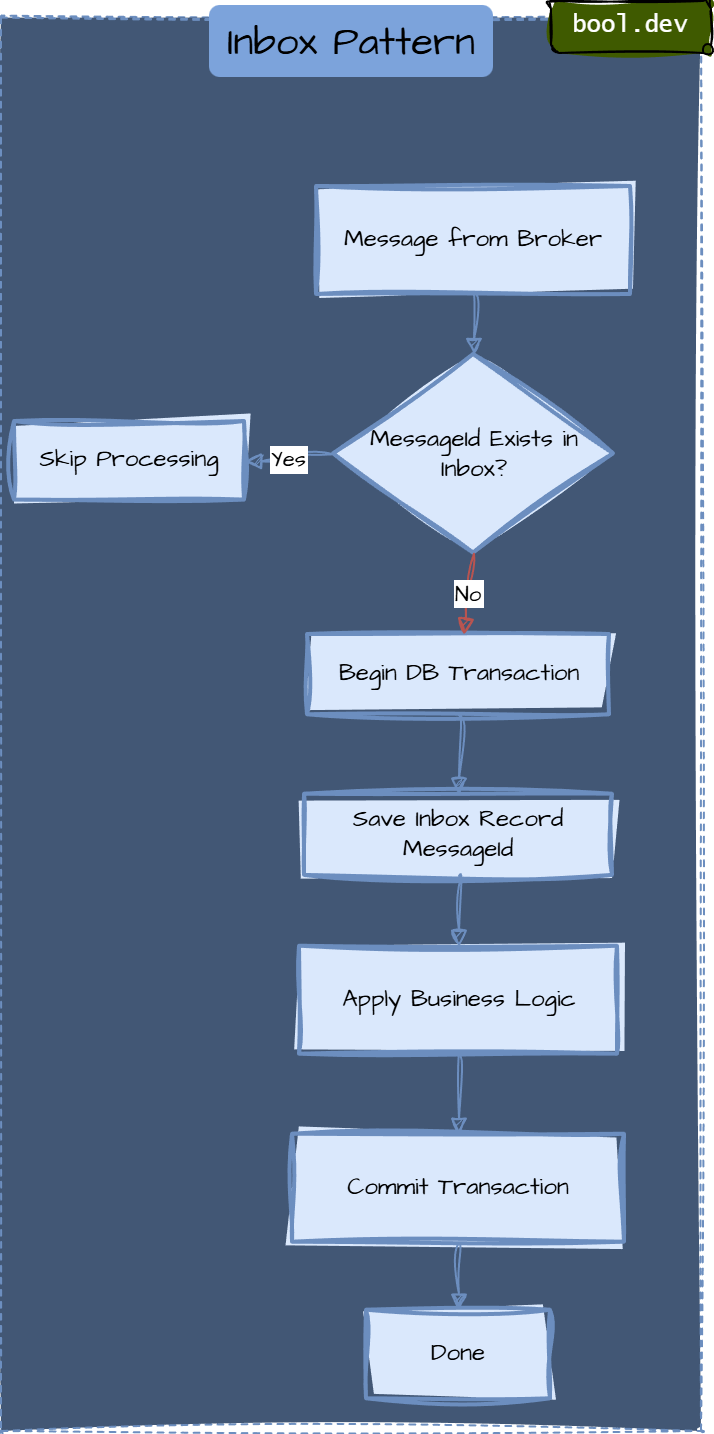
The Inbox pattern helps achieve end-to-end consistency by:
- Preventing duplicate side effects when messages are retried.
- Ensuring that business operations are applied only once.
- Allowing safe retries after crashes or timeouts.
- Making message handling deterministic and repeatable.
Inbox vs Outbox
- Inbox: protects consumers from duplicate processing.
- Outbox: protects producers from losing messages after database commits.
They are often used together to build reliable event-driven flows.
Common mistakes
- Not storing Inbox records transactionally with business changes.
- Using in-memory caches instead of durable storage.
- Letting the Inbox table grow without retention or cleanup.
- Treating the inbox as optional while assuming exactly-once delivery.
What .NET engineers should know
- 👼 Junior: Know that Inbox prevents duplicate message processing.
- 🎓 Middle: Understand how Inbox works with transactions and retries.
- 👑 Senior: Design Inbox storage, retention, and integration with Outbox for end-to-end consistency.
📚 Resources: Transactional Inbox and Outbox Patterns: Practical Guide for Reliable Messaging
❓ How do you handle validation of API/Contract changes across microservices?
API and contract changes are one of the main failure points in microservices. Services are deployed independently, so you must assume that producers and consumers will run different versions simultaneously. Validation is about proving that a change is safe before it reaches production.
1. Consumer-Driven Contract Testing (PACT testing)
This is the most effective way to ensure a service doesn't break its consumers.
Instead of the Provider (API creator) defining what's essential, the Consumer defines a "Pact" file containing the exact requests it sends and the responses it expects.
Validation: During the Producer's CI/CD pipeline, the Pact tests are run. If a proposed code change breaks a consumer's expected contract, the build fails.
Benefit: You find out an API change will break a specific mobile app or microservice before you deploy.
2. Schema Registry (for Asynchronous/Events)
For services communicating via Kafka, RabbitMQ, or Azure Service Bus using Protobuf or Avro.
The Registry: A central service (like Confluent Schema Registry or Azure Event Grid Schema Registry) stores all versions of your contracts.
Enforcement: The registry is configured with a Compatibility Level (e.g., BACKWARD or FULL).
Validation: When a producer tries to publish an event with a new schema, the Registry validates it against previous versions. If it violates compatibility rules (e.g., removing a required field), the Registry rejects the schema.
3. Breaking Change Policy (Semantic Versioning)
Establish a strict "No Breaking Changes" rule for existing endpoints.
Expansion only: You can add new fields or endpoints, but never rename or delete existing ones.
Versioning: If a breaking change is unavoidable, you must version the API (e.g., /api/v1/orders vs /api/v2/orders).
Parallel Run: Run both versions in production simultaneously. Use monitoring to see when traffic to v1 drops to zero before decommissioning it.
4. Integration Tests in CI/CD
Use tools like Swagger/OpenAPI to generate documentation. Use tools like spectral or oasdiff in your CI pipeline to automatically detect breaking changes in the specification file itself compared to the version currently in production.
What .NET engineers should know
- 👼 Junior: Know that API contracts must stay backward compatible.
- 🎓 Middle: Use contract tests and schema validation in CI.
- 👑 Senior: Define compatibility rules, tooling, and rollout strategies across teams.
📚 Resources:
❓ How do MassTransit or NServiceBus simplify messaging compared to raw clients?
MassTransit and NServiceBus sit on top of raw brokers like Azure Service Bus or RabbitMQ. Instead of working with low-level queues and messages, you work with typed messages and consumers, with most reliability concerns handled for you.
What do you handle with raw clients
- Serialization and deserialization.
- Retries and transient failures.
- Poison messages and DLQs.
- Idempotency and duplicate delivery.
- Correlation IDs and tracing.
This logic is often reimplemented differently across services.
What messaging frameworks give you
- Strongly typed consumers instead of low-level handlers.
- Built-in retries, delayed retries, and error queues.
- Inbox and Outbox support for safe message processing.
- Transport abstraction (Azure Service Bus, RabbitMQ, SQS).
- Consistent observability and message routing.
Trade-offs
- Added abstraction and learning curve.
- Broker-specific features are sometimes hidden.
When they make sense
- Multiple services rely on messaging.
- Reliability and consistency matter.
- Teams want shared conventions and fewer mistakes.
What .NET engineers should know
- 👼 Junior: Frameworks reduce messaging boilerplate.
- 🎓 Middle: They handle retries, errors, and idempotency.
- 👑 Senior: Choose frameworks when consistency matters more than low-level control.
📚 Resources:
❓ How do you avoid temporal coupling between producers and consumers?
Temporal coupling happens when a producer and a consumer must be available at the same time for the system to work. If one side is down or slow, the whole flow breaks. In distributed systems, this quickly becomes a reliability and scalability problem.
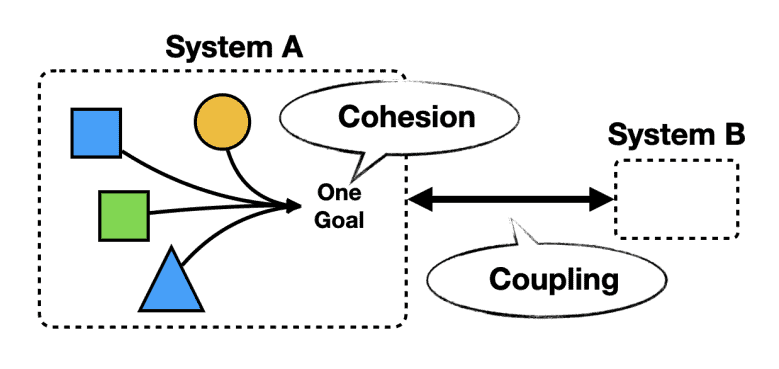
Example of Temporal coupling
Sequential Dependencies: When methods or operations must be called in a specific order to work correctly, without explicit enforcement of that order.
# Problematic: Temporal coupling through required sequence
user_service = UserService()
user_service.initialize_connection()  # Must be called first
user_service.authenticate()           # Must be called second
user_service.load_preferences()       # Must be called third
user_service.get_user_data()         # Only works after all above
Common mistakes
- Long synchronous call chains across services.
- Using messaging but waiting for an immediate reply.
- Treating message brokers like remote procedure calls.
Ways to reduce temporal coupling
- Use asynchronous messaging. Instead of synchronous HTTP calls, publish events to a message broker. The producer writes once and moves on. Consumers process when they are ready.
- Persist messages durably. Queues and topics must store messages until consumers can handle them. This protects against downtime and restarts.
- Avoid request-response dependencies. Do not build workflows that require an immediate response from another service to continue. Prefer eventual consistency.
- Design idempotent consumers. If messages are retried or delivered later, consumers must handle duplicates safely.
- Use timeouts and fallbacks. When synchronous calls are unavoidable, always use timeouts, retries, and graceful degradation rather than blocking.
- Separate commands from queries. Commands can be async and fire-and-forget. Queries can stay synchronous but should not mutate.
What .NET engineers should know
- 👼 Junior: Know that async messaging decouples services in time.
- 🎓 Middle: Design event-driven flows and idempotent consumers.
- 👑 Senior: Balance async and sync communication and avoid hidden dependencies.
📚 Resources:
- Design Smell: Temporal Coupling
- Temporal Coupling in Software Development: Understanding and Prevention Strategies
Distributed Data and State Management

❓ Why is 2PC avoided in microservices, and what are the alternatives?
Two-Phase Commit (2PC) is a distributed transaction protocol that tries to guarantee atomicity across multiple services or databases. In microservices, it is usually avoided because it creates tight coupling, hurts availability, and does not scale well.
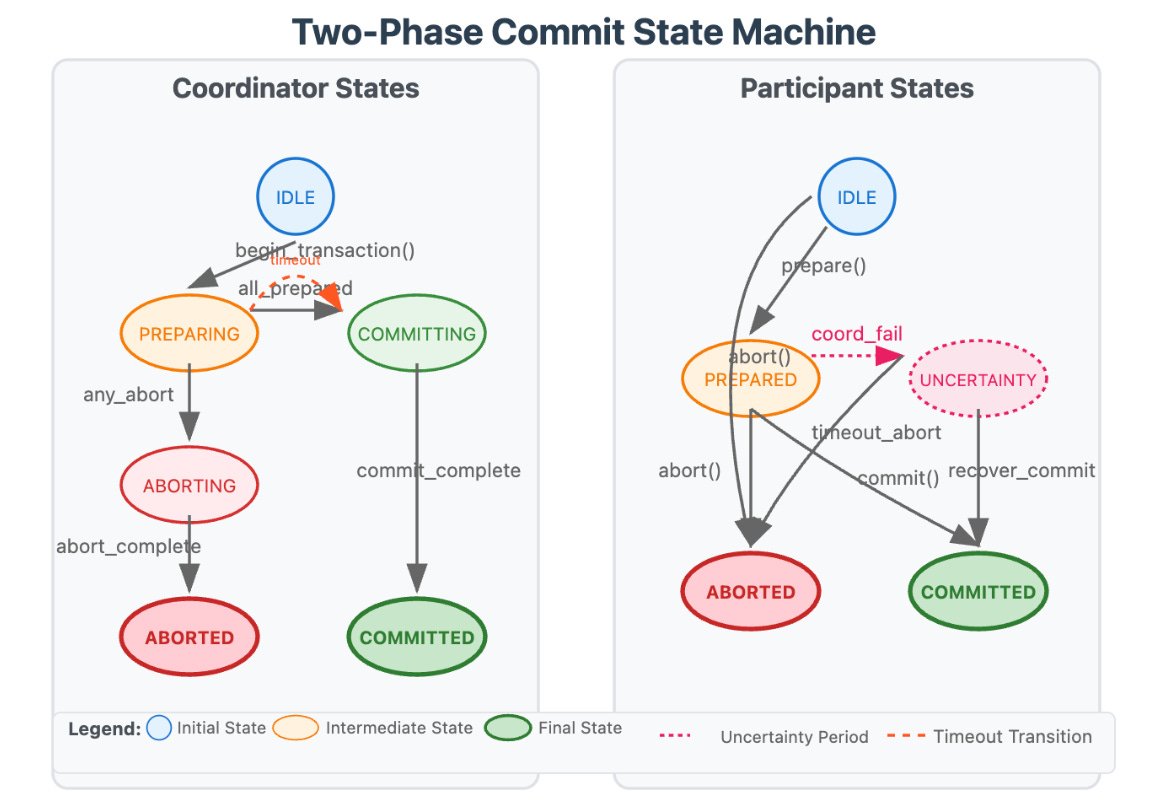
Common alternatives to 2PC
Saga pattern
A Saga splits a transaction into multiple local transactions. Each step commits independently. If something fails, compensating actions undo previous steps.
- Orchestration: a central coordinator drives the steps.
- Choreography: services respond to events and advance the process.
Eventual consistency
Instead of immediate consistency, systems accept temporary inconsistency and converge over time using events and retries.
Outbox and Inbox patterns
- Outbox ensures messages are published reliably after local database commits.
- Inbox ensures messages are processed exactly once at the consumer level.
Together, they give transactional safety without distributed locks.
Idempotent operations
Consumers handle duplicate messages safely, allowing retries without corruption.
Domain redesign
Often, the real fix is better boundaries. If multiple services must commit together, they may belong to the same bounded context.
What .NET engineers should know
- 👼 Junior: Know that 2PC blocks services and hurts reliability.
- 🎓 Middle: Use Sagas and eventual consistency instead of distributed transactions.
- 👑 Senior: Design domains to avoid cross-service transactions and apply compensations safely.
📚 Resources:
- Design Microservices: Using DDD Bounded Contexts
- [ru] Choreography pattern
- Transactional Inbox and Outbox Patterns: Practical Guide for Reliable Messaging
❓ How do you implement a saga, and how do compensating steps work?
A Saga is a sequence of local transactions where each service performs its task and then publishes an event to trigger the next service. If any step fails, the Saga executes Compensating Transactions to undo the previous successful steps, ensuring eventual consistency.
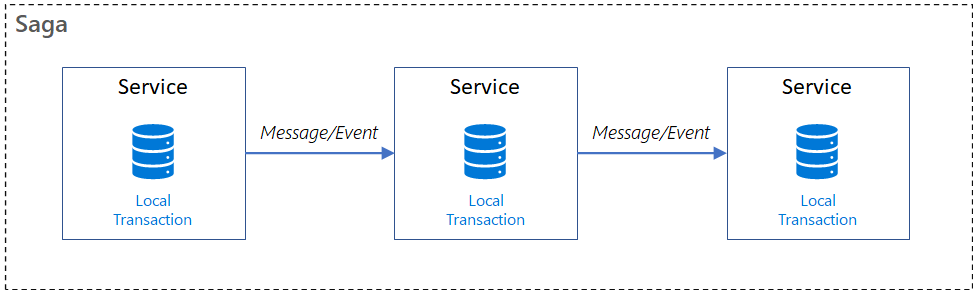
The key idea: move from atomic transactions to controlled business rollback.
How a Saga works
- Execute a local transaction. Each service performs its own database transaction and commits it.
- Publish an event or command. After committing, the service notifies the next step in the process.
- Continue the flow. Other services react and execute their local transactions.
- Handle failure with compensation. If a step fails, previously completed steps are compensated in reverse order.
The two typical saga implementation approaches are choreography and orchestration. Each approach has its own set of challenges and technologies to coordinate the workflow.
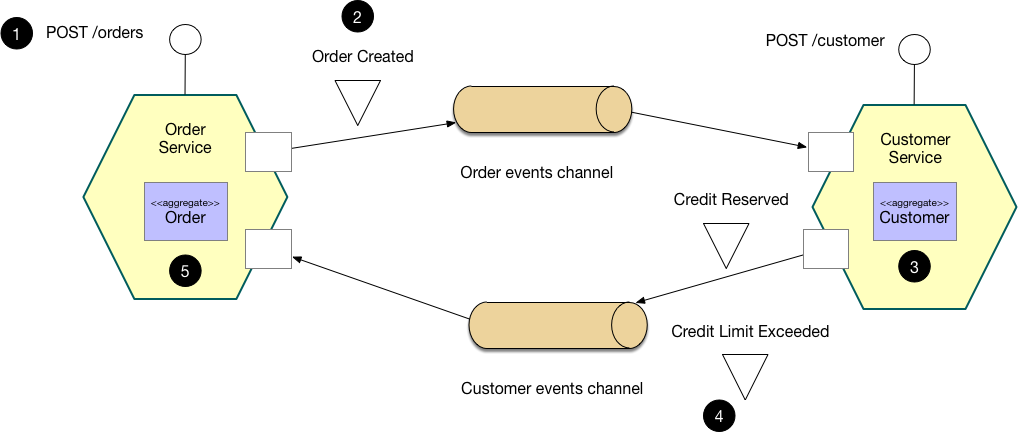
Example: Choreography-based saga (decentralized)
In the choreography approach, services exchange events without a centralized controller. With choreography, each local transaction publishes domain events that trigger local transactions in other services.
Best For: Simple workflows with few services.
Cons: Hard to track the overall state of the process; can become a "spaghetti" of events.
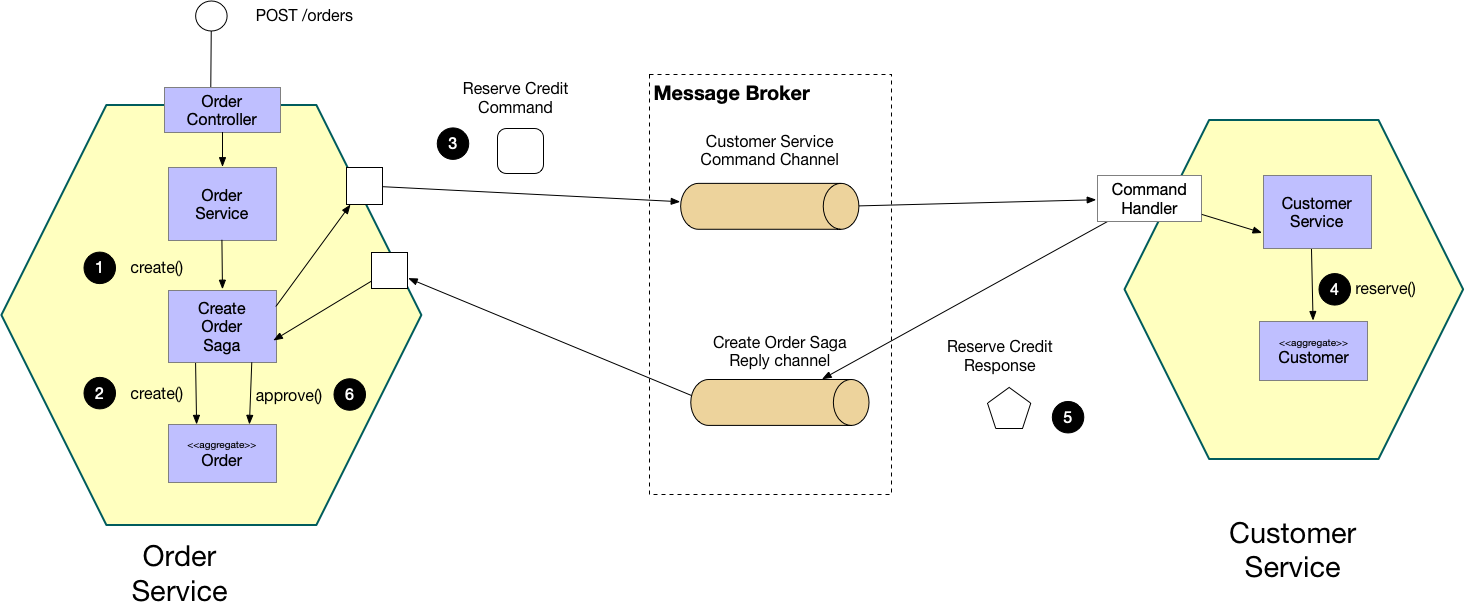
Example: Orchestration-based saga (Centralized)
In orchestration, a centralized controller, or orchestrator, handles all the transactions and tells the participants which operation to perform based on events. The orchestrator processes saga requests, stores and interprets each task's state, and handles failure recovery using compensating transactions.
Best For: Complex workflows with many steps or conditional logic.
Cons: The Orchestrator can become a single point of failure or a bottleneck if not appropriately scaled.
What .NET engineers should know
- 👼 Junior: Know that a Saga replaces distributed transactions with local steps and compensation.
🎓 Middle: Implement Saga flows and design proper compensating actions.
👑 Senior: Choose orchestration or choreography wisely and ensure observability and safety.
📚 Resources:
❓ When would you avoid event sourcing in enterprise systems?
While Event Sourcing (storing every state change as a sequence of events) is powerful for auditing and complex domains, it introduces significant complexity that can derail an enterprise project if misapplied.
You should avoid Event Sourcing in the following scenarios:
- Simple CRUD domains. If the system is mostly create, read, update, and delete with no complex workflows, event sourcing adds overhead with little value.
- Low business value from history. If the business does not care about full change history, replay, or temporal queries, storing every event is unnecessary.
- Heavy reporting requirements. Building reports over event streams requires projections, rebuilds, and operational discipline. Traditional read models are often simpler and faster.
- Complex data corrections. Fixing insufficient data in event-sourced systems is hard. You cannot “just update a row. Corrections require compensating events or stream rewriting, which many teams struggle with.
- Tight delivery timelines. Event sourcing has a steep learning curve. Teams new to it often slow down significantly and make costly mistakes early.
- Integration-heavy systems. When many external systems expect the current state, not event streams, you still end up maintaining state projections everywhere.
- Limited team maturity. Event sourcing requires strong discipline around versioning, idempotency, replay safety, and schema evolution. Without this, systems become fragile.
What .NET engineers should know
- 👼 Junior: Know that event sourcing is advanced and not a default choice.
- 🎓 Middle: Recognize when CRUD plus events is enough.
- 👑 Senior: Push back on unnecessary event sourcing and choose it only when business value is clear.
📚 Resources:
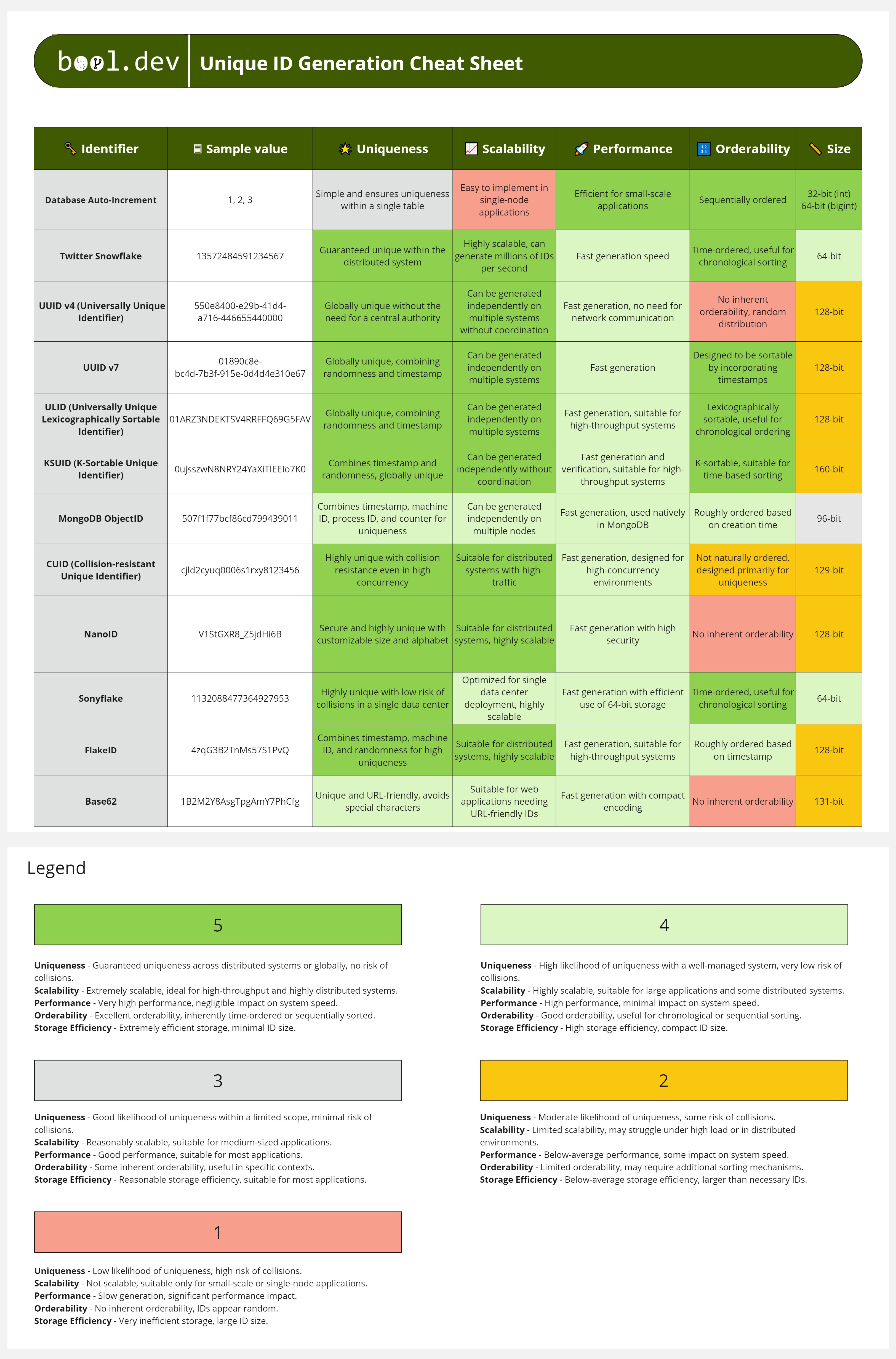
❓ How do you choose distributed IDs, and which IDs are best?
Distributed IDs must be unique across services, generated without coordination, and safe under scale. The wrong choice causes collisions, hot partitions, or performance problems. There is no single “best” ID. The right one depends on your access patterns and infrastructure.
What matters when choosing an ID:
- Global uniqueness without central coordination.
- Fast generation under high load.
- Good databases and index behavior.
- Safe exposure outside the system (URLs, APIs).
- Optional ordering by time.
The Main Candidates:
1. UUID / GUID (v4)
Standard 128-bit random identifiers.
- Pros: Guaranteed to be unique across any system without coordination. No collision risk.
- Cons: Not sortable. Because they are random, inserting them into a clustered index (like in SQL Server or MySQL) causes "index fragmentation," severely hurting write performance. They are also bulky (36 characters as strings).
- Best For: Non-database identifiers, session IDs, or distributed systems where insert order doesn't matter.
2. Snowflake IDs (Twitter/Discord style)
64-bit integers composed of a timestamp, worker ID, and sequence number.
- Pros: Time-sortable. Since the first bits are a timestamp, new IDs are always larger than old ones. This keeps database indexes healthy. They are smaller than UUIDs (64 bits vs 128 bits).
- Cons: Requires a "Coordinator" (like Zookeeper or a central configuration) to assign unique Worker IDs to each node to prevent collisions.
- Best For: High-scale systems like Twitter or Discord where chronological sorting is vital.
3. ULID (Universally Unique Lexicographically Sortable Identifier)
A 128-bit identifier that combines a timestamp with randomness.
- Pros: Lexicographically sortable (sortable as strings). Compatible with UUID storage formats and resolves fragmentation—no coordination required between nodes.
- Cons: Slightly larger than Snowflake IDs; can still lead to "hotspots" in the database if many IDs are generated at the exact millisecond.
- Best For: Modern web apps needing the convenience of UUIDs with the performance of sortable keys.
Practical suggestions:
- Prefer UUID v7 or Snowflake-style IDs for most distributed systems.
- Avoid using UUID v4 as a clustered primary key in write-heavy databases.
- Never expose internal numeric IDs to external clients without proper authorization.
- Generate IDs at the service boundary, not in shared infrastructure.
What .NET engineers should know
- 👼 Junior: Know that IDs must be unique and not coordinated.
- 🎓 Middle: Understand index impact and ordering trade-offs.
- 👑 Senior: Choose IDs based on scale, storage, and domain exposure.
📚 Resources: Unique ID Generation Cheat Sheet
❓ What is eventual consistency, and how do you communicate its impact to the business?
Eventual consistency means that data does not become consistent everywhere immediately. After a change, different parts of the system may temporarily show different states, but over time, they converge to the same correct result.
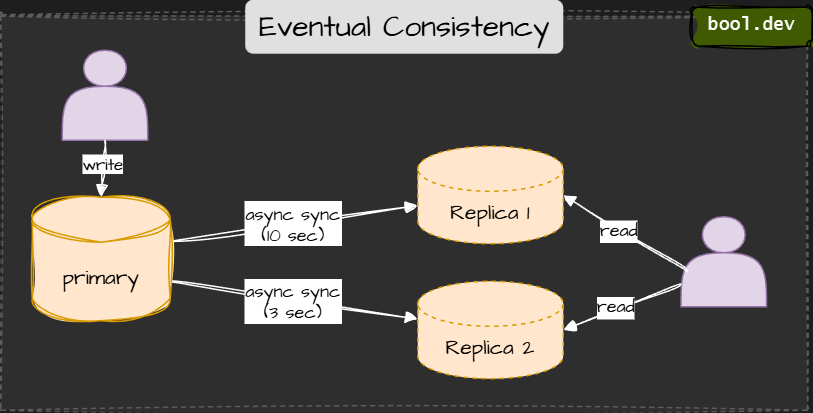
⚠️ Temporary inconsistency
Example:
- An order is placed.
- The Orders service shows it immediately.
- The Reporting service updates a few seconds later.
- Both end up consistent, just not at the same time.
Why do systems choose eventual consistency?
- Better availability during failures.
- Higher throughput and lower latency.
- Independent scaling of services.
- No distributed locks or 2PC.
How to explain this to the business
Translate technical delay into business behavior. Do not say: "eventual consistency".
Say
some screens may update a few seconds later”
Be explicit:
- Dashboards can lag by minutes.
- Notifications may arrive later.
- Payments and balances must be consistent immediately.
What .NET engineers should know
- 👼 Junior: Understands that Read operations might return "stale" data immediately after a Write. Knows that this is a normal part of cloud-scale apps.
- 🎓 Middle: Can design UX patterns to hide latency (e.g., Optimistic UI updates). Knows how to use Idempotency keys to handle cases where a user retries an action because they didn't see the update yet.
- 👑 Senior: Can apply the CAP Theorem to justify consistency choices. Architect the system to ensure Business-critical paths remain strongly consistent while offloading heavy reporting to eventually consistent read models (CQRS).
📚 Resources: Consistency Models for Distributed Systems
❓ What is the difference between logical clocks and physical clocks?
A physical clock is a device that indicates the time. A distributed system can have many physical clocks, and in general, they will not agree.
A logical clock is the result of a distributed algorithm that allows all parties to agree on the order of events.
Examples of physical clocks include a wall clock, a watch, a computer time-of-day clock, a processor cycle counter, the US Naval Observatory, etc.
An example of a logical clock is a Lamport Clock:
class LamportClock

  public int tick(int requestTime) {
      latestTime = Integer.max(latestTime, requestTime);
      latestTime++;
      return latestTime;
  }
Key differences between Physical clocks and Logical clocks
- Physical clocks track real time, logical clocks track order.
- Physical clocks can drift; logical clocks cannot.
- Physical clocks are suitable for logging and UX; logical clocks are ideal for correctness.
- Logical clocks cannot tell you actual timestamps.
Physical clocks are used for:
- Logs and monitoring.
- Expiration times and TTL.
- User-facing timestamps.
Logical clocks are used for:
- Conflict resolution.
- Distributed databases.
- Event ordering.
- Detecting causality.
What .NET engineers should know
- 👼 Junior: Know that physical clocks show time, logical clocks show order.
- 🎓 Middle: Understand clock drift and why ordering cannot rely on time alone.
- 👑 Senior: Choose logical or hybrid clocks when correctness depends on causality.
📚 Resources:
❓ What is write-skew, and how does it appear in distributed systems?
Write-skew is a consistency anomaly in which two concurrent operations read the same data, make independent decisions, and then write updates that, together, violate a business rule. Each write is valid on its own, but the final combined state is wrong.
This usually happens under weak isolation or eventual consistency.
Example:
Initial state:
- Doctor A is on call.
- Doctor B is on call.
Two transactions run at the same time:
- Transaction 1 checks if Doctor B is on call, then removes Doctor A.
- Transaction 2 checks if Doctor A is on call, then removes Doctor B.
Both checks pass. Both writers commit.
Final state: No doctors on call.
The rule is broken, even though no transaction did anything “illegal”.
How to prevent or reduce write-skew
- Move the invariant into a single owner or bounded context.
- Use stronger consistency where invariants matter.
- Model rules as atomic updates rather than read-then-write.
- Use database constraints or conditional updates when possible.
- Accept eventual consistency only where violations are tolerable.
What .NET engineers should know
- 👼 Junior: Know that concurrent updates can break rules even if each update looks correct.
- 🎓 Middle: Recognize write-skew in weak isolation and distributed workflows.
- 👑 Senior: Design invariants carefully and choose consistency guarantees intentionally.
📚 Resources:
❓ What is monotonic read consistency, and why does it matter?
Monotonic read consistency is a guarantee in distributed systems that once a process has read a specific version of a data item, any subsequent reads by that same process will never return an "older" version of that data.
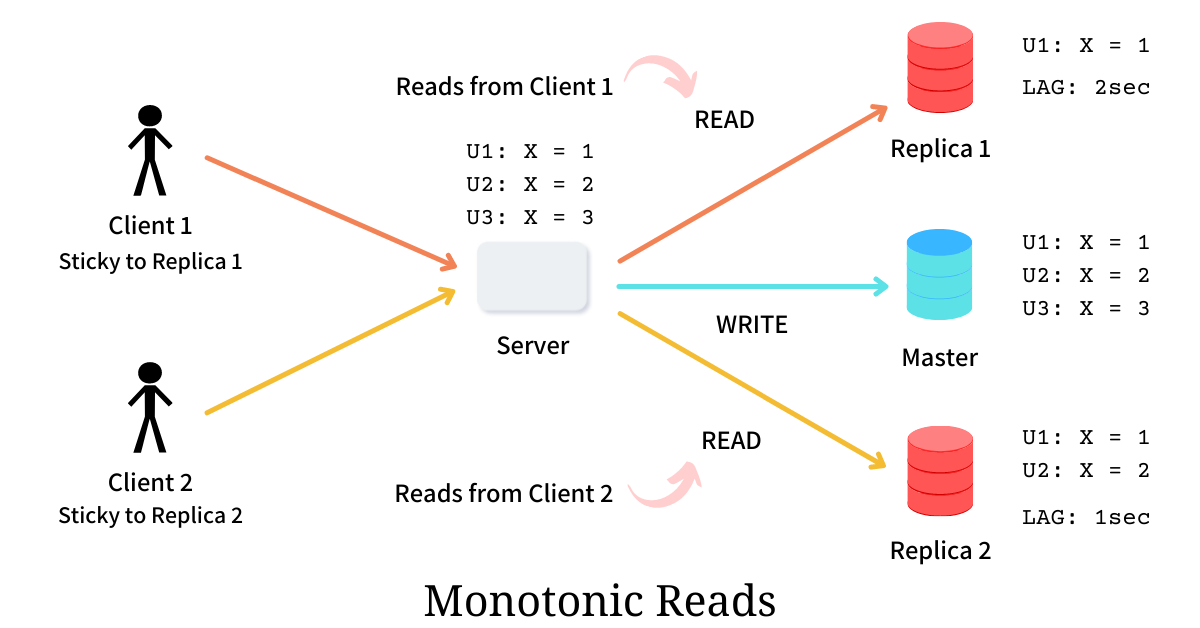
In simpler terms: Time only moves forward. Even if the system as a whole is eventually consistent, a single user should never see data "roll back" or vanish after they have already seen it.
In eventually consistent systems, data replicas update asynchronously. Without monotonic reads, a client might:
- Read new data from one replica.
- Read older data from another replica later.
Common approaches to achieve monotonic read:
- Session stickiness to the replica.
- Read-your-writes guarantees per user session.
- Client-side version tracking.
- Routing reads to replicas that are at least as fresh as the last seen version.
- This is often done at the platform or database level, not in business code.
What monotonic reads do not guarantee
- They do not guarantee global consistency.
- They do not guarantee the latest data for everyone.
- They only guarantee a stable experience for a single client.
What .NET engineers should know
- 👼 Junior: Ensure users do not see older data after viewing newer data.
- 🎓 Middle: Understand how eventual consistency can break UX without monotonic reads.
- 👑 Senior: Design read paths and session behavior to preserve monotonic guarantees.
📚 Resources: Monotonic Reads Consistency
Resilience and Failure Handling
❓ What is a distributed deadlock, and how does it occur?
A distributed deadlock occurs when multiple services or nodes in a distributed system wait for each other indefinitely, preventing any of them from making progress. Each participant is blocked, waiting for another to release a resource, respond, or complete an action.
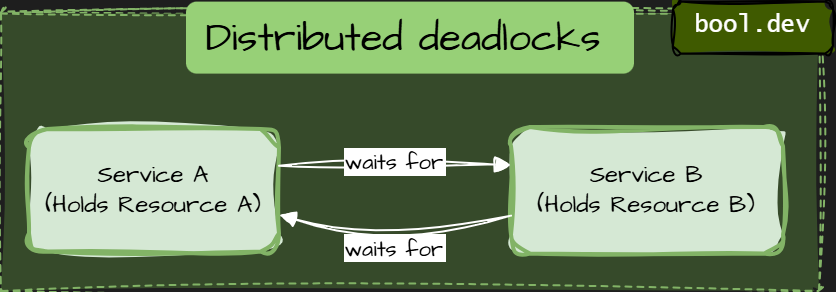
Types of distributed deadlocks:
Resource-Based Deadlocks
Resource-based deadlocks are the most common type of distributed deadlock. They happen when services hold exclusive resources and wait for other resources owned by another service.
How to prevent resource-based deadlocks
- Never hold locks while making synchronous remote calls. Commit or release resources before calling another service.
- Define a global resource ordering. If multiple resources must be locked, always lock them in the same order across services.
- Reduce lock scope and duration. Short transactions. Minimal critical sections.
- Prefer async workflows for cross-service coordination. Events and message queues break circular waiting.
- Design idempotent operations. So retries do not extend lock lifetimes.
- Treat business invariants as resources. If an invariant is exclusive, explicitly design it.
Communication Deadlocks
A communication deadlock occurs when services block each other through synchronous communication, even without explicit locks.
Each service waits for a response from another service, forming a cycle of blocking calls. No database locks. No distributed locks. Just waiting on the network.
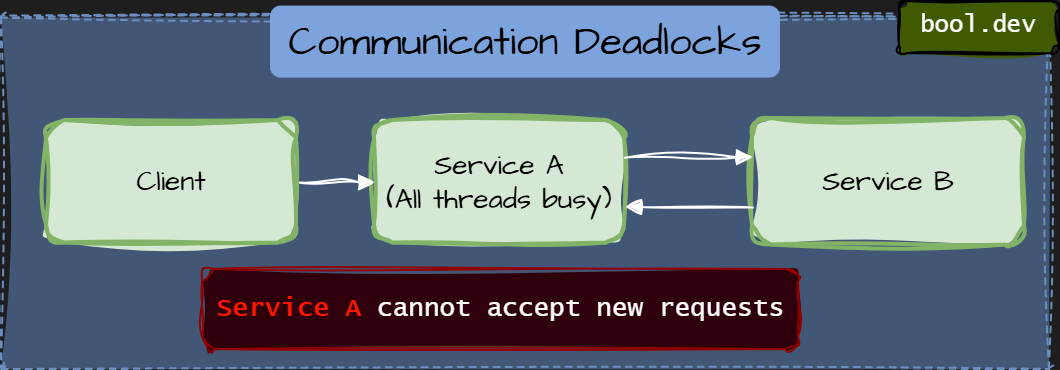
How to prevent communication deadlocks
- Avoid synchronous call cycles. No service should synchronously depend on itself through other services.
- A service should never synchronously depend on itself, even indirectly.
- Prefer async communication for workflows. Queues and events break waiting chains.
- Separate inbound and outbound thread pools. So, blocked outbound calls do not block inbound requests.
- Set strict timeouts and fail fast. Waiting forever is worse than failing early.
- Apply bulkheads and concurrency limits. Limit the number of requests a service can block on downstream dependencies.
- Keep services behaviorally autonomous. A service should not require another service to complete its own request.
Transactional Deadlocks
Transactional deadlocks occur when distributed transactions or long-running workflows block each other, usually due to coordination protocols or incomplete rollback.
Unlike resource-based deadlocks, these do not always involve direct locks.
Instead, they are caused by transaction participants waiting for a global decision that never arrives.
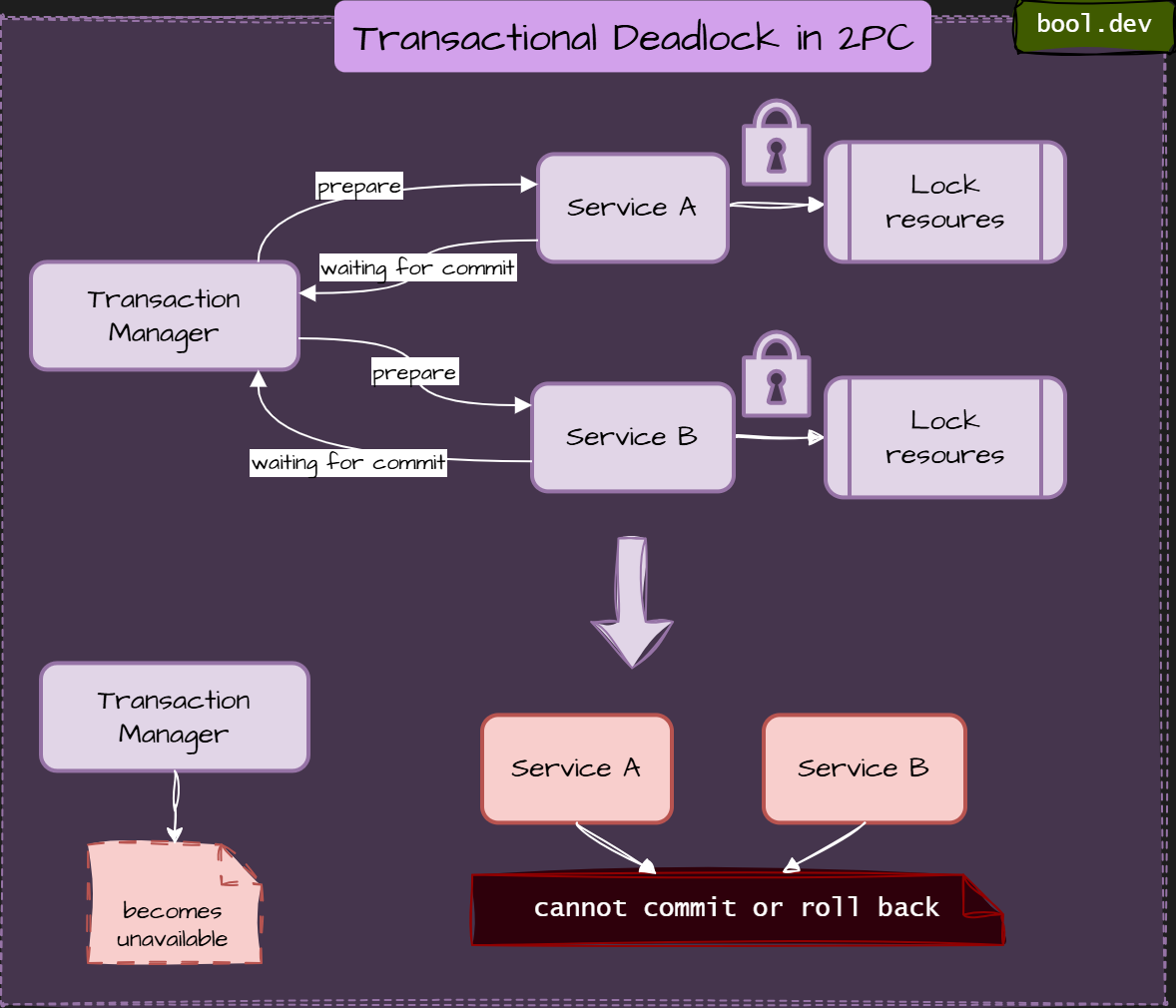
This deadlock type is common in:
- two-phase commit (2PC)
- saga-based workflows with synchronous steps
- long-running business processes
How to prevent transactional deadlocks
- Avoid distributed transactions when possible. Prefer eventual consistency over global atomicity.
- Prefer Saga over 2PC. Sagas reduce deadlock risk, but only if steps and compensations are asynchronous and independent.
- Make compensation idempotent and independent. A rollback should not depend on another service being available or responsive.
- Set clear timeouts for prepared states. Prepared should not mean “forever”.
- Persist workflow state explicitly. So recovery can continue after failures.
- Design for partial failure first. Assume coordinators and participants will disappear.
Lock Manager Deadlocks
Lock manager deadlocks occur when a centralized or semi-centralized lock service becomes the point where waiting chains form and never resolve.
Instead of services blocking each other directly, they all block through the lock manager.
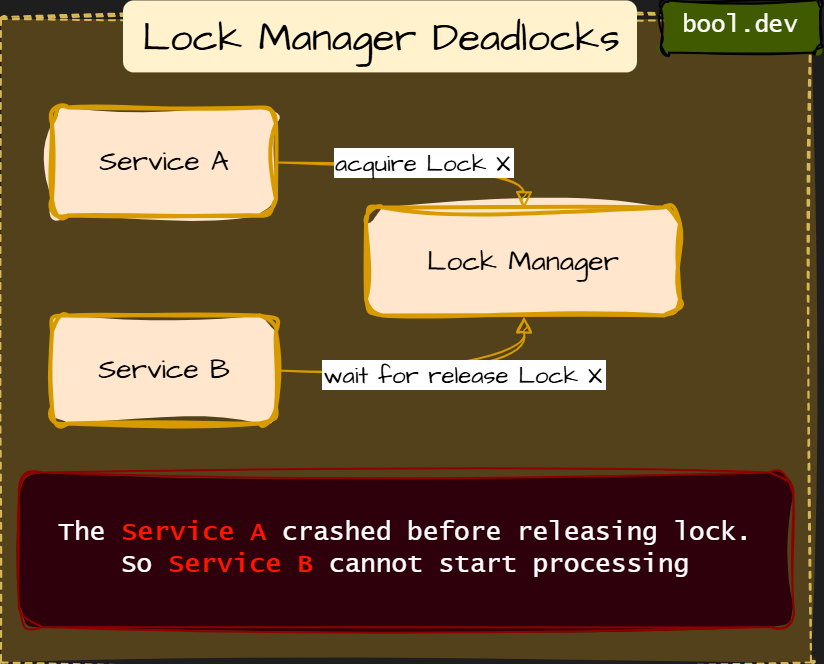
This type of deadlock is subtle because:
- Services do not talk to each other
- The deadlock lives “inside” the coordination infrastructure
- Failures look like infrastructure instability, not logic errors
How to prevent lock manager deadlocks
- Prefer data-level guarantees over distributed locks. Databases are better lock managers than ad-hoc systems.
- Always use lock TTLs. No lock should live longer than the business operation.
- Use fencing tokens. So stale lock holders cannot corrupt the state.
- Avoid acquiring multiple locks. If unavoidable, enforce strict lock ordering.
- Monitor lock duration and contention. Long-held locks are early warning signals.
- Treat the lock manager as critical infrastructure. Design for its partial failure explicitly.
What .NET engineers should know
- 👼 Junior: Know that waiting across services can bring the whole system to a halt.
- 🎓 Middle: Recognize risky patterns like long synchronous call chains and held locks.
- 👑 Senior: Design workflows to avoid circular waits and enforce timeouts and async boundaries.
📚 Resources: Deadlocks in Distributed Systems: Detection, Prevention, Recovery
❓ What is split-brain, and how do systems avoid it?
Split-brain is a failure scenario in which a distributed system is divided into multiple partitions, and each partition believes it is the only active or “leader” partition. As a result, numerous nodes simultaneously make conflicting decisions.
In simple terms, the system loses agreement on who is in charge.
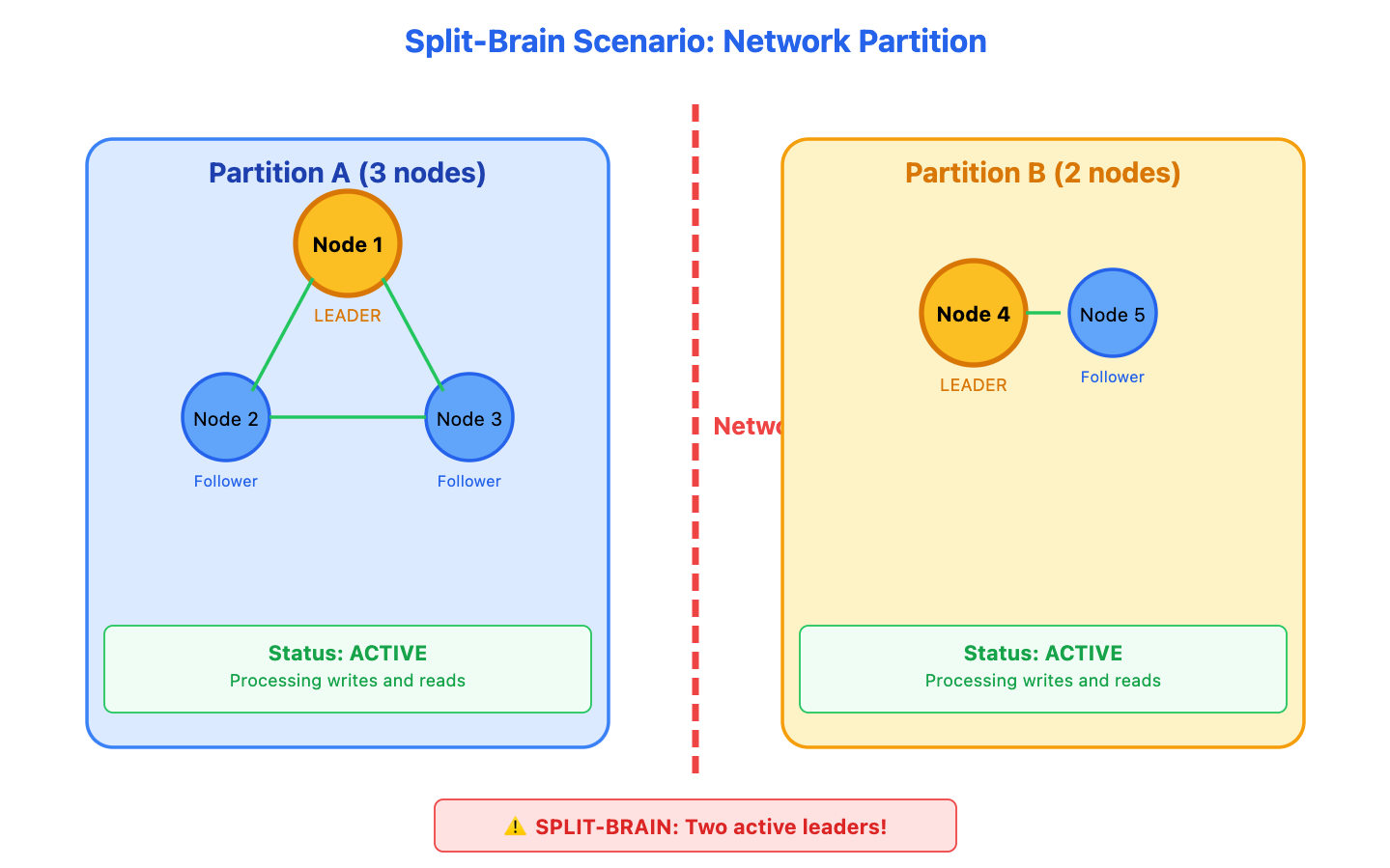
Typical scenario:
- A cluster is split into two groups due to a network failure.
- Nodes in each group can still communicate internally.
- Each group assumes the other is dead.
- Both groups elect a leader or accept writes.
Now, two active sides are making independent decisions.
How Systems Avoid Split-Brain:
Modern distributed systems (such as Kubernetes, Kafka, and Elasticsearch) use several strategies to ensure that only one "brain" remains active during a partition.
1. Quorum (Majority Vote)
The most common solution is to require a Quorum—more than half of the nodes (N/2 + 1) to perform any critical action or elect a leader.
2. Fencing / STONITH(Shoot The Other Node In The Head)
When a master node suspects another node is causing a split, it uses a power management tool or a hardware switch to physically power down or reset the other node, ensuring it cannot write any data.
3. Generation Clock / Epoch Numbers
Systems use a monotonically increasing number (called an Epoch or Term) to track the current leadership.
Every time a new leader is elected, the version number increases. If a "brain" from an old partition tries to write data, the storage layer checks the Epoch number. If the number is lower than the current one, the write is rejected.
4. Shared Storage Leases
In some active-passive setups, nodes compete for a lease, or "lock," on a shared resource (such as a file or a database record).
Summary:
| Strategy | When to Use | Trade-off |
|---|---|---|
| Quorum | Most distributed databases (Raft/Paxos). | Most distributed databases (Raft/Paxos). |
| Fencing | High-availability (HA) clusters. | Requires hardware/cloud API integration. |
| Epochs | Kafka, ZooKeeper. | Only protects the data layer, not the state |
| Leases | Distributed locking (Redis, Consul). | Dependent on time synchronization. |
What .NET engineers should know
- 👼 Junior: Split-brain means multiple parts of the system think they are in charge.
- 🎓 Middle: Quorum and leader election prevent split-brain during partitions.
- 👑 Senior: Design systems to fail fast and protect consistency instead of risking data corruption.
📚 Resources:
❓ How do you design safe retry strategies across multiple services?
Safe retry strategies prevent retries from worsening failures. In distributed systems, poorly designed retries can amplify load, cause cascading failures, and turn minor incidents into outages. The goal is to retry only when it helps and to fail fast when it does not.
Core principles of safe retries
- Retry only transient failures. Retries are appropriate for timeouts, temporary network issues, or short outages of dependencies. Validation errors, authorization failures, and business rule violations must never be retried.
- Retries must be bounded. Every retry policy has a strict limit on the number of attempts or the time. Infinite retries create retry storms and hide real failures.
- Retries must slow down. Immediate retries increase pressure on already failing systems. Backoff is mandatory.
Key building blocks
- Timeouts first. Retries without timeouts are dangerous. Every remote call must fail fast so retries do not pile up.
- Exponential backoff with jitter. Backoff spreads retry attempts over time. Jitter adds randomness, so many clients do not retry simultaneously.
- Idempotency. Retries assume the same operation may run more than once. APIs and message handlers must be idempotent to avoid duplicate side effects.
- Circuit breakers. When a dependency is clearly unhealthy, retries stop for a period of time. This protects both the caller and downstream services.
- Retry budgets. Limit the amount of retry traffic a service can generate. When the budget is exhausted, failures are surfaced instead of retried.
What .NET engineers should know
- 👼 Junior: Retries are only for transient failures and must always be limited.
- 🎓 Middle: Combine timeouts, backoff, idempotency, and circuit breakers.
- 👑 Senior: Design retries end-to-end, accounting for call chains, retry budgets, and observability.
❓ What is a circuit breaker, and when do you need one?
A circuit breaker is a resilience pattern that protects a system from repeatedly calling a failing dependency. Instead of retrying endlessly, it temporarily stops requests and allows the system to recover.
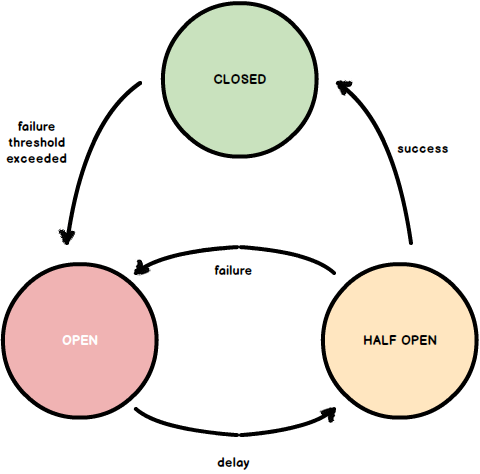
How a circuit breaker works
- Closed
Requests flow normally. Failures are monitored. - Open
Failure threshold is exceeded. Calls are rejected immediately for a cooldown period. - Half-open
After the cooldown, a small number of test calls are allowed. If they succeed, the breaker closes. If they fail, it opens again.
When you need one
- Calls to remote dependencies (HTTP services, databases, external APIs).
- Dependencies that fail by timing out or becoming slow.
- High-traffic systems where waiting for failures exhausts resources.
- Multi-service call chains where a slow service can cause cascading failures.
- Circuit breakers are usually paired with timeouts and limited retries.
What .NET engineers should know
- 👼 Junior: Circuit breaker stops calling a failing dependency to prevent timeouts and cascading failures.
- 🎓 Middle: Combine circuit breakers with timeouts, bounded retries, and fallback behavior.
- 👑 Senior: Tune thresholds and cooldowns, add observability, and prevent retry storms across service chains.
📚 Resources: Circuit Breaker
❓ How does Bulkhead isolation in .NET protect against cascading failures in microservices?
Bulkhead isolation is a resilience pattern that limits the number of resources (threads, tasks, or connections) a part of your system can use. It prevents failures in one area from spreading and crashing everything else, just as watertight compartments on a ship.
In microservices, this means:
- If one external service slows down or crashes, it won’t exhaust all your threads or memory.
- Each subsystem or client gets its quota of execution capacity.
- Fast and healthy parts of your system stay responsive, even when other components fail.
How to implement Bulkhead in .NET:
You can use Polly, a popular .NET resilience library:
var bulkheadPolicy = Policy.BulkheadAsync<HttpResponseMessage>(
    maxParallelization: 10,
    maxQueuingActions: 5
);
Wrap your outgoing HTTP call:
await bulkheadPolicy.ExecuteAsync(() =>
    httpClient.GetAsync("https://slow-service/api/data")
);
This setup:
- Allows up to 10 concurrent calls
- Queues 5 more
- Rejects the rest with a
BulkheadRejectedException
What .NET engineers should know:
- 👼 Junior: Should understand that failures in one part of a system can affect others without isolation.
- 🎓 Middle: Should apply Polly bulkhead policies to protect critical services and prevent resource exhaustion.
- 👑 Senior: Should architect service boundaries with isolation in mind—using bulkheads, queues, and timeouts to reduce blast radius during failures.
📚 Resources:
❓ What is backpressure, and how do you apply it to message processing?
Backpressure is a mechanism that prevents a fast producer from overwhelming a slow consumer.
Instead of letting queues grow infinitely, the system applies controlled pressure, slowing producers when consumers can’t keep up.
Without backpressure:
- Queues grow unbounded.
- Memory and storage are exhausted.
- Latency spikes and timeouts cascade.
- Failures spread to healthy services.
With backpressure:
- The load is absorbed gradually.
- Systems degrade gracefully instead of collapsing.
- Failures stay isolated.
- How backpressure works in messaging systems
- Backpressure shifts pressure upstream when consumers cannot keep up.
Common techniques
- Limit concurrency. Control how many messages a consumer processes in parallel.
Example: limit the number of active handlers or threads. - Control prefetch and batching. Reduce the number of messages pulled from the broker at once.
This prevents consumers from buffering more than they can process. - Slow or stop consumption. Temporarily pause consumers when CPU, memory, or downstream dependencies are under pressure.
- Use bounded queues. Queues with limits force producers to slow down or block rather than endlessly push messages.
- Apply retry delays. Use delayed retries instead of tight retry loops that amplify load.
- Shed load when needed. Reject, defer, or dead-letter non-critical messages under extreme pressure.
Common mistakes
- Unlimited consumer concurrency.
- High prefetch combined with slow processing.
- Immediate retries with no delay.
- Treating queues as infinite buffers.
What .NET engineers should know
- 👼 Junior: Know that backpressure protects systems from overload.
- 🎓 Middle: Tune concurrency, prefetch, and retry policies.
- 👑 Senior: Design end-to-end flow control and prevent overload propagation.
❓ How do you handle poison messages that repeatedly crash consumers?
A Poison Message is a specific type of message that contains data the consumer cannot process (e.g., malformed JSON, a divide-by-zero scenario, or an edge case not handled in code). Because the message itself is "bad," retrying it simply causes the consumer to crash or fail again, creating an infinite loop.
Here are the steps to handle them:
| Step | Technique | Primary Purpose |
|---|---|---|
| Detection | Delivery Count | Identifying that a message is failing repeatedly. |
| Containment | Dead Letter Queue | Moving the "toxic" message away from healthy traffic. |
| Logic | Try/Catch Filtering | Avoiding retries for obviously malformed data. |
| Protection | Circuit Breaker | Preventing the service from restarting endlessly. |
What .NET engineers should know
- 👼 Junior: Understand that poison messages must not block message processing.
- 🎓 Middle: Configure retries, DLQs, and idempotent consumers correctly.
- 👑 Senior: Design failure classification, safe replay strategies, and monitoring around DLQs.
📚 Resources:
❓ What patterns help with long-running workflows or batch jobs?
Long-running workflows and batch jobs cannot rely on synchronous calls or single transactions. They must survive restarts, partial failures, retries, and long delays. The key idea is to make progress durable and resumable.
Here are the primary patterns:
1. The Saga Pattern (Orchestration)
For workflows that span multiple services and take minutes, hours, or days (e.g., an e-commerce order-to-delivery pipeline).
Mechanism: A central "State Machine" tracks the current step. It triggers a task, waits for an async completion event, and then moves to the next state.
Resiliency: If a step fails, the Saga executes Compensating Transactions (undo actions) to ensure eventual consistency.
2. Asynchronous Request-Reply
Used when a client initiates a long task via an API (e.g., generating a massive PDF report).
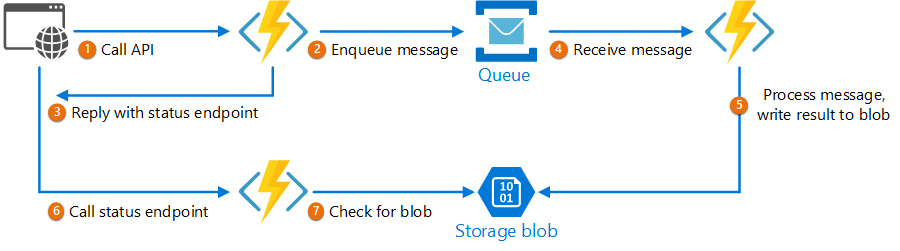
Mechanism: The server immediately returns a 202 Accepted with a Location header pointing to a status URL. The client polls this URL (or waits for a webhook) to see when the job is finished.
Benefit: Prevents HTTP timeouts and keeps the user interface responsive.
3. The Claim Check Pattern
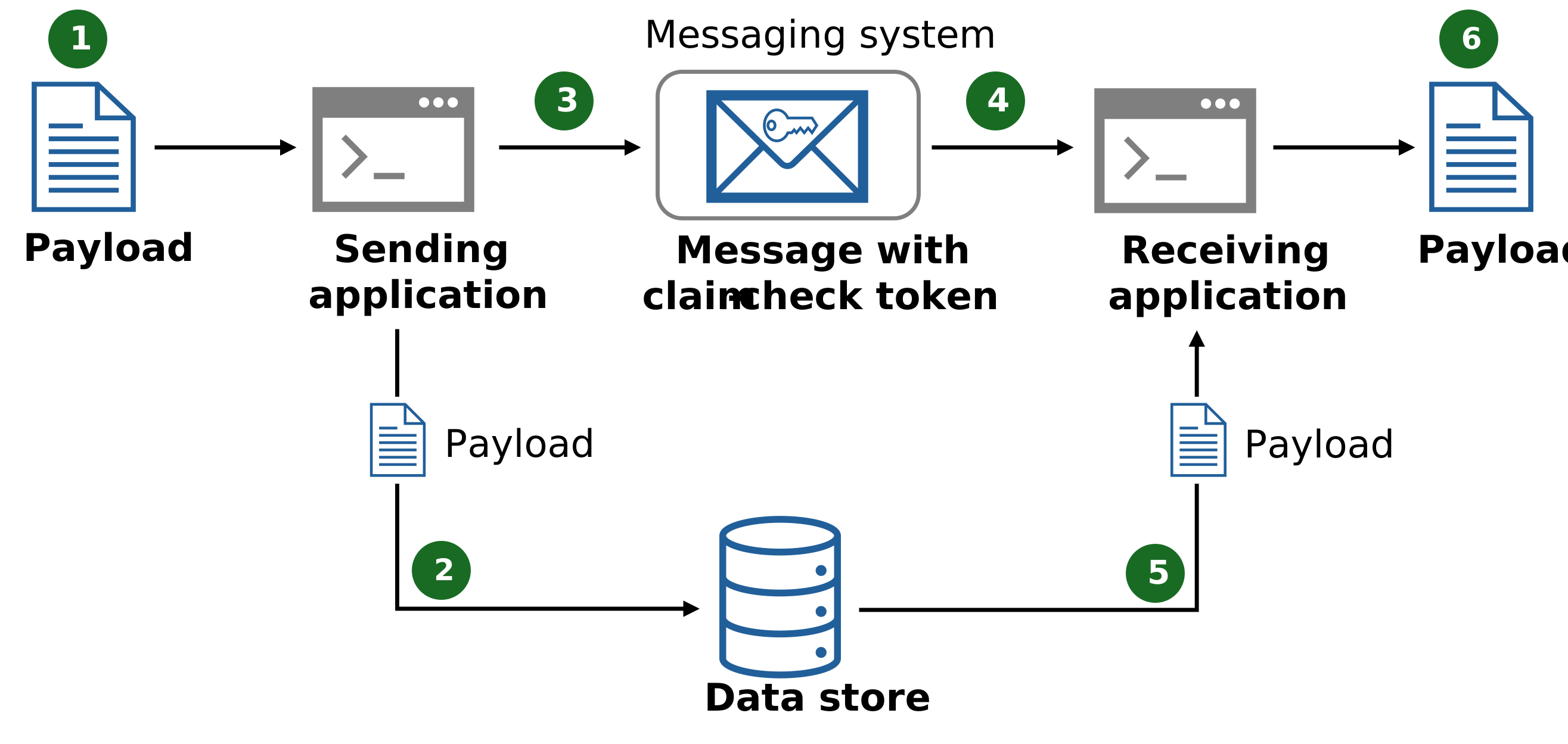
Used when batch jobs involve data payloads too large for a message broker (e.g., a 500MB CSV file).
Mechanism: The producer uploads the data to Blob Storage (e.g., S3 or Azure Blob Storage) and sends a message containing only the "Claim Check" (the URL or ID).
Benefit: Prevents memory exhaustion and "Out of Memory" errors in the message broker.
4. Checkpointing (Step-Restart)
Essential for batch jobs that take hours (e.g., a data migration of 10 million rows).
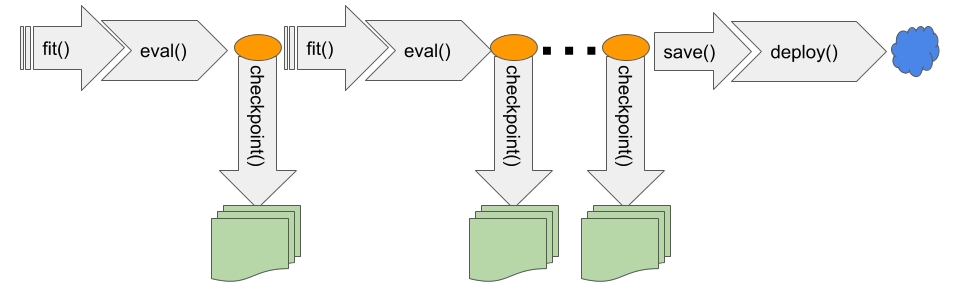
Mechanism: The system processes data in small batches (e.g., 1,000 rows at a time) and saves its progress (Checkpoint) in a database after each batch.
Resiliency: If the server crashes at 90% completion, it can restart from the last successful checkpoint rather than starting from scratch.
5. Competing Consumers with Priority Queues
Used to manage resources when processing a mix of urgent and non-urgent batch jobs.
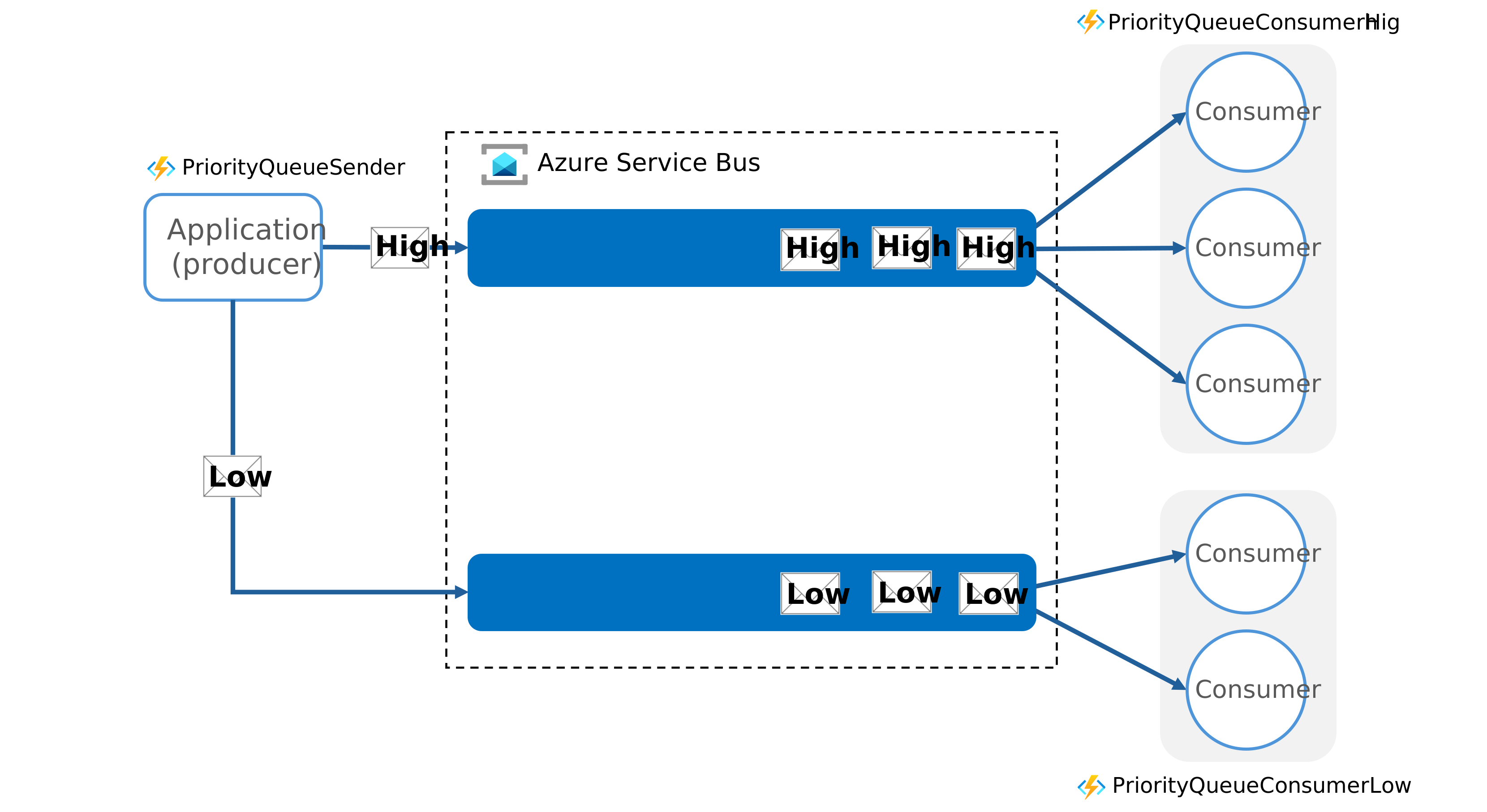
Mechanism: High-priority tasks (e.g., "VIP Customer Billing") are placed in a high-priority queue that consumers process first, while lower-priority tasks wait.
Benefit: Ensures that massive background batch runs don't "starve" or delay urgent business requests.
What .NET engineers should know
- 👼 Junior: Know that long-running work must be split into resumable steps.
- 🎓 Middle: Use Sagas, Process Managers, and idempotent handlers for reliability.
- 👑 Senior: Design durable workflows with state, timeouts, retries, and observability.
📚 Resources:
- Catalog of Patterns of Distributed Systems
- Priority Queue pattern
- Asynchronous Request-Reply pattern
- [ru] Saga pattern
❓ What RED and USE metrics should you instrument?
RED and USE are two complementary metric sets. RED focuses on user-facing services. USE focuses on system resources. Together, they help answer two questions: are users affected, and where is the bottleneck?
RED tells you when users or upstream systems are suffering.
Rate
- Requests per second per endpoint.
- Messages processed per second per queue or consumer.
Errors
- Error rate split by status code or exception type.
- Failed message handling count and DLQ rate.
Duration
- Latency is measured as percentiles, not averages.
- Track p50, p95, and p99.
- For async flows, include end-to-end processing time.
USE metrics for resources. USE is applied to infrastructure components.
Utilization
- CPU usage.
- Memory usage.
- Thread pool usage.
- Database connection pool usage.
Saturation
- Queue length and backlog.
- Thread pool queue length.
- Databases lock, wait, and connection exhaustion.
Errors
- Resource-level failures such as timeouts, connection failures, or disk or network errors.
What .NET engineers should know
- 👼 Junior: RED shows user pain, USE shows system pressure.
- 🎓 Middle: Always track latency percentiles and queue depth.
- 👑 Senior: Build alerts around RED signals and use USE for root cause analysis.
📚 Resources:
Security in Distributed Systems
❓ How do you authenticate and authorize between microservices?
In a microservices architecture, authentication and authorization are typically handled through a combination of centralized and decentralized patterns to ensure both security and performance.
1. External Authentication (Entry Point)
At the edge of the system, a centralized API Gateway or a Backends-for-Frontends (BFF) layer is responsible for the initial authentication and authorization of incoming client requests.
- The Gateway's Role: It serves as the single entry point, handling auth and permissions and managing the user context.
- Strangler Fig Pattern: During migrations, this gateway can also manage routing rules and feature flags to safely redirect traffic between legacy and new services.
2. Internal Service-to-Service Security
Once a request is inside the network, services must verify the identity and permissions of the calling service.
- Identity Propagation: The API Gateway often translates external credentials (such as a session cookie) into a standardized token (such as a JWT) and passes it to downstream services.
- Sidecar Proxies: In advanced setups such as a Service Mesh, sidecar proxies can handle mutual TLS (mTLS) for encrypted, authenticated communication between services without requiring changes to application code.
- BFF Orchestration: A BFF can handle user context and permissions tailored explicitly for its associated frontend while orchestrating calls to internal services via REST or gRPC.
3. Choosing Communication Protocols
The method used to communicate between services also impacts how security is implemented:
- gRPC: Best for internal, high-performance service-to-service calls with strong contracts and low latency.
- REST: Often used for public APIs and mobile clients where simplicity and wide support are prioritized.
- Messaging: Used for asynchronous workflows where producers send events without waiting for an immediate response, requiring security to be embedded within the message or handled by the broker.
4. Common Pitfalls
- Logic Leakage: A familiar architectural "smell" is allowing business rules or complex authorization logic to leak into the API Gateway or BFF layer.
- God Services: Avoid letting the gateway or an orchestration layer become a "god service" that owns too much behavior instead of just coordinating it.
What .NET engineers should know
- 👼 Junior: Services must authenticate each other, not just users.
- 🎓 Middle: Use tokens, claims, and policy-based authorization.
- 👑 Senior: Design zero-trust service communication with short-lived credentials and clear ownership.
❓ What is a token exchange, and when is it used?
A token exchange is a security pattern in which one token is exchanged for another with a different scope, audience, or trust level. It is commonly used when a service needs to call another service on behalf of a user or another service, without reusing the original token directly.
In simple terms: One token comes in, a different token goes out, tailored for the next hop.
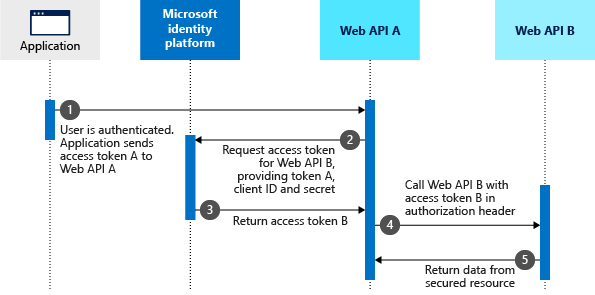
In microservices, a single token often cannot be reused safely:
- It may be issued for a different audience.
- It may carry more permissions than needed.
- Downstream services may not trust it.
What .NET engineers should know
- 👼 Junior: Token exchange creates a new, safer token for downstream calls.
- 🎓 Middle: Use token exchange for delegation and least-privilege service calls.
- 👑 Senior: Design identity flows where each service gets only the access it needs.
📚 Resources:
- Microsoft identity platform and OAuth 2.0 On-Behalf-Of flow
- Set up OAuth 2.0 On-Behalf-Of Token Exchange
❓ Why is secret rotation important in distributed systems?
In distributed systems, secret rotation is the periodic rotation of credentials (such as API keys, database passwords, and encryption keys) to reduce the risk of unauthorized access.
It is considered a critical security practice for the following reasons:
- Limits the "Blast Radius" of a Compromise: If a secret is leaked or stolen, its period of usefulness to an attacker is limited to the time remaining until the next rotation. This ensures that a single breach does not grant indefinite access to the system.
- Mitigates "Security Leakage": A familiar architectural "smell" in microservices is passing broad security tokens or long-lived credentials across multiple services. Regular rotation ensures that even if a credential "leaks" into logs, metrics, or a compromised downstream service, it quickly becomes invalid.
- Enforces "Least Privilege" over Time: Ensures credentials remain aligned with the service's current needs. If a service no longer needs access to a specific resource, the rotated credentials can be issued with reduced scopes.
- Validates Automated Recovery: Regularly rotating secrets proves that your system can handle credential updates without downtime. This "drills" the recovery process, making it easier to rotate secrets quickly in the event of an actual emergency breach.
- Supports Compliance and Auditing: Many security standards and regulatory frameworks (such as PCI DSS or SOC2) require periodic rotation of administrative and service-level secrets to maintain a secure posture.
Why is rotation harder in distributed systems
- Many services use secrets.
- Deployments are independent and asynchronous.
- Downtime during rotation is unacceptable.
- Some components cache secrets aggressively.
What .NET engineers should know
- 👼 Junior: Secrets can leak and must be rotated regularly.
- 🎓 Middle: Use short-lived credentials and runtime secret reload.
- 👑 Senior: Design systems that rotate secrets automatically without downtime.
📚 Resources
❓ How do you secure internal service communication in Kubernetes?
In a Kubernetes environment, securing internal service communication requires a multi-layered approach that addresses encryption, identity, and network-level access control.
The following strategies are standard for securing inter-service traffic:
| Layer | Tool/Mechanism | Purpose |
| Transport | mTLS (Service Mesh) | Encrypts data in transit and verifies service identity. |
| Network | Network Policies | Restricts which pods can talk to each other. |
| Application | JWT / Token Exchange | Ensures the caller has permission to perform a specific action. |
| Edge | API Gateway / BFF | Validates external users before they access internal services. |
What .NET engineers should know
- 👼 Junior: Internal traffic is not automatically trusted. Use NetworkPolicies and HTTPS/mTLS.
- 🎓 Middle: Prefer workload identity over shared secrets, validate tokens, and enforce service authorization per endpoint.
- 👑 Senior: Build a defense-in-depth setup: default-deny networking, mTLS everywhere, least-privilege identities, and consistent policy enforcement across services.
📚 Resources:
❓ What is zero-trust networking, and why is it growing in popularity?
Zero-trust networking is a security model built on the principle of "never trust, always verify". Unlike traditional perimeter-based security—which assumes everything inside a corporate network is safe—zero-trust treats every request as a potential threat, regardless of its origin.
What zero-trust networking means in practice:
- There is no “internal trusted network”.
- Every service call is authenticated.
- Access is granted based on identity and policy, not IP or location.
- Permissions follow least privilege.
Why zero-trust is growing in popularity
- Microservices and cloud native systems. Services scale dynamically and communicate constantly. Static network trust no longer works.
- Security incidents and supply-chain attacks. Breaches show that internal networks cannot be trusted—zero-trust limits blast radius.
- Remote and hybrid environments. Users, services, and infrastructure are no longer in one place. Identity becomes the only stable signal.
- Better tooling and platforms. mTLS, service meshes, identity providers, and policy engines are now mature enough to make zero-trust practical.
- Compliance and regulation. Many security standards now expect continuous verification and least-privilege access.
How zero-trust is typically implemented
- Strong service identity (certificates, tokens).
- Mutual TLS for all service-to-service traffic.
- Policy-based authorization per request.
- Network Policies as a baseline, not the primary defense.
- Continuous rotation of credentials.
What .NET engineers should know
- 👼 Junior: Internal network traffic is not automatically trusted.
- 🎓 Middle: Use identity, mTLS, and policy-based authorization between services.
- 👑 Senior: Design systems assuming breach, minimize trust, and limit blast radius.
📚 Resources: Zero Trust Guidance Center
❓ How can you reuse a user token across multiple microservices for authorization?
In .NET microservices, securely reusing a user token across multiple services requires balancing architectural simplicity with robust security principles like Least Privilege and Zero Trust.
Here is how to implement this from a .NET perspective:
1. Identity Propagation via JWT
The most common approach in .NET is propagating a JSON Web Token (JWT) through the service chain.
- Initial Auth: An API Gateway (like YARP or Ocelot) or a Backends-for-Frontends (BFF) layer authenticates the incoming request and attaches the JWT to the
Authorizationheader. - Downstream Calls: Using
IHttpClientFactoryor gRPC clients in .NET, you can forward this header to internal services. - Validation: Each receiving ASP.NET Core service uses
Microsoft.AspNetCore.Authentication.JwtBearerto validate the token's signature against a central Identity Provider (IdP).
2. Token Exchange Pattern (RFC 8693)
To avoid "Security Leakage"—an architectural smell where a broad user token is passed into deep internal services—senior .NET engineers often use Token Exchange.
- The Problem: Passing a high-privilege user token everywhere increases the "blast radius" if an internal service is compromised.
- The Solution: Service A presents the user's token to an Authorization Server, which issues a new, short-lived token specifically scoped for Service B.
- Internal Context: This allows for Impersonation/Delegation, where the downstream service knows both who the user is and which service is acting on their behalf.
3. Securing Interservice Communication
Beyond token reuse, the underlying connection should be secured to prevent man-in-the-middle attacks within the cluster.
- Mutual TLS (mTLS): In a Kubernetes environment, a Service Mesh (such as Istio or Linkerd) can use sidecar proxies to automatically handle mTLS and certificate rotation, ensuring that only verified services can communicate with one another.
- Network Policies: Use Kubernetes Network Policies to implement a Zero Trust architecture by explicitly allowing only necessary traffic between specific pods.
4. Architectural Best Practices
- Avoid "God Tokens": Do not pass a single token with all-powerful scopes throughout the system.
- BFF Orchestration: Use the BFF pattern to handle frontend-specific authentication and aggregate data from internal services using more restricted service-to-service credentials.
- Separate Cross-Cutting Concerns: Offload token validation and mTLS to sidecar proxies to keep your .NET business logic clean of infrastructure-heavy security code.
What .NET engineers should know
- 👼 Junior: User tokens must be validated by every service.
- 🎓 Middle: Use claims and scopes for local authorization decisions.
- 👑 Senior: Design identity flows that balance reuse, least privilege, and service autonomy.
Performance and Scalability
❓ What is the difference between latency and throughput?
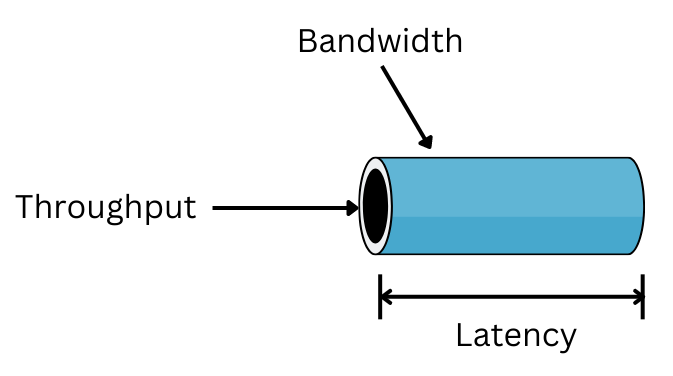
Latency (The "Speed") is the time it takes for a single unit of data (or a single request) to travel from the source to the destination and back.
Throughput (The "Volume") is the amount of data or the number of requests a system can process within a specific timeframe.
What .NET engineers should know
- 👼 Junior: Latency is the time it takes for a request to complete. Throughput is how many requests are handled.
- 🎓 Middle: Monitor latency percentiles, not just averages, and relate them to throughput.
- 👑 Senior: Optimize based on business needs. User paths care about latency. Pipelines and batch jobs care about throughput.
❓ Why does chatty communication break performance in microservices?
Chatty communication happens when a single user request triggers many synchronous calls between services. Each call may be fast on its own, but together they create latency, fragility, and poor scalability.
In microservices, network calls are the expensive part.
What chatty communication looks like
- One API request causes 10–20 downstream HTTP calls.
- Services call each other in a chain.
- The client or BFF orchestrates many fine-grained calls.
- Simple screens require data from multiple services to be synchronized.
- This often appears after naive service decomposition.
Why does it break performance?
- Network latency multiplies. Each network hop adds latency. Even 10–20 ms per call can add up to hundreds of milliseconds when chained.
- Failure probability increases. More calls mean more chances for timeouts or partial failures. One slow service can break the whole request.
- Poor tail latency. Chatty calls amplify p95 and p99 latency. One slow dependency dominates the response time.
- Tight coupling. Services become implicitly dependent on each other’s availability and performance. Scaling one service no longer helps.
- Load amplification. One incoming request fans out into many internal requests, increasing load across the system.
- Hard to reason about. Debugging and tracing become difficult when business logic is spread across many synchronous calls.
How to reduce chatty communication
- Design services around business capabilities, not entities.
- Prefer coarse-grained APIs.
- Use async messaging for non-critical paths.
- Aggregate data inside services, not in clients.
- Cache aggressively where appropriate.
- Use BFFs carefully and keep them thin.
What .NET engineers should know
- 👼 Junior: Network calls are expensive compared to in-process calls.
- 🎓 Middle: Spot chatty patterns and redesign APIs to be coarser.
- 👑 Senior: Enforce boundaries that minimize synchronous dependencies and protect latency.
❓ How do you design services that scale horizontally?
Designing services for horizontal scaling—adding more instances of a service to handle increased load—requires a shift away from stateful monoliths toward stateless, decoupled architectures. In a .NET microservices environment, this is achieved through the following strategies:
1. Ensure Statelessness
The most critical requirement for horizontal scaling is that each instance of a service can handle any incoming request.
- Avoid In-Memory State: Do not store user sessions, cached data, or background task states in the service's local memory.
- Centralized State Management: Use external distributed stores, such as Redis, for caching and session management. This ensures that if a load balancer routes a user's second request to a different instance, the necessary data is still available.
- Stateless Authentication: Use JWT (JSON Web Tokens) for authentication so that services can verify identity using a public key without needing to call a central session database for every request.
2. Leverage Asynchronous Communication
Synchronous calls (like REST or gRPC) create "temporal coupling," where the caller must wait for the receiver to be online and responsive.
- Messaging and Queues: Use a message broker like RabbitMQ or Azure Service Bus to decouple services. This allows you to scale the number of consumer instances independently based on the size of the message queue.
- Event-Carried State Transfer (ECST): Include all necessary data in the event payload so that consumer services don't have to call back to the producer for more information, further reducing coupling and improving scalability.
3. Database Scaling and Isolation
A single, monolithic database often limits the application layer's horizontal scaling.
- Database per Service: Ensure each microservice owns its own data and schema to avoid hidden coupling and lock contention.
- Read Replicas: Use read-only replicas of your database to offload traffic from the primary instance.
- Saga Pattern: For transactions that span multiple services, use the Saga pattern (Orchestration or Choreography) to manage consistency across distributed data stores without requiring resource-heavy distributed locks.
4. Optimize Network Performance
As you add more service instances, the network communication overhead can become a bottleneck.
- gRPC for Internal Calls: Use gRPC instead of REST for service-to-service communication to benefit from low-latency, high-performance binary serialization (Protobuf).
- Backends-for-Frontends (BFF): Implement a BFF layer to aggregate multiple internal service calls into a single response for the client, reducing the number of expensive network round-trips.
5. Specialized Runtimes (e.g., Microsoft Orleans)
For high-scale, stateful scenarios (like gaming or real-time IoT), consider specialized frameworks like Microsoft Orleans.
- Virtual Actors: Orleans uses a "virtual actor" model where stateful entities (Grains) are automatically distributed across a cluster.
- Location Transparency: The runtime handles the placement and activation of these actors, allowing you to scale out by simply adding more "Silo" instances to the cluster.
What .NET engineers should know
- 👼 Junior: Stateless services scale better than stateful ones.
- 🎓 Middle: Design idempotent APIs and externalize state.
- 👑 Senior: Build systems that assume instances come and go at any time.
📚 Resources:
❓ What is load shedding, and when should you apply it?
Load shedding is a deliberate strategy to drop or reject some requests when a system is overloaded. Instead of trying to handle everything and failing unpredictably, the system fails fast for a subset of traffic to protect overall stability.
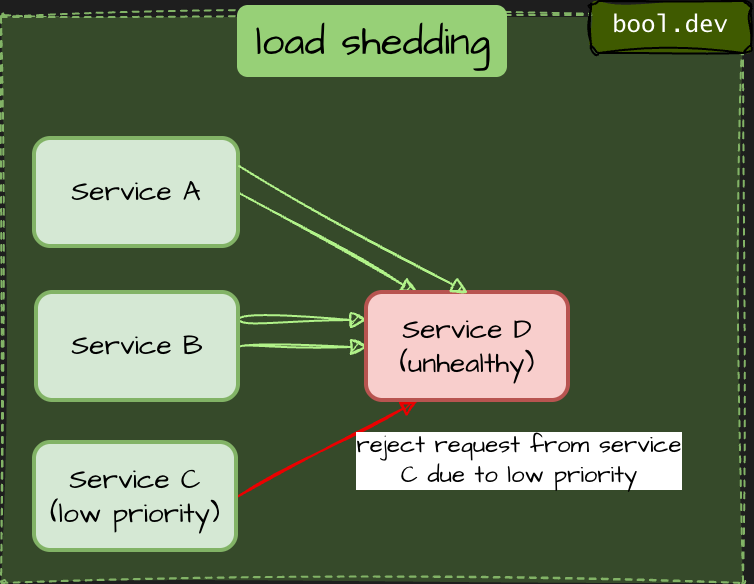
The goal is graceful degradation, not maximum throughput at all costs.
What load shedding does
- Rejects excess work before it consumes critical resources.
- Keeps latency and error rates acceptable for remaining requests.
- Prevents cascading failures across services.
Common load shedding techniques
- Request rejection. Return a fast error when limits are exceeded, such as HTTP 429 or 503, instead of queueing endlessly.
- Rate limiting. Cap requests per client, user, or service to prevent noisy neighbors from overwhelming the system.
- Priority-based shedding. Drop low-priority traffic first, such as background jobs, analytics, or non-critical endpoints.
- Queue bounds. Use bounded queues. When full, new work is rejected rather than piling up and increasing latency.
- Circuit breakers. When a dependency is unhealthy, stop sending traffic to it temporarily to avoid amplification.
- Backpressure. Slow down producers or consumers when downstream systems are saturated.
When should you apply load shedding
- Traffic spikes exceed planned capacity.
- Latency and tail latency (p95, p99) are growing rapidly.
- Dependencies are slow or partially unavailable.
- Retry storms amplify load.
- Protecting critical user-facing paths is more important than best-effort work.
- Load shedding is significant in user-facing APIs, shared platforms, and high-traffic gateways.
When not to rely on it
- As a substitute for capacity planning.
- To hide bugs or inefficient algorithms.
- When all traffic is truly critical and must be processed, you need stronger isolation.
What .NET engineers should know
👼 Junior: Load shedding intentionally drops requests to keep systems alive.
🎓 Middle: Apply rate limits, bounded queues, and fast rejection under overload.
👑 Senior: Design priority-based shedding and protect critical paths from cascading failures.
📚 Resources:
❓ How do you reduce the cost of cross-region traffic?
To reduce cross-region traffic costs in .NET microservices, focus on data volume and locality:
- Locality-Aware Routing: Configure your Load Balancer or Service Mesh to prioritize service instances in the same region to avoid egress fees.
- Efficient Serialization: Use gRPC (Protobuf) instead of REST (JSON). Binary payloads are significantly smaller, reducing the total bytes transferred across regional boundaries.
- Event-Carried State Transfer (ECST): Include all necessary data in the message payload. This prevents downstream services in other regions from having to "call back" to the source for more data.
- Data Replication: Deploy read replicas of your database or a distributed cache (e.g., Redis) in each region so services can fetch data locally.
- Compression: Enable Gzip or Brotli compression at the API Gateway level for all cross-region HTTP traffic.
- Aggregation (BFF): Use a Backend-for-Frontend layer to aggregate multiple internal calls into a single response, sending only the final result across regions.
What .NET engineers should know
- 👼 Junior: Cross-region calls are slower and more expensive than local ones.
- 🎓 Middle: Use regional reads, async replication, and caching.
- 👑 Senior: Design for data locality and accept eventual consistency to control cost.
❓ What is the Tail-at-Scale problem, and how do you mitigate it?
The Tail-at-Scale problem describes a situation where a small percentage of very slow requests dominates overall system latency. Even if most calls are fast, the slowest ones (the tail, often p95, p99, p99.9) determine user experience and system stability.
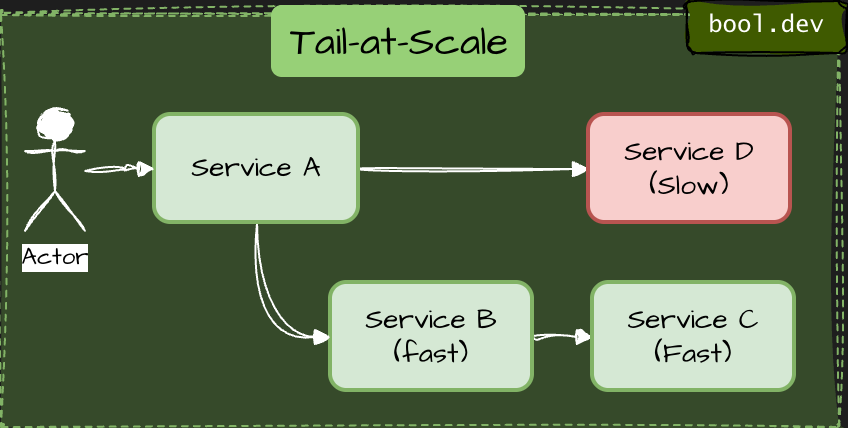
In distributed systems, this effect gets worse as requests fan out across multiple services. A single slow dependency can delay the entire request.
Why it happens
- Requests call multiple downstream services in parallel.
- Latency adds up at the tail, not the average.
- Garbage collection pauses, cold caches, network jitter, or overloaded nodes affect a few requests.
- Retries amplify load and push more requests into the slow path.
- A system can look healthy at average latency and still feel slow or broken to users.
How to mitigate Tail-at-Scale
Reduce fan-out
- Avoid synchronous calls to many services.
- Aggregate data earlier, or redesign APIs to return only what is needed.
Use timeouts aggressively
- Every remote call must have a timeout.
- Slow responses are often worse than failed ones.
Apply hedged requests
- Send the same request to two replicas and use the first response.
- Cancel the slower one. This trades extra load for lower tail latency.
Use bulkheads and isolation
- Isolate thread pools and connection pools per dependency.
- One slow service should not starve the whole system.
Cache smartly
- Cache hot paths and expensive computations.
- Even short-lived caches reduce pressure during spikes.
Control retries
- Use retries only for safe operations.
- Add jitter and strict retry limits to avoid retry storms.
Measure the right metrics
- Focus on p95, p99, and p99.9, not averages.
- Tail latency is where failures start.
What .NET engineers should know
- 👼 Junior: Know that averages hide problems, and slow requests matter more than fast ones
- 🎓 Middle: Understand fan-out, timeouts, retries, and why p99 latency is critical.
- 👑 Senior: Design systems to minimize tail amplification using isolation, hedging, and load-aware patterns.
Cloud-Native and .NET Runtime Considerations
❓ What is a distributed scheduler, and how do you handle fault-tolerant recurring jobs?
A distributed scheduler coordinates recurring or delayed jobs across multiple nodes so that each job runs once, even when services scale horizontally or nodes fail. Unlike a local cron, it must handle leader election, locking, retries, and recovery.
Standard Tools in the .NET Ecosystem
- Hangfire: A popular library for .NET that uses a persistent storage (SQL/Redis) to manage background jobs and includes a built-in dashboard for monitoring.
- Quartz.NET: A full-featured, open-source job scheduling system that supports complex triggering and persistent job stores.
- Cloud-Native Schedulers: Using platform-specific tools like Azure Functions (Timer Triggers) or Kubernetes CronJobs, which offload the scheduling and fault-tolerance responsibility to the underlying cloud infrastructure.
What .NET engineers should know
- 👼 Junior: Know that recurring jobs must not rely on local timers in distributed systems.
- 🎓 Middle: Understand locking, idempotency, and durable job state.
- 👑 Senior: Design schedulers that survive crashes, scale safely, and recover automatically.
❓ How do you detect memory leaks in .NET microservices?
In .NET, most “memory leaks” are not classic leaks. The GC works fine. The problem is usually object retention: something still holds a reference, preventing memory from being reclaimed. In microservices, this slowly increases memory usage until the service becomes unstable or gets killed.
Typical causes in microservices
- Static caches or dictionaries that grow forever.
- Event handlers or delegates that are never unsubscribed.
- Long-lived singleton services holding references to scoped objects.
- HttpClient misuse (per-request creation, socket exhaustion patterns).
- Large allocations end up on the LOH and never shrink.
- Background tasks or timers that capture objects and never stop.
How to detect memory leaks
Watch memory trends, not spikes
- Look at RSS and the managed heap for hours or days.
- A healthy service shows a sawtooth pattern.
- A leaking service shows a steady upward slope.
Use runtime metrics
- Monitor GC heap size, Gen 2 collections, and LOH size.
- Watch allocation rate and GC pause time.
- A sudden increase in Gen 2 survivors is a red flag.
Capture memory dumps
- Take dumps before and after memory growth.
- Compare object counts, not just total size.
- Look for types that only grow, never shrink.
Analyze object retention
- Identify GC roots, keeping objects alive.
- Check static fields, singletons, and background services.
- Look for captured closures and async state machines.
Use controlled load tests
- Run a service under steady load for a long time.
- Memory should stabilize after warm-up.
- If it keeps growing, you likely have a retention issue.
Common tools in .NET
- dotnet-counters for live metrics.
- dotnet-dump for capturing and analyzing dumps.
- PerfView for allocation and GC analysis.
- Visual Studio Diagnostic Tools for local repro.
- Production monitoring (container memory, OOM kills).
Typical fixes
- Replace unbounded caches with size-limited or time-based eviction.
- Fix DI lifetimes (never inject scoped into singleton).
- Dispose of IDisposable objects correctly.
- Reuse HttpClient via IHttpClientFactory.
- Avoid capturing large objects in async lambdas or timers.
What .NET engineers should know
- 👼 Junior: Know that memory leaks often come from objects being kept alive, not GC bugs.
- 🎓 Middle: Be able to read GC metrics and analyze memory dumps for growing object graphs.
- 👑 Senior: Design services with bounded memory usage, observability, and proactive leak detection.
📚 Resources:
- PerfView — GC and memory analysis
- Dump collection and analysis utility (dotnet-dump)
- Investigate performance counters (dotnet-counters)
❓ What is .NET Aspire, and what problems does it solve for cloud-native apps?
.NET Aspire is a cloud-native application stack for .NET that helps developers build, run, and manage distributed applications more easily. It combines tools, templates, and curated NuGet packages so you don’t start from scratch wiring up observability, resiliency, service discovery, and deployment concerns every time.
In practice, .NET Aspire gives you a unified way to define your app model, orchestrate services locally and in the cloud, and integrate standard backend services with consistent patterns for health checks, metrics, tracing, and resiliency. It aims to reduce boilerplate, offer a predictable developer experience, and simplify the complexity of cloud-native systems.
Some liken .NET Aspire to a .NET analogue of Spring Boot for Java: an opinionated stack that gets you productive quickly with sensible defaults, but still allows customization as your architecture grows.
What problems Aspire solves
- Boilerplate and wiring: Instead of manually writing configs, DI setup, connection logic, and health checks across projects, .NET Aspire gives templates and conventions.
- Local orchestration: Launch your entire multi-service app locally with a single command and get a live dashboard showing logs, metrics, and traces.
- Service discovery and integration: Common backing services (databases, caches, messaging) integrate through NuGet packages that handle wiring and configuration patterns for you.
- Cloud portability: Deploy to any environment (Azure, AWS, GCP, containers/Kubernetes) without rewriting the core composition logic.
- Observability and resiliency by default: Builds in telemetry, health checks, and resilience concerns so you don’t have to stitch them together manually.
❓ How do Aspire resources differ from normal DI registrations?
Aspire resources are a higher-level concept in the .NET Aspire application model that describes external or shared parts of your application topology, such as databases, caches, message brokers, containers, and even other services. They are part of an application model that .NET Aspire orchestrates and wires across services at runtime and during development. Meanwhile, normal DI registrations are just .NET dependency injections inside a single service that let you resolve types at runtime. .NET Aspire goes beyond DI by defining *what the application is* and* how the pieces connect*, not just how objects are created within a single service.
In simple terms
- Aspire resources = application-wide building blocks that let Aspire compose, start, connect, and observe distributed pieces as a whole.
- Normal DI registrations = per-service wiring of classes and dependencies inside a process.
What .NET engineers should know
- 👼 Junior: Aspire resources are shared building blocks for services and external systems in your app model, not just simple DI.
- 🎓 Middle: Resources drive automatic wiring of connections and environment details across services; DI handles local object graphs.
- 👑 Senior: Use resources to define the full distributed topology once and let .NET Aspire orchestrate inter-service dependencies, leaving DI for per-service concerns.
📚 Resources:
❓ What is Aspire service discovery, and how does it connect distributed components?
.NET Aspire service discovery is a built-in mechanism that lets services find and communicate with each other by name rather than hard-coded addresses. In distributed systems, services move, scale, and change URLs or ports frequently. .NET Aspire hides that complexity. It wires up service endpoints for you so services can call one another reliably during development and testing without manual networking setup.
Below is a minimal example showing how service discovery works in practice:
1. Define services in the Aspire AppHost
In your AppHost/Program.cs you declare services and references:
using Microsoft.Extensions.Hosting;
using Aspire.Hosting;

var builder = DistributedApplication.CreateBuilder(args);

// Register backend API
var catalog = builder.AddProject<Projects.CatalogService>("catalog");

// Register frontend and reference the API
var frontend = builder.AddProject<Projects.WebFrontend>("frontend")
                      .WithReference(catalog);

builder.Build().Run();
Here we tell .NET Aspire that frontend depends on the catalog service. .NET Aspire will emit service discovery info into the config so the frontend knows where to find the backend.
2. Configure HttpClient in the frontend
In the frontend project’s Program.cs, add service defaults and configure service discovery:
var builder = WebApplication.CreateBuilder(args);

// This wires telemetry, health checks, and service discovery by default
builder.AddServiceDefaults();

// Register an HttpClient that uses service discovery
builder.Services.AddHttpClient("catalog", (_, client) =>
{
    // Notice we use the logical name here
    client.BaseAddress = new Uri("http://catalog");
})
.AddServiceDiscovery(); // enables name resolution

var app = builder.Build();
app.MapGet("/", async (IHttpClientFactory factory) =>
{
    var client = factory.CreateClient("catalog");
    return await client.GetStringAsync("/items");
});

app.Run();
This pattern uses logical service names instead of fixed URLs. Behind the scenes, .NET Aspire (and the Microsoft.Extensions.ServiceDiscovery support) resolves "http://catalog" to a real endpoint at runtime — localhost ports in dev, container addresses in orchestrated environments, or cloud hostnames in production.
What .NET engineers should know
- 👼 Junior: Aspire lets you use service names in C# without hard-coding addresses.
- 🎓 Middle: You register HttpClient with service discovery and logical names, and .NET Aspire wires real endpoints into config.
- 👑 Senior: Aspire abstracts environment differences and makes runtime endpoint resolution seamless across dev, test, and production.
📚 Resources:
❓ How does Aspire handle configuration for distributed systems?
In a distributed application, you usually juggle a bunch of settings: connection strings, ports, environment differences, secrets, and custom configs for every service and backing resource. .NET Aspire treats configuration as part of the application model rather than as a set of scattered files. It centralizes and automatically generates the necessary configuration, so all services consistently know how to connect to external systems without manual wiring. You define services and resources in one place (the AppHost), and Aspire propagates the settings to each service at build/run time.
How Aspire’s configuration model works
Code-first source of truth
- Instead of scattered JSON/YAML files, you declare your architecture in C# code via
DistributedApplication.CreateBuilder(...). - Services, databases, caches, and other resources are registered with names. .NET Aspire turns this into a usable config for every service.
Auto-wiring of settings
- When a service references another (for example, a database or another microservice), .NET Aspire injects connection strings, host/port values, and environment variables.
- You don’t hand-write URLs, hostnames, or ports; .NET Aspire drives them from the AppHost config.
Consistent environments
- This helps avoid config drift between dev, test, and prod. The same app model code produces consistent runtime configuration across environments.
- Services pick up settings via standard .NET config (environment variables or generated files) — nothing magical in the app code.
Example:
Let’s say you want a backend API and a Redis cache that both need config.
In AppHost:
var builder = DistributedApplication.CreateBuilder(args);

// define Redis as a resource
var redis = builder.AddRedis("cache")
                   .WithDefaultSettings();

// define API and reference the cache
builder.AddProject<Projects.ApiService>("api")
       .WithReference(redis);

builder.Build().Run();
Here Aspire:
- Creates or orchestrates a Redis instance locally/cloud.
- Generates a configuration that includes the Redis connection string.
- Injects that connection string into the
ApiServiceenvironment at runtime.
In the API’s Program.cs, you can consume it normally:
builder.Services.AddStackExchangeRedisCache(options =>
{
    options.Configuration = builder.Configuration["cache:connection"];
});

var app = builder.Build();
You never hard-code hostnames or ports; .NET Aspire fills them in based on the app model.
What .NET engineers should know
- 👼 Junior: Aspire generates and manages config for you, so you don’t manually wire connection strings and ports.
- 🎓 Middle: You declare resources and references in the AppHost, and .NET Aspire propagates settings to each service reliably.
- 👑 Senior: Aspire enforces consistent configuration across environments, reduces config drift, and lets you evolve distributed configs from one code model.
❓ What are the limits of Aspire today, and when should you avoid it?
Aspire helps build and run cloud-native .NET apps, but it isn’t mature enough to replace all infra tools yet. It works best for projects that start distributed and can live within Aspire’s app model.
Core Aspire limitations
- Configuration and infra options are still limited compared to complete Kubernetes/Terraform setups.
- Some production settings (resource limits, cloud-specific configs) still require manual edits outside Aspire.
- Tooling overlap with existing observability or deployment pipelines can feel redundant.
- It works best when services live in a single, coordinated model; scattered repos make adoption harder.
When to skip Aspire
- Monolithic or straightforward apps that don’t need orchestration.
- Legacy or non-cloud hosts where Aspire’s cloud-native model adds friction.
- Highly customized infrastructure needs that don’t align with Aspire’s opinionated defaults.
What .NET engineers should know
- 👼 Junior: .NET Aspire makes cloud-native dev easier, but it’s not a magic bullet for every project.
- 🎓 Middle: Know its current gaps (config limits, local defaults, emulator vs production differences) and balance those with project needs.
- 👑 Senior: Choose .NET Aspire where it accelerates the team; avoid it where its opinionated model conflicts with existing infrastructure, multi-cloud strategies, or highly specialized tooling.
❓ What is YARP, and when would you build your own gateway?
YARP (Yet Another Reverse Proxy) is a high-performance, highly customizable reverse proxy library for .NET. It lets you build proxy servers or API gateways inside ASP.NET Core apps. You use it to route, balance, and transform requests between clients and backend services in a microservice architecture, giving you fine-grained control over traffic and integrations with middleware like authentication or logging.
When you’d use YARP
- You want a central entry point for microservices so clients don’t call each service directly.
- You need routing rules, load balancing, or path transformations.
- You want to handle auth, rate limits, headers, and custom logic at the gateway level.
- You want it built in C# inside your .NET ecosystem, with full middleware integration.
When you might build your own gateway instead of using YARP out of the box
- Special business rules or orchestration logic that a standard API gateway can’t express easily.
- You need deep integration with custom protocols or advanced message composition beyond HTTP routing.
- You’re building a gateway that isn’t just routing — for example, aggregating responses from many services into one complex result.
- You want to embed domain logic (not just plumbing) into the traffic path instead of keeping the gateway thin.
- You require tight performance tuning or resource control that off-the-shelf solutions can’t easily expose.
When you don’t need a custom gateway
- Your requirements are standard routing, SSL termination, and simple traffic control — YARP already handles this.
- You want to use existing solutions (managed gateways, API Management, cloud load balancers) rather than maintain custom gateway code.
What .NET engineers should know
- 👼 Junior: YARP is a reverse proxy in .NET that lets you route requests to backend services.
- 🎓 Middle: Use YARP to centralize routing, load balancing, and request transformation in your microservices stack.
- 👑 Senior: Build your own gateway only when YARP’s flexibility isn’t enough, or you need custom business-level routing and orchestration that goes beyond proxying.
📚 Resources:
Implementing an API Gateway For Microservices With YARP
❓ What is Dapr, and how do its building blocks differ from usual SDKs?
Dapr (Distributed Application Runtime) is an open-source, portable runtime that makes it easier to build distributed, cloud-native applications. It runs as a sidecar process alongside your service and exposes a set of standardized APIs, called building blocks, over HTTP or gRPC. These building blocks encapsulate common distributed system concerns, so you don’t rewrite the same infrastructure code over and over.
Dapr isn’t just another library you install into your app. It’s a runtime that runs alongside your process and exposes APIs for distributed patterns: service calls, state, pub/sub, actors, secrets, locks, configuration, and more. All of these are pluggable and language-agnostic — any runtime or language can use them by speaking to the local Dapr sidecar.
How its building blocks differ from usual SDKs
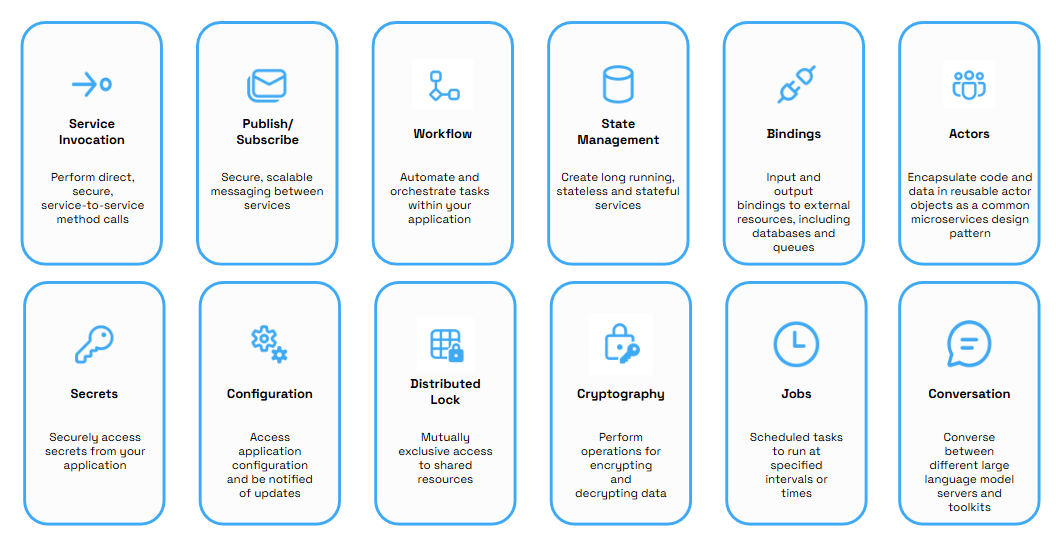
SDKs are libraries you include in your app to talk to specific platforms or services (e.g., a Redis client or an Azure Service Bus client). They are tied to a particular technology and typically embed that technology’s API directly into your code.
Dapr building blocks are not tied to a specific backend implementation. They sit above SDKs and provide generic distributed systems primitives with these traits:
- Abstracted APIs. You call Dapr’s building block APIs (e.g., state, pub/sub) via HTTP/gRPC instead of calling a Redis or RabbitMQ SDK directly. The sidecar translates that call to whichever component you’ve configured (Redis, AWS SQS, etc.). This lets you swap implementations without changing app code.
- Best-practice patterns baked in. Building blocks use patterns like service discovery, retries, partitioning, and at-least-once delivery under the hood, so your microservices don’t have to reimplement them.
- Consistent interface across languages. Because Dapr exposes REST/gRPC endpoints for these primitives, any language can use them — .NET, Node, Python, Go, etc. You’re not locked to one SDK family.
- Sidecar isolation. Unlike an SDK that runs in your process, Dapr’s building blocks are handled by a separate sidecar process. Your app calls a local API, and the sidecar handles the heavy lifting — keeping your business code cleaner and decoupled from infrastructure details.
Use Dapr when you want to:
- Standardize distributed patterns (state, messaging, pub/sub).
- Avoid coupling to specific infrastructure SDKs.
- Write cloud-native apps that can run locally, in containers, or on Kubernetes with minimal changes.
- Swap component implementations easily (Redis to Cosmos DB for state, for example) without rewriting business logic.
What .NET engineers should know
- 👼 Junior: Dapr gives you ready-made distributed capabilities you call over HTTP/gRPC — not just another library.
- 🎓 Middle: Its building blocks are infrastructure-agnostic APIs that abstract common patterns, unlike typical service SDKs tied to one backend.
- 👑 Senior: Use Dapr to centralize distributed patterns and decouple infrastructure from domain logic; choose SDKs directly only when low-level control is needed.
📚 Resources:
❓ What are the trade-offs of containers vs serverless for .NET workloads?
Containers and serverless are both valid ways to run .NET apps in the cloud, but they solve different problems and come with various trade-offs.
Containers
Pros
- Complete control over the runtime, OS, and libraries — great for complex, long-running services and microservices with custom needs.
- Predictable performance and consistent environments from dev to prod.
- Portability — you can run the same container locally, in Kubernetes, or anywhere else.
- Easier to avoid vendor lock-in because the stack is your own.
Cons
- You manage or orchestrate the runtime environment (Kubernetes, ECS, AKS), which adds ops overhead.
- You pay for running infrastructure continuously, even when idle.
- Scaling and autoscaling need tooling and rules (Cluster Autoscaler, HPA).
Best for
- Steady traffic, long-running processes, performance-sensitive workloads.
- Services that require complete control over the environment, dependencies, or networking.
Serverless (e.g., Functions)
Pros
- You don’t manage servers — deploy code, and the cloud scales it automatically.
- Auto-scaling and pay-per-use pricing make it cost-effective for intermittent or bursty workloads.
- Simple deployment and faster time-to-market for event-driven APIs and jobs.
Cons
- Cold-start latency can degrade latency-sensitive paths.
- Execution time limits and statelessness can limit the execution of long-running jobs.
- Closer coupling to a cloud provider’s platform can lead to vendor lock-in.
Best for
Event-driven tasks, short HTTP APIs, background jobs, unpredictable bursts.
What .NET engineers should know
- 👼 Junior: Serverless removes most ops work and scales automatically; containers give you control but need ops.
- 🎓 Middle: Choose containers when you need complete environment control and consistent performance; choose serverless when you want minimal ops and cost for bursty workloads.
- 👑 Senior: Balance cost, performance, and ops burden — often a hybrid where core services run in containers and specific functions run serverless.
📚 Resources:
- Serverless computing vs. containers | How to choose
- Serverless vs containers: Which is best for your application
- Serverless vs. Containers: When to Choose (And Why It Matters for Delivery)
❓ How does .NET Native AOT improve cold starts in serverless scenarios?
.NET Native AOT (Ahead-of-Time compilation) compiles your .NET app into a native machine binary at publish time instead of shipping IL code that the runtime must JIT compile on startup. The result is a smaller executable with no runtime JIT overhead and much faster process initialization — a big win for serverless, where cold starts directly affect latency and cost.
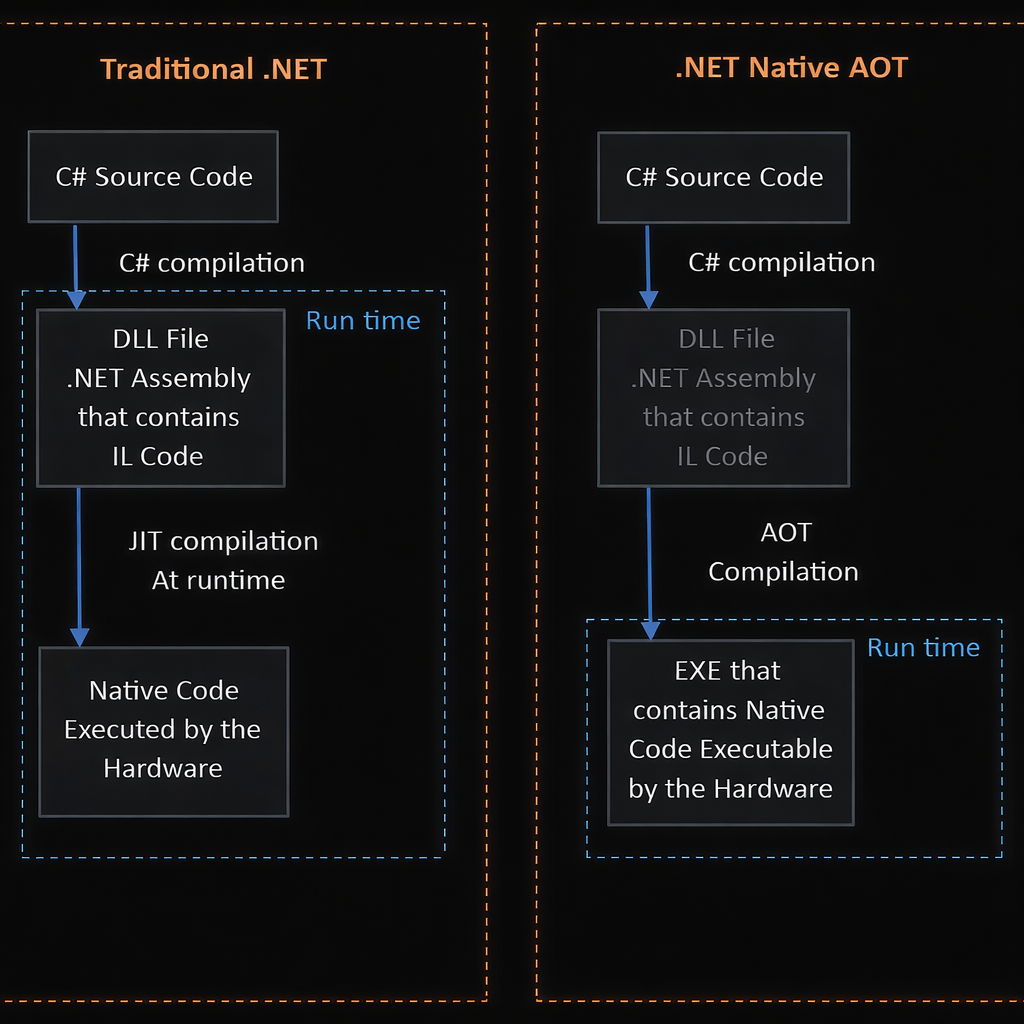
In serverless platforms (such as AWS Lambda or Azure Functions), a cold start occurs when a function instance is created and initialized before handling a request. Traditional .NET apps must:
- load the runtime,
- load assemblies,
- and JIT-compile IL to machine code.
That takes time, especially when functions scale up on demand. Native AOT eliminates the JIT phase and packages only what your app needs, so startup often happens much faster and with a smaller memory footprint.
Trade-offs
Native AOT isn’t perfect for every workload. It requires all code and dependencies to be AOT-compatible, and features that rely heavily on runtime reflection or dynamic code might need refactoring. But for serverless entry points where fast startup is critical, it’s often worth it.
What .NET engineers should know
- 👼 Junior: Native AOT precompiles your code so it doesn’t wait for JIT at runtime — meaning much faster cold starts.
- 🎓 Middle: You’ll see both faster startup and often lower memory, because you ship only what’s needed.
- 👑 Senior: Use Native AOT when cold start latency and resource usage matter (serverless, burst-scaling APIs), but understand compatibility and tooling trade-offs.
📚 Resources:
❓ Why do stateless services scale more easily than stateful ones?
Stateless services treat every request independently. They don’t hold session data in memory so that any instance can handle any request without coordination. That means you can add or remove instances dynamically and let a load balancer distribute traffic evenly. There’s no need to worry about where a user’s state lives or how to keep it synchronized across replicas. This simplicity makes horizontal scaling straightforward and fast. In contrast, stateful services must track and often synchronize state, which requires session affinity, shared storage, or replication, all of which complicate scaling and add overhead.
What .NET engineers should know
- 👼 Junior: Stateless services don’t store session state, so scaling is “add more instances.”
- 🎓 Middle: Load balancers and autoscaling work efficiently with stateless services because they don’t need special session routing.
- 👑 Senior: Stateful workloads require careful replication, partitioning, or external state stores, making horizontal scaling more complex and expensive.
📚 Resources: Stateful vs. Stateless Applications
❓ How do you optimize microservices for Native AOT without losing flexibility?
Native AOT gives you faster startup and smaller binaries, which helps microservices and cloud functions. But it also imposes limitations, such as restricted reflection and no dynamic assembly loading, so you need to strike a balance between optimization and flexibility.
Practical ways to optimize without losing flexibility
- Use Minimal APIs and Slim Builders. Pick APIs and features that play well with AOT (e.g., minimal middleware and configuration), so you avoid pulling in code that won’t trim well.
- Avoid heavy reflection and dynamic code.
Patterns likeAssembly.LoadFile, dynamic proxy generation, or runtime code emission, isn’t supported under AOT. Replace them with compile-time alternatives or source generators when you must. - Leverage source generators. For tasks like JSON serialization or configuration binding, use source generators so the necessary code is generated at build time rather than trimmed out.
- Modularize code paths. Move reflection-heavy or plugin-style logic into separate services where flexibility matters more, and keep your AOT-compiled microservices lean.
- Profile and trim intentionally. Use AOT’s optimization settings (
OptimizationPreferencefor size vs speed) to communicate your goals and trim unused code.
Trade-offs to balance
- Less runtime dynamism. Native AOT restricts dynamic assembly loading and runtime code generation, so you trade off some flexibility for performance benefits.
- Build time complexity. AOT adds extra compile steps and requires careful dependency selection to avoid compatibility issues.
What .NET engineers should know
- 👼 Junior: Keep your services simple and avoid reflection-heavy features.
- 🎓 Middle: Use source generators and modular design to stay AOT-friendly while keeping flexibility where needed.
- 👑 Senior: Architect for hybrid deployment: critical paths optimized with AOT, dynamic features isolated where AOT would block them.
📚 Resources:
Microsoft Orleans
❓ What is the Orleans virtual actor model, and how does it differ from classic actor systems?
The Orleans Virtual Actor Model, developed by Microsoft Research, is a framework that simplifies distributed systems by introducing the concept of Virtual Actors (also called "Grains").
While it draws inspiration from the classic Actor Model (such as Erlang or Akka), it significantly improves the developer experience by automatically managing the actor's lifecycle.
Classic Actor Systems (Erlang, Akka)
In classic systems, an actor is a physical entity that you must manually manage.
- Lifecycle: You must explicitly create an actor and, more importantly, manually stop it to free up memory.
- Addressing: If an actor on a specific node dies, its address (reference) becomes invalid. You have to handle "restarting" it and updating references.
- Failures: If a server crashes, all actors on that server are lost unless you have complex supervision trees and manual persistence logic.
The Orleans "Virtual" Actor Model
Orleans introduces Virtualization, similar to how Virtual Memory works on a computer. A "Grain" (actor) is an abstract entity that always exists, even if it isn't currently in memory.
- Automatic Lifecycle (Activation/Deactivation): You never "create" or "destroy" a Grain. If you call a Grain, Orleans automatically "activates" it on a server. If it hasn't been used for a while, Orleans "deactivates" it to save memory
- Location Transparency: You address a Grain by a unique Key (e.g.,
User_123). You don't care which server it lives on. Orleans handles the routing. - Eternal Existence: From the developer's perspective, a Grain exists forever. If the server holding Grain
User_123crashes, the next time you call it, Orleans recreates it on a different healthy server.
Key Differences:
| Feature | Classic Actors (Akka/Erlang) | Virtual Actors (Orleans) |
|---|---|---|
| Instantiation | Manual (new or Spawn). | Automatic (on first call). |
| Memory Mgmt | Manual (must stop/kill actors). | Automatic (Garbage Collection/Deactivation). |
| Addressing | Specific to a process/node. | Logical (Key-based, location transparent). |
| State Persistence | Manual implementation. | Built-in "State" providers. |
| Complexity | High (Handling "Dead Letters"). | Low (Feels like calling a method). |
What .NET engineers should know
- 👼 Junior: Orleans actors are virtual and managed by the runtime, not created manually.
- 🎓 Middle: Orleans removes actor lifecycle and distribution complexity while keeping actor semantics.
- 👑 Senior: Use Orleans when you want scalable, stateful systems without writing custom coordination, sharding, or recovery logic.
📚 Resources: Microsoft Orleans Overview: Actors, Grains, and Cloud-Native Architecture
❓ What are grains, and how do they achieve location transparency?
Grains are the core building blocks in Orleans. A grain is a virtual actor that combines state and behavior and is addressed by a stable logical identity (for example, OrderId = 123). You never create or place grains manually. You call them, and Orleans makes sure the call reaches the right place.
What a grain is
- A unit of computation with single-threaded execution.
- Identified by a unique key, not by a memory address.
- Activated on demand and deactivated when idle.
- Can be stateful or stateless.
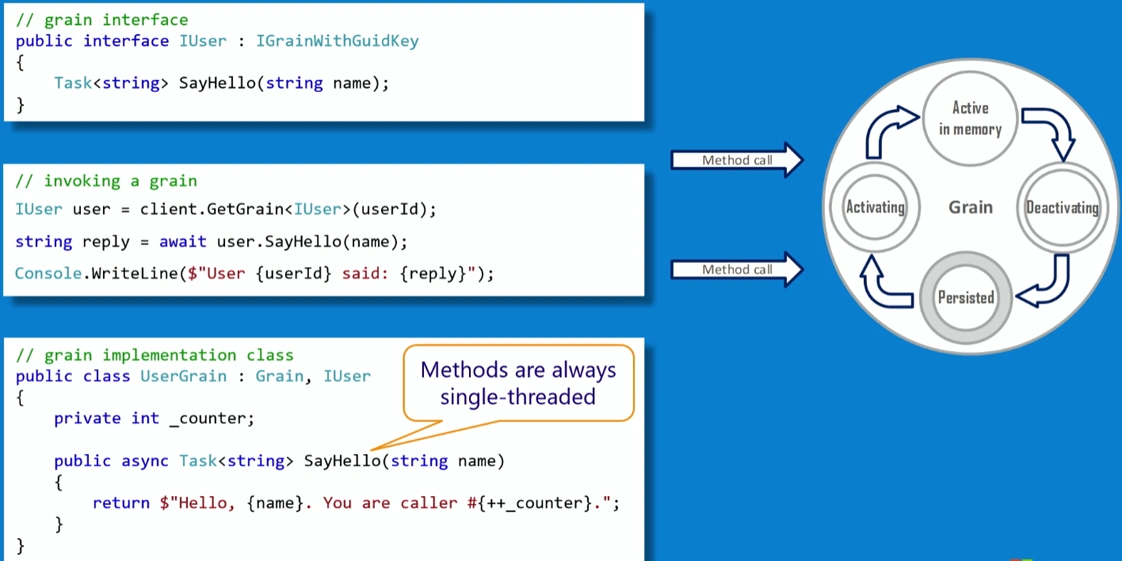
How grains achieve location transparency:
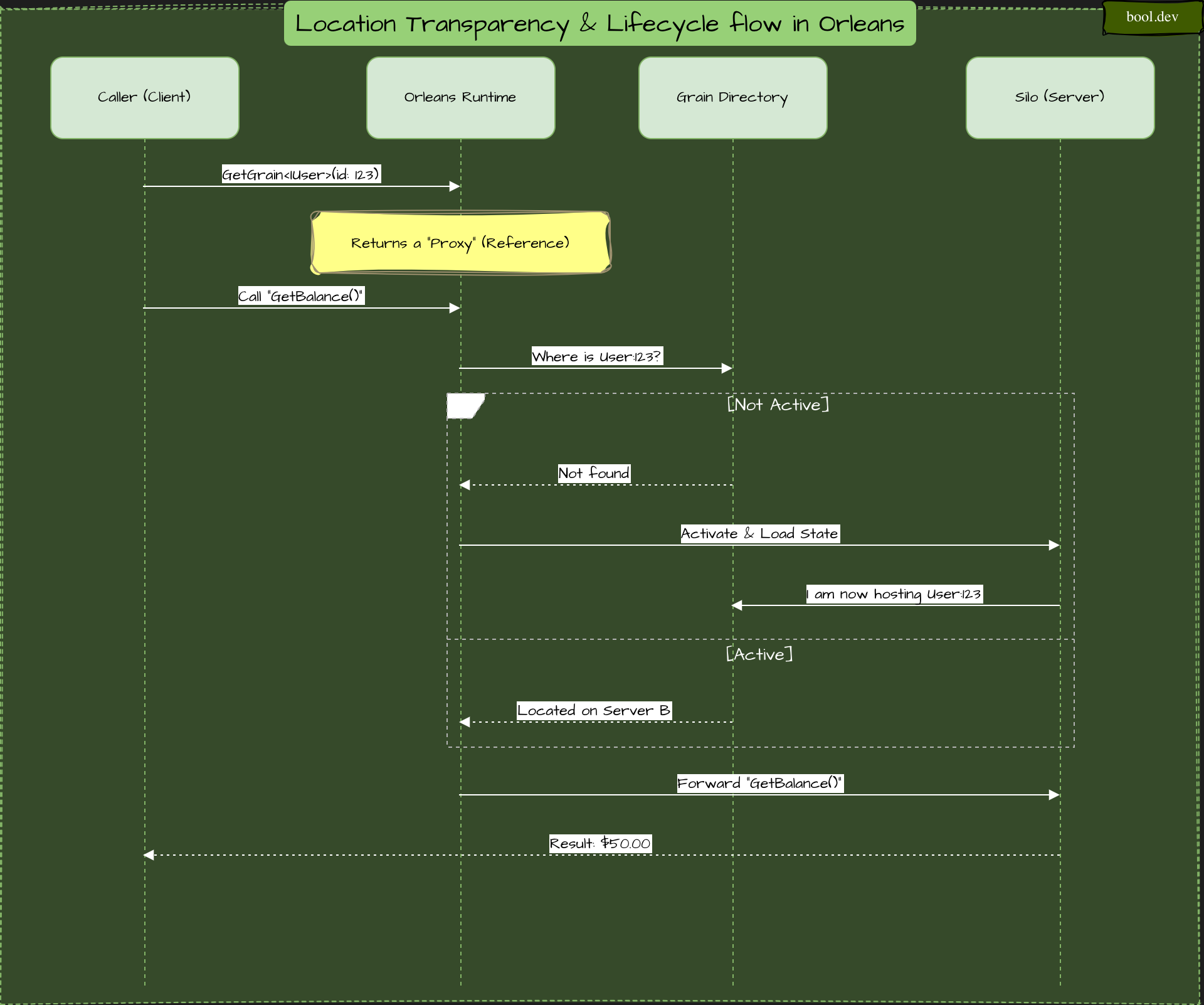
What .NET engineers should know
- 👼 Junior: Grains are actors you call by ID, not by address.
- 🎓 Middle: Orleans routes calls and manages activation so the location is invisible to your code.
- 👑 Senior: Location transparency removes the need for custom sharding, routing, and failover logic in stateful systems.
📚 Resources: Microsoft Orleans Overview: Actors, Grains, and Cloud-Native Architecture
❓ How does Orleans handle distributed state without explicit locks?
Orleans avoids locks by design. Each grain processes one request at a time, so its state is never accessed concurrently. Instead of locking shared data, Orleans enforces single-threaded, turn-based execution per grain.
Below is a simple diagram that shows how this works:
What the diagram shows:
- Multiple callers can send requests simultaneously.
- Requests are queued per grain, not executed in parallel.
- The grain processes one message, updates its state, then moves to the next.
- No two messages touch the grain state concurrently.
- No mutexes, no distributed locks, no race conditions.
What .NET engineers should know
- 👼 Junior: Grains processes one request at a time, so locks are unnecessary.
- 🎓 Middle: Message queues and turn-based execution guarantee state safety.
- 👑 Senior: Grain isolation replaces locks, simplifies correctness, and scales naturally in distributed systems.
📚 Resources: Microsoft Orleans Overview: Actors, Grains, and Cloud-Native Architecture
❓ What are Orleans Streams, and when should you prefer them to message brokers?
Orleans Streams are a built-in, asynchronous messaging abstraction inside Orleans. They let grains publish and consume events without tight coupling, while keeping the Orleans programming model: virtual actors, location transparency, and single-threaded execution per grain.
Think of streams as in-cluster event delivery for grains, not a general external messaging system.
What Orleans Streams are:
- A logical stream identified by a stream ID and namespace.
- Producers publish events to the stream.
- Consumers (grains or clients) subscribe and receive events asynchronously.
- Delivery is managed by Orleans, not by the application.
You don’t manage partitions, offsets, or consumer groups manually.
Comparison: Orleans Streams vs. Direct Message Brokers
| Feature | Direct Broker (e.g., Kafka) | Orleans Streams |
|---|---|---|
| Coupling | High (Client libs, connection mgmt) | Low (Integrated into Grain logic) |
| Activation | Manual (Consumer must be running) | Automatic (Wakes up Grains) |
| Complexity | High (Handling offsets/partitions) | Low (Handled by the runtime) |
| Best Use Case | External system integration | Internal Grain-to-Grain events |
What .NET engineers should know
- 👼 Junior: Streams let grains send events without having to call each other directly.
- 🎓 Middle: Streams integrate event delivery with Orleans’ actor and concurrency model.
- 👑 Senior: Prefer Streams for internal eventing; use brokers for integration and durability boundaries.
📚 Resources:
❓ What is the Orleans Silo, and how does clustering work?
An Orleans Silo is a runtime host process that runs grains. Think of a silo as a node in the Orleans cluster. A cluster is multiple silos working together to host, route, and execute grains as one logical system.
You don’t manually deploy grains to silos. You deploy silos, and Orleans handles the rest.
Each silo is responsible for:
- Hosting grain activations.
- Executing grain code (one request at a time per grain).
- Routing messages to other silos.
- Managing grain lifecycle (activation, deactivation).
- Participating in cluster membership and failure detection.
Cluster membership
- All silos register with a membership store (SQL, Azure Table Storage, Kubernetes, etc.).
- The membership store tracks which silos are alive.
- Silos periodically heartbeat to detect failures.
Message routing
- When a grain is called, Orleans determines which silo it is in.
- If the grain is active, the call is routed directly to that silo.
- If not, Orleans activates the grain on a suitable silo.
No leader node
- There is no single master or coordinator.
- All silos are peers.
- Failure of one silo does not stop the cluster.
Failure handling
- If a silo goes down, its grains are considered unavailable.
- On the next call, those grains are reactivated on other silos.
- Persistent state is reloaded automatically.
❓ How do you scale grains across a clustered environment?
Scaling Grains in an Orleans cluster is handled automatically by the runtime through a process called Placement. Unlike traditional microservices, where you manually balance traffic via a Load Balancer, Orleans distributes individual Grain instances across available "Silos" (servers) using configurable strategies.
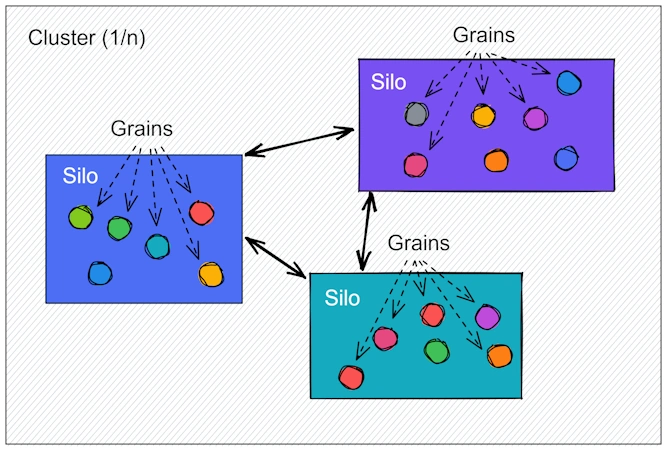
Handling hotspots
- Split hot entities into multiple grains (by key or partition).
- Use stateless worker grains for parallel processing.
- Avoid long-running work inside a single grain.
- Scale storage independently if state access becomes the bottleneck.
What .NET engineers should know
- 👼 Junior: You scale Orleans by adding nodes; grains move automatically.
- 🎓 Middle: Parallelism comes from many grains, not multithreading inside one grain.
- 👑 Senior: Design grain identities and boundaries to avoid hotspots and enable even distribution.
❓ How does Orleans differ from Dapr actors?
Both Orleans and Dapr implement the "Virtual Actor" model—a concept in which actors exist conceptually and are automatically managed by the runtime. However, their architecture and design goals are fundamentally different.
The Main Difference: Sidecar vs. Integrated Runtime
- Orleans is an integrated framework specifically for .NET. The actor logic and the Orleans runtime live inside the same process. It uses highly optimized custom binary protocols for communication between servers.
- Dapr is a language-agnostic sidecar. Your application code runs in a single process, and Dapr runs as a separate "sidecar" process (usually a container) alongside it. They communicate via HTTP or gRPC.
When to Choose Which?
Choose Orleans if:
- You are building a high-performance, low-latency system (e.g., a game backend or a high-frequency trading system).
- Your team is 100% committed to .NET.
- You need complex features such as distributed transactions, streaming, or custom grain-placement strategies.
- You want the best possible throughput (Orleans can handle millions of messages per second).
Choose Dapr if:
- You are building a polyglot system (some actors in Go, some in Python, some in .NET).
- You already use Dapr for other things (like Pub/Sub or Service Invocation).
- You want to avoid being locked into a specific .NET-only framework.
- You are running on Kubernetes and prefer the sidecar approach for deployment.
What .NET engineers should know
- 👼 Junior: Orleans is a full actor runtime; Dapr actors are a feature layered on top of services.
- 🎓 Middle: Orleans gives stronger guarantees and simpler stateful scaling; Dapr actors trade power for flexibility.
- 👑 Senior: Choose Orleans for actor-first systems, Dapr actors for actor-lite use cases inside microservices.
📚 Resources:
❓ What are the main Orleans failure modes, and how do you mitigate them?
Orleans hides many distributed-system problems, but failures still happen. The key is knowing where they occur and how Orleans expects you to handle them.
1. Silo Failure (The "Node Crash")
A server or container hosting Grains crashes or becomes unreachable.
- Effect: Requests to active Grains on that node throw a
SiloUnavailableException. - Mitigation: Orleans automatically detects the failure via heartbeats. The next call to a lost Grain triggers its Reactivation on a healthy Silo.
- Strategy: Implement idempotent Grain methods so the client can safely retry after a timeout.
2. Storage Failure (Database Outage)
The underlying database (SQL, Azure Tables, etc.) is down or slow.
- Effect:
WriteStateAsyncthrows aPersistentStorageException, and Grains cannot save or load their data. - Mitigation: Use Optimistic Concurrency (ETags). If a write fails because the state changed elsewhere, the ETag check prevents data corruption.
- Strategy: Wrap storage calls in a retry policy with backoff and consider a "Read-Only" fallback mode.
3. Grain Deadlocks (The "Wait-For" Cycle)
Grain A calls Grain B, and Grain B calls Grain A (Cyclic Dependency).
- Effect: Both Grains wait indefinitely for each other, causing all incoming requests to time out.
- Mitigation: Orleans uses a Turn-based scheduler. If non-reentrant Grains form a cycle, they will block.
- Strategy: Use the
[Reentrant]attribute for read-only methods and design your Grain calls as a Directed Acyclic Graph (DAG).
4. Split-Brain (Network Partition)
Connectivity breaks between Silos, creating two separate "clusters."
- Effect: The same Grain ID might be activated in both partitions.
- Mitigation: Orleans uses a Membership Table as the source of truth. Once connectivity returns, the "duplicate" Grain is deactivated.
- Strategy: Always use an odd number of nodes and a storage provider that supports versioning to ensure only one "brain" can successfully commit data.
5. Hot Grain Overload
Because a single Grain ID is single-threaded, a global "hot spot" (e.g., a single CounterGrain updated by every user) becomes a bottleneck.
- Mode: The Grain's request queue grows indefinitely, causing global latency spikes and
TimeoutExceptionfor all callers. - Mitigation:
- Stateless Workers: For CPU-heavy or read-only tasks, use
[StatelessWorker]. Orleans will spin up multiple instances of the same Grain ID on every server to share the load. - Hierarchical Aggregation: Don't have 10,000 grains call 1. Have 10,000 grains call 100 intermediate "Aggregator" grains, which then report to the final 1.
- Reentrancy: If the bottleneck is I/O (waiting on a DB), use
[Reentrant]to allow the Grain to process the following message while the first isawaiting.
- Stateless Workers: For CPU-heavy or read-only tasks, use
What .NET engineers should know
- 👼 Junior: Grains can disappear and come back at any time.
- 🎓 Middle: Most failures are handled by reactivation, not retries or locks.
- 👑 Senior: Design grain identity, state, and execution time so failures are cheap and invisible.
❓ How do you handle grain versioning and schema evolution?
In Orleans, grains can be reactivated at any time, so state versioning and schema evolution must be safe by default. The core idea is simple: make the old state readable by the new code and evolve gradually.
By default, grains are not versioned. You can version grain by using the VersionAttribute on the grain interface:
[Version(X)]
public interface IVersionUpgradeTestGrain : IGrainWithIntegerKey {}
When a call from a versioned grain arrives in a cluster:
- If no activation exists, a compatible activation will be created
- If an activation exists:
- If the current one is not compatible, it will be deactivated, anda new compatible one will be created (see version selector strategy)
- If the current one is compatible (see compatible grains), the call will be handled normally.
By default:
- All versioned grains are supposed to be backward-compatible only (see backward compatibility guidelines) and compatible grains(Compatible-grains.md)). That means that a v1 grain can make calls to a v2 grain, but a v2 grain cannot call a v1.
- When multiple versions exist in the cluster, the new activation will be randomly placed on a compatible silo.
You can change this default behavior via the option GrainVersioningOptions:
var silo = new SiloHostBuilder()
  [...]
  .Configure<GrainVersioningOptions>(options =>
  {
    options.DefaultCompatibilityStrategy = nameof(BackwardCompatible);
    options.DefaultVersionSelectorStrategy = nameof(MinimumVersion);
  })
  [...]
What .NET engineers should know
- 👼 Junior: Grain state can outlive code, so changes must be backward compatible.
- 🎓 Middle: Use additive changes and lazy migrations during grain activation.
- 👑 Senior: Treat grain state as a versioned contract and evolve it incrementally.
📚 Resources: Grain versioning
❓ How do you integrate Orleans with ASP.NET Core for request-driven scenarios?
Integrating Orleans with ASP.NET Core allows you to build a responsive, request-driven frontend (API) that leverages the stateful power of Grains on the backend. In modern .NET (Orleans 7.0+), the integration is seamless because both frameworks share the same Generic Host and Dependency Injection container.
The most efficient way to run Orleans with ASP.NET Core is Co-hosting, where the Silo and the Web API run in the same process. This avoids network overhead between your API controllers and your Grains.
In your Program.cs:
var builder = WebApplication.CreateBuilder(args);

// 1. Add Orleans to the Host
builder.Host.UseOrleans(siloBuilder =>
{
    siloBuilder.UseLocalhostClustering(); // For dev; use Azure/K8s for prod
    siloBuilder.AddMemoryGrainStorage("Default"); // Example storage
});

var app = builder.Build();
Once Orleans is added to the host, the IGrainFactory is automatically registered in the Dependency Injection (DI) container. You can inject it directly into your controllers or Minimal API endpoints.
// Example using a Minimal API
app.MapGet("/user/{id}/balance", async (int id, IGrainFactory grains) =>
{
    // Get a reference to the grain
    var userGrain = grains.GetGrain<IUserGrain>(id);

    // Call the grain (Request-Driven)
    var balance = await userGrain.GetBalance();

    return Results.Ok(balance);
});
What .NET engineers should know
- 👼 Junior: ASP.NET Core handles HTTP; grains handle state and logic.
- 🎓 Middle: Controllers should be thin adapters that delegate to grains by ID.
- 👑 Senior: Use ASP.NET Core as a façade and Orleans as the consistency and scalability layer.
📖 Future reading
- Part 1: Core Language & Platform Fundamentals
- Part 2: Types and Type Features
- Part 3: Collections and Data Structures
- Part 4: Async & Parallel Programming
- Part 5: Design Patterns
- Part 6: ASP.NET Core
- Part 7: SQL Database
- Part 8: NoSQL Databases
- Part 10: Testing
- Part 11: Desktop Development
- Part 12: Mobile Development
- Part 13: AI
- Part 14: Agile & Scrum